

As an Amazon Associate, I earn from qualifying purchases
MacBook Air M2 vs M3: Quick Verdict
The MacBook Air M2 is still worth buying in 2026 if you find it at a significantly lower price than an equivalent M3 model. It remains powerful enough for everyday work, studying, business tasks, web development, and light creative projects.
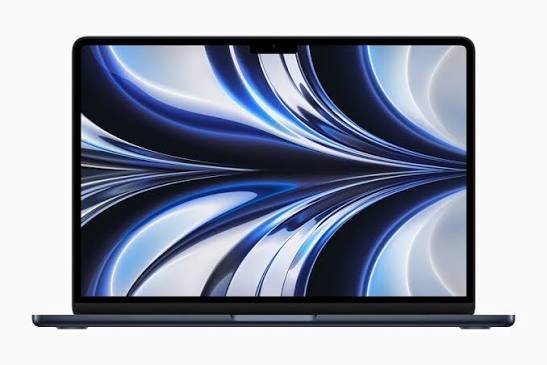
However, the MacBook Air M3 is the better overall choice if the price difference is small. It offers a faster processor, improved graphics capabilities, Wi-Fi 6E, AV1 video decoding, and support for up to two external displays when the laptop lid is closed.
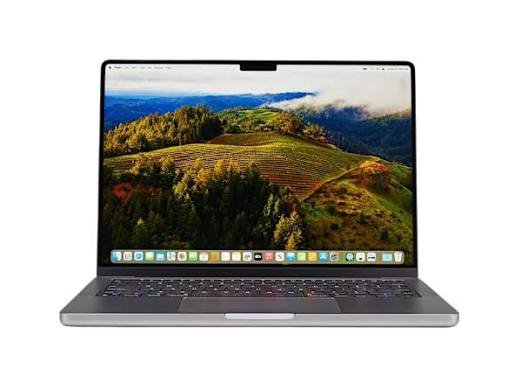
Neither laptop is perfect for every buyer. Both use fanless designs, have similar displays, and offer broadly similar portability. The M3 is an improvement, but it is not a complete redesign.
There is another important consideration in 2026: newer MacBook Air generations are available. Therefore, you should compare the M2 and M3 with newer refurbished or discounted models before making a purchase.
| Feature | MacBook Air M2 | MacBook Air M3 |
| Release year | 2022 | 2024 |
| Processor | Apple M2 | Apple M3 |
| CPU | 8-core | 8-core |
| GPU | Up to 10-core | Up to 10-core |
| Display | 13.6-inch or 15.3-inch | 13.6-inch or 15.3-inch |
| Memory | Up to 24GB | Up to 24GB |
| Storage | Up to 2TB | Up to 2TB |
| Wireless | Wi-Fi 6 | Wi-Fi 6E |
| External displays | One external display | Up to two with lid closed |
| Battery rating | Up to 18 hours video playback | Up to 18 hours video playback |
| Cooling | Fanless | Fanless |
| Best for | Budget-conscious buyers | Buyers wanting better performance and connectivity |
Specifications can vary by screen size and configuration. Check the exact model before purchasing.
1. Performance: Is the M3 Really Faster Than the M2?
Performance is the biggest difference between the MacBook Air M2 and M3.
Both laptops use Apple silicon, which combines the CPU, GPU, and other processing components into a system-on-a-chip design. However, the M3 is a newer generation with improvements in processing and graphics performance.
MacBook Air M2 performance
The M2 chip has an eight-core CPU, with four performance cores and four efficiency cores. Depending on the configuration, it comes with an eight-core or ten-core GPU.
For everyday computing, the M2 remains very capable.
You can use it for:
- Browsing websites.
- Writing documents.
- Managing spreadsheets.
- Creating presentations.
- Attending online meetings.
- Editing photographs.
- Developing websites.
- Running everyday business applications.
- Watching videos and streaming content.
For most ordinary tasks, the M2 does not feel like an outdated processor.
Students can use it for assignments and research. Business users can manage documents, email, and meetings. Programmers can run code editors and develop websites.
The M2 is also suitable for light creative work, although demanding video editing and complex graphics projects can expose its limitations.
MacBook Air M3 performance
The M3 also has an eight-core CPU, but its newer architecture improves processing performance.
It introduces additional graphics features, including hardware-accelerated ray tracing and mesh shading. It also supports AV1 video decoding.
These improvements are useful for certain graphics applications, supported games, and media workflows.
The M3 is also faster in many processor benchmarks. MacRumors’ comparison reports improvements of approximately 17% in single-core performance and 21% in multi-core performance in the benchmark comparisons it discusses. Actual results depend on the application and configuration.
For everyday activities, however, you may not notice a dramatic difference.
Opening a document, browsing the internet, sending emails, and watching YouTube do not require the full power of either processor.
The difference becomes more noticeable when you run demanding applications, compile code, export media, or perform graphics-intensive work.
Performance verdict: The M3 is faster, but the M2 remains powerful enough for most everyday users. Do not pay substantially more for the M3 if your workload is mainly browsing, writing, studying, and office applications.
2. Design and Build Quality: Are There Any Major Differences?
If you place the MacBook Air M2 and M3 next to each other, you will notice very few external differences.
Apple kept the same general design for both generations.
Both models have a flat aluminum body, rounded corners, a large trackpad, a comfortable keyboard, and a slim profile.
The design is different from the older wedge-shaped MacBook Air M1.
MacBook Air M2 design
The M2 introduced the modern MacBook Air design that many people still like.
It has a flat chassis and a notch at the top of the display. The laptop is thin and easy to carry.
It is available in several finishes, including Midnight, Starlight, Silver, and Space Gray.
MacBook Air M3 design
The M3 retains almost the same external appearance.
It is also available in Midnight, Starlight, Silver, and Space Gray.
One small improvement is Apple’s anodization seal on the Midnight finish, designed to reduce fingerprints. This does not transform the laptop, but it is a useful detail for people who prefer the darker color.
Which design is better?
There is no major design winner.
Both laptops are well-built and suitable for everyday use. Your decision should depend more on price, memory, storage, and performance than appearance.
If you already own an M2, the M3 does not offer enough design changes to justify upgrading for looks alone.
3. Display Quality: M2 vs M3 MacBook Air
The display is another area where the two generations are very similar.
Both the 13-inch M2 and 13-inch M3 have a 13.6-inch Liquid Retina display.
They offer a resolution of 2560 × 1664 pixels and brightness of up to 500 nits.
Both support True Tone and the P3 wide color gamut.
This means you get sharp text, good colors, and a comfortable screen for everyday activities.
Is the M2 display good in 2026?
Yes.
The M2 display remains suitable for:
- Reading documents.
- Writing assignments.
- Watching educational videos.
- Browsing websites.
- Editing photographs.
- Preparing presentations.
- General office work.
You do not need the newest MacBook display to complete these activities.
Does the M3 have a better display?
Not in any major way.
The M3 does not introduce a completely different display technology compared with the M2. Both offer a similar viewing experience.
If you want more screen space, consider the 15-inch versions instead of focusing only on the processor.
Should you choose the 13-inch or 15-inch model?
The 13-inch MacBook Air is better for portability.
It is easier to carry between classrooms, offices, libraries, and meetings.
The 15-inch version offers a larger workspace. It is more comfortable if you regularly work with several windows, spreadsheets, or long documents.
For students and frequent travelers, the 13-inch model is a practical choice. For people who work mainly at a desk, the 15-inch model may be more comfortable.
Display verdict: Neither generation has a meaningful display advantage over the other. Choose the screen size that suits your working style.
4. Battery Life: Which MacBook Air Lasts Longer?
Battery life is important when choosing a laptop, especially if you travel frequently or work away from a power outlet.
Apple rates both the M2 and M3 MacBook Air for up to 18 hours of Apple TV app movie playback and up to 15 hours of wireless web browsing under its testing conditions. These are official estimates, not guaranteed real-world results.
MacBook Air M2 battery life
The M2 Air has a 52.6-watt-hour battery in the 13-inch configuration.
It is designed for portable use and can handle everyday tasks without requiring constant charging.
However, actual battery life depends on what you are doing.
Writing documents and browsing the internet may consume less power than video editing, gaming, or long video meetings.
MacBook Air M3 battery life
The M3 Air also has a 52.6-watt-hour battery in the 13-inch configuration.
Its official battery estimates are broadly the same as the M2.
Although the newer chip is more efficient in some workloads, that does not mean every user will experience a significant improvement in battery life.
What about used M2 and M3 models?
In 2026, battery condition is particularly important because both generations have been available for several years.
A used M2 with a healthy battery may last longer than a heavily used M3 with a degraded battery.
Before purchasing a second-hand model, check:
- Maximum battery capacity.
- Battery condition.
- Cycle count.
- Charging behavior.
- Whether the battery has been replaced.
Battery verdict: There is no major reason to choose the M3 purely for its advertised battery life. When buying used, choose the laptop with the healthier battery.
5. RAM: Is 8GB Enough or Should You Choose 16GB?
Memory is one of the most important things to consider when buying either MacBook Air.
Both the M2 and M3 were originally available with 8GB of unified memory, configurable to 16GB or 24GB. Apple later made 16GB the standard configuration on newer production models, so used and refurbished listings may have different memory specifications.
MacBook Air M2 with 8GB RAM
The 8GB M2 Air can handle basic tasks such as:
- Browsing.
- Writing documents.
- Email.
- Online classes.
- Presentations.
- Streaming.
- Light programming.
However, it can become restrictive when you open many applications simultaneously.
For example, running Chrome with numerous tabs, Microsoft Word, Photoshop, and other applications together can create memory pressure.
MacBook Air M3 with 8GB RAM
The M3 is faster, but 8GB remains 8GB.
A faster processor does not eliminate memory limitations.
If you regularly multitask, the amount of RAM can matter more than the difference between the M2 and M3 chips.
Is 16GB better?
Yes. For most buyers planning to keep a MacBook for several years, 16GB is the configuration I recommend.
It provides more room for multitasking and demanding applications.
It is particularly useful for:
- Programming.
- Photo editing.
- Business applications.
- Larger spreadsheets.
- Multiple browser tabs.
- Light video editing.
- Running several applications together.
Should you choose 24GB?
Consider 24GB if you regularly work with large creative projects, demanding development tools, or memory-intensive applications.
You may not need it for ordinary student or office work.
Remember that unified memory is integrated into the computer. You cannot upgrade it after purchase.
RAM verdict: A 16GB M2 is often a better purchase than an 8GB M3 if the M2 is considerably cheaper and your workload needs more memory.
6. Storage: Is 256GB Enough in 2026?
Storage is another area where you should compare the actual configurations instead of choosing by processor name.
Both generations support SSD configurations starting at 256GB, with options for 512GB, 1TB, and 2TB.
When 256GB is enough
A 256GB model can be suitable if you mainly:
- Browse the internet.
- Write documents.
- Store school assignments.
- Use cloud storage.
- Watch online videos.
- Install a moderate number of applications.
Students who use Google Drive or OneDrive to store documents may find 256GB manageable.
Why 512GB is better
A 512GB SSD offers more flexibility.
It is useful if you store:
- Large video files.
- Photographs.
- Software projects.
- Development environments.
- Offline documents.
- Creative applications.
- Large datasets.
Applications and system files also consume space, so the full advertised storage capacity is not available for personal files.
Does the M3 have faster storage?
Storage performance can vary by configuration, so compare the exact model numbers and capacities rather than assuming that every M3 SSD is faster than every M2 SSD.
For most ordinary users, choosing sufficient capacity is more important than chasing small differences in storage benchmarks.
Storage verdict: I recommend 512GB for buyers who can afford it. A 256GB model can still work for light users who rely on cloud storage.
7. External Monitor Support: A Major Difference Between M2 and M3
This is one of the most useful differences between the two generations.
The M2 MacBook Air supports one external display.
The M3 MacBook Air supports up to two external displays, but both external displays can be used together only when the laptop lid is closed.
MacBook Air M2 external display support
The M2 Air can connect to one external monitor while keeping the laptop display available.
This is enough for many people who want a larger screen at home or in an office.
You can use the built-in display for your main application and the external monitor for research, email, or another window.
However, if you need two external monitors, the M2 has a limitation.
MacBook Air M3 external display support
The M3 offers more flexibility.
It can support two external displays when the laptop lid is closed.
This is particularly useful for people who work with a desktop-style setup.
For example, you can connect two monitors and use an external keyboard and mouse.
However, remember that closing the laptop means you cannot use its built-in screen at the same time.
Who should care about this difference?
The M3 is the better choice if you:
- Work with two external monitors.
- Use a home office setup.
- Need more screen space for spreadsheets.
- Work with multiple applications.
- Prefer a desktop-style workstation.
If you only use the laptop screen or one external monitor, this feature may not matter much.
8. Graphics Performance: Is the M3 Better for Gaming and Creative Work?
The M3 has newer graphics capabilities compared with the M2.
It introduces hardware-accelerated ray tracing and mesh shading, which can improve supported graphics workloads.
It also includes AV1 decoding support.
These features make the M3 more attractive for people interested in gaming, graphics applications, and media workflows.
Gaming
Neither MacBook Air is designed primarily as a gaming laptop.
However, both can run supported games and lighter titles.
The M3 is the better option for supported games that benefit from its newer GPU features.
The fanless design remains a limitation during extended demanding gaming sessions.
Photo editing
Both models are suitable for everyday photo editing.
You can work with compatible versions of applications such as Adobe Photoshop and Lightroom.
The M3 may complete some demanding tasks faster, but the M2 remains capable.
If you regularly work with large image files, prioritize 16GB or more of memory.
Video editing
Both laptops can handle basic and moderate video editing.
You can edit shorter videos, create social media content, and work with supported versions of applications such as Final Cut Pro.
The M3 offers newer media and graphics capabilities, but neither model has active cooling.
If you regularly edit large 4K projects, apply complex effects, or render videos for long periods, a MacBook Pro or newer, more powerful MacBook Air may be a better option.
Graphics verdict: The M3 is better for graphics-heavy work, but the M2 remains suitable for light creative tasks.
9. Wi-Fi and Connectivity: Does the M3 Offer Better Features?
The M3 has Wi-Fi 6E, while the M2 uses Wi-Fi 6.
Wi-Fi 6E can access the 6GHz band when paired with a compatible router and network environment.
This can provide additional wireless capacity and reduce congestion in suitable conditions.
However, you will not automatically get faster internet simply by buying the M3. Your router, internet plan, network conditions, and location also matter.
Both laptops offer:
- Two Thunderbolt/USB 4 ports.
- MagSafe 3 charging.
- A 3.5mm headphone jack.
- Wireless connectivity.
- Bluetooth support.
Neither generation offers a large improvement in the number of physical ports.
If you regularly connect several accessories, a USB-C hub or dock may still be necessary.
10. Which MacBook Air Is Better for Students?
Both laptops are suitable for students, but the better purchase depends on the price and configuration.
MacBook Air M2 for students
The M2 is a good option if you need a laptop for:
- Writing assignments.
- Research.
- Online classes.
- Microsoft Office.
- Google Workspace.
- Presentations.
- Reading PDFs.
- Basic programming.
Its performance is sufficient for many academic activities.
If you find a 16GB model at a much lower price than a similar M3, it can be an excellent value.
MacBook Air M3 for students
The M3 is a better option if you want more performance and newer connectivity.
It is especially useful for students studying:
- Computer science.
- Software development.
- Graphic design.
- Media production.
- Photography.
- Other creative subjects.
It is also the better choice if you want to use two external monitors with the lid closed.
My recommendation
For most students, I would choose a 16GB MacBook Air M2 if it is significantly cheaper than the M3.
If both laptops have the same memory, storage, condition, and warranty, and the price difference is small, choose the M3.
11. MacBook Air M2 vs M3 for Programming
Both models are suitable for programming, but the M3 offers some advantages.
You can use either laptop for:
- HTML and CSS.
- JavaScript.
- Python.
- Java.
- Web development.
- Visual Studio Code.
- Git.
- Smaller application projects.
The M2 is powerful enough for learning programming and developing websites.
The M3 is faster and may complete certain builds and computational tasks more quickly.
For demanding software development, memory is particularly important.
I recommend 16GB as a practical starting point. If you run multiple Docker containers, virtual machines, large databases, or demanding IDEs, consider a configuration with more memory or a newer Pro-level Mac.
If you are a beginner programmer, you do not need to spend extra money on the M3 just because it is newer.
12. Is the MacBook Air M2 Still Worth Buying in 2026?
Yes, but the price needs to make sense.
The M2 is no longer a current-generation MacBook Air. Newer generations have replaced it, which means you are more likely to find it through refurbished sellers, second-hand listings, open-box stock, and remaining retailer inventory.
That changes the buying decision.
You should not compare the M2 and M3 using only their original launch prices. Instead, compare the actual laptops available to you.
Look at:
- Memory capacity.
- SSD storage.
- Battery health.
- Physical condition.
- Warranty.
- Seller reputation.
- Return policy.
- Price difference.
A used M2 with 16GB of memory and a healthy battery may be a better purchase than an M3 with 8GB of memory and a worn battery.
However, if an M2 costs almost as much as an M3 with the same configuration and condition, there is little reason to choose the older model.
Also compare both with newer MacBook Air generations. In 2026, a discounted newer model may offer a better long-term purchase than either older option.
M2 buying verdict: Buy the M2 when the discount is meaningful. Do not pay nearly the same amount as an equivalent M3 or newer model.
13. MacBook Air M2 vs M3: Which One Should You Buy?
Here is a simple guide based on different types of buyers.
| Buyer | Recommended model | Why |
| Students on a tight budget | M2 | Good everyday performance at a lower price |
| Business users | Either | Both handle common office tasks |
| Web developers | Either | Both support common development tools |
| Programmers with demanding workflows | M3 | Newer chip and graphics capabilities |
| Photographers | M3 | Better graphics features, depending on workload |
| Video editors | M3 | Newer media and graphics capabilities |
| Two-monitor users | M3 | Supports two external displays with lid closed |
| Everyday browsing | M2 | No need to pay extra for unused performance |
| Existing M2 owners | Keep the M2 | The upgrade is relatively small for most users |
14. What Should You Check Before Buying a Used MacBook Air M2 or M3?
Because these are older generations in 2026, many buyers will consider used or refurbished machines.
Before paying, inspect the following.
1. Battery health
Check maximum capacity and battery condition. A heavily degraded battery can make an otherwise good laptop inconvenient.
2. RAM configuration
Confirm whether the machine has 8GB, 16GB, or 24GB of unified memory.
3. Storage capacity
Check whether it has 256GB, 512GB, 1TB, or 2TB.
4. Display condition
Look for cracks, dead pixels, discoloration, lines, and uneven brightness.
5. Keyboard and trackpad
Test every key, the trackpad, and Touch ID.
6. Charging and ports
Test both USB-C ports and the MagSafe charging connection.
7. Wi-Fi and Bluetooth
Connect to a wireless network and test Bluetooth.
8. Activation Lock
Make sure the seller removes the Mac from their Apple Account and Find My. You should be able to set it up using your own account.
9. Warranty and return policy
Ask about repair history and whether the seller offers a warranty or return period.
10. Compare the total cost
If the battery needs replacement or the laptop requires repairs, include those costs when comparing it with a newer model.
Frequently Asked Questions
Is the MacBook Air M2 still worth buying in 2026?
Yes. The M2 remains suitable for studying, browsing, business work, programming, and everyday productivity. It is worth buying when it is significantly cheaper than an equivalent M3 or newer model.
Is the MacBook Air M3 much better than the M2?
The M3 is faster and offers improved graphics features, Wi-Fi 6E, AV1 decoding, and support for two external displays with the lid closed. However, the design, display, and general everyday experience are similar.
Should I buy the M2 or M3 MacBook Air?
Choose the M2 if it is significantly cheaper and has the memory and storage you need. Choose the M3 if the price difference is small or you need its specific features.
Is 8GB RAM enough for MacBook Air M2 or M3?
It can be enough for basic activities such as browsing, writing, and online classes. However, 16GB is a better choice for multitasking, programming, and heavier applications.
Is the MacBook Air M2 good for students in 2026?
Yes. It is suitable for assignments, presentations, online classes, research, and everyday productivity. A 16GB configuration is preferable if your budget allows.
Is the MacBook Air M3 good for video editing?
Yes, for basic and moderate video editing. It can handle many shorter projects, but demanding 4K editing and extended rendering may be better suited to a MacBook Pro or a newer, more powerful model.
Does the MacBook Air M3 support two monitors?
Yes. The M3 MacBook Air supports up to two external displays when its lid is closed. The M2 supports one external display.
Does the M3 have better battery life than the M2?
Apple’s official maximum battery estimates are broadly the same for the 13-inch models. Actual battery life depends on workload, settings, and battery condition.
Is the MacBook Air M2 good for programming?
Yes. It can handle web development, Python, JavaScript, code editors, and many student programming projects. Choose 16GB of memory if you expect to multitask heavily.
Should I upgrade from MacBook Air M2 to M3?
For most users, no. The M3 is faster, but the improvements are not large enough to justify replacing a working M2 for everyday activities. Upgrade only if you need a specific M3 feature or a meaningful performance improvement.
Is the MacBook Air M2 better than the M1?
The M2 has a newer design, a larger display, a better webcam, and improved performance. The M1 can still be a good budget option, but the M2 is generally the more modern laptop.
Final Verdict: MacBook Air M2 vs M3 in 2026
The MacBook Air M2 is still worth buying in 2026, but the M3 is the better overall laptop.
The M2 remains powerful enough for everyday computing, studying, business tasks, programming, and light creative work. If you find a well-maintained model with 16GB of memory at a significantly lower price, it can offer excellent value.
The M3 is the better choice if you want improved performance, newer graphics features, Wi-Fi 6E, and support for two external monitors with the lid closed.
My final recommendations are:
- Choose the MacBook Air M2 if you want to save money and mainly perform everyday tasks.
- Choose the MacBook Air M3 if you want better performance and newer connectivity.
- Choose a newer MacBook Air generation if the price difference is small and you want more long-term value.
- Avoid paying extra for an M3 with less memory when a cheaper M2 offers the configuration you actually need.
For most buyers, a 16GB MacBook Air with 512GB storage is a sensible combination. Compare the actual condition, warranty, and price before deciding. The best purchase is not necessarily the newest MacBook. It is the one that gives you the performance, memory, storage, and reliability you ne