

As an Amazon Associate, I earn from qualifying purchases
The 14-inch MacBook Pro M4 lasts roughly one hour longer than the M3 in comparable independent web-browsing tests. In Laptop Mag’s battery test, the M3 lasted 17 hours and 16 minutes, while the M4 lasted 18 hours and 32 minutes. Tom’s Guide recorded a similar result, with the M3 reaching 17 hours and 25 minutes and the M4 reaching 18 hours and 31 minutes. These tests used controlled conditions, so your everyday battery life will vary.
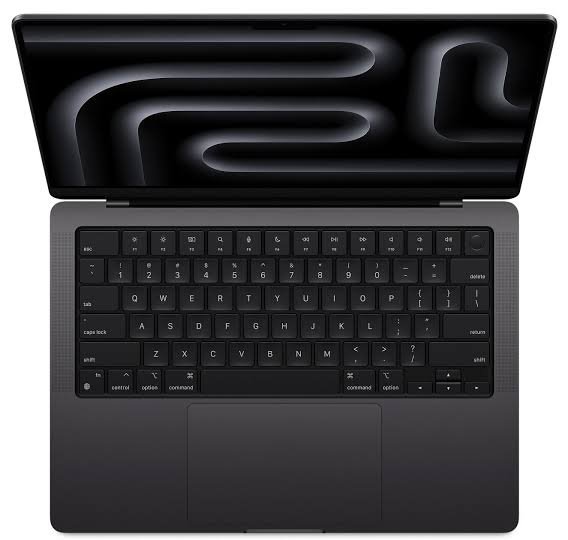
The M4 is the better choice if you want the longest battery life, a newer processor, and more flexibility for everyday work. However, the M3 remains an excellent laptop if you already own one or can buy it at a significantly lower price.
MacBook Pro M3 vs M4 Battery Life: Quick Comparison
| Feature | MacBook Pro 14-inch M3 | MacBook Pro 14-inch M4 |
| Release year | 2023 | 2024 |
| Battery capacity | 70Wh | 72.4Wh |
| Apple’s video playback estimate | Up to 22 hours | Up to 24 hours |
| Apple’s wireless web estimate | Up to 15 hours | Up to 16 hours |
| Laptop Mag web-browsing test | 17 hours 16 minutes | 18 hours 32 minutes |
| Tom’s Guide web-browsing test | 17 hours 25 minutes | 18 hours 31 minutes |
| Processor | 8-core CPU | 10-core CPU |
| Starting unified memory | 8GB on original base configuration | 16GB |
| Display | 14.2-inch Liquid Retina XDR | 14.2-inch Liquid Retina XDR |
| Best for | Buyers seeking value | Buyers wanting better endurance and newer hardware |
Apple’s battery estimates and independent test results measure different things. The official figures are maximum estimates under specified conditions, while review tests use their own controlled procedures.
1. How Much Longer Does the MacBook Pro M4 Battery Last?
The M4 offers a real but relatively modest improvement in battery life over the M3.
In Laptop Mag’s controlled battery test, the M4 lasted 18 hours and 32 minutes, compared with 17 hours and 16 minutes for the M3. That is a difference of 1 hour and 16 minutes, or approximately 7% longer.
Tom’s Guide measured 18 hours and 31 minutes for the M4 and 17 hours and 25 minutes for the M3. In that test, the difference was 1 hour and 6 minutes.
These results tell a consistent story: the M4 lasts longer under comparable light-use testing, but it does not double battery life or transform the laptop into a completely different endurance machine.
What does an extra hour mean in everyday use?
An additional hour can be useful if you regularly work away from a power outlet.
For example, it could give you more time to finish an assignment in a library, continue writing on a train, or complete a meeting before looking for a charger.
If you use your MacBook for a few hours at a time and usually have access to power, the difference may not be important.
If you work long days away from your desk, that extra hour can provide a useful buffer.
Verdict: The MacBook Pro M4 wins, but the improvement is incremental rather than dramatic.
2. Apple’s Official Battery Claims: M3 vs M4
Apple rates the two models differently.
The 14-inch MacBook Pro M3 is rated for up to 22 hours of Apple TV app movie playback and up to 15 hours of wireless web browsing. The M4 is rated for up to 24 hours of video streaming and up to 16 hours of wireless web browsing.
| Battery activity | MacBook Pro M3 | MacBook Pro M4 |
| Video playback or streaming | Up to 22 hours | Up to 24 hours |
| Wireless web browsing | Up to 15 hours | Up to 16 hours |
| Difference in Apple’s published estimates | — | Up to 2 hours of video, 1 hour of web browsing |
The video figures should not be treated as a guarantee that you will get 22 or 24 hours while streaming any video service. Screen brightness, network conditions, software, and the type of video can all affect battery use.
Similarly, Apple’s web-browsing estimate does not mean every user will get exactly 15 or 16 hours when browsing the internet.
Why are Apple’s figures different from review results?
Apple and independent reviewers do not necessarily use the same tests.
Apple publishes results based on its own testing procedures and specified settings. Reviewers may run continuous web browsing, loop a locally stored video, or use other repeatable workloads.
A test with a relatively dim screen and light browsing is not the same as a normal workday involving video calls, editing software, downloads, and multiple applications.
The most useful approach is to compare models tested by the same reviewer using the same method. That makes the difference between the laptops more meaningful.
3. Why Does the MacBook Pro M4 Last Longer?
Several factors help explain the M4’s battery advantage.
A larger battery
The M3 model has a 70Wh battery, while the M4 model has a 72.4Wh battery. That gives the M4 a small increase in battery capacity.
A larger battery can store more energy, but capacity alone does not determine runtime. A laptop can still use more power if its processor, screen, or workload demands more energy.
A newer processor
The M4 has a 10-core CPU, compared with the M3’s 8-core CPU in these base models. Apple also specifies higher memory bandwidth for the M4.
The M4’s architecture and power management help it deliver stronger performance while remaining efficient in supported workloads.
This is important because battery life depends on how much energy a laptop uses to complete a task. If the system can finish certain tasks efficiently, it may spend less time under load.
However, a more powerful chip does not automatically guarantee longer battery life in every situation. Demanding applications can use additional processing power and drain the battery faster.
Software and power management
Battery performance also depends on macOS, background processes, application optimization, and power settings.
A laptop performing indexing, syncing large files, or running a demanding application may consume more energy than one sitting idle.
Software updates can sometimes change performance or power behavior, so results from an older test may not exactly match your experience today.
The same high-quality display
Both models use a 14.2-inch Liquid Retina XDR display. The display can deliver high brightness, strong contrast, and smooth refresh rates, but using those features at high settings can consume more energy.
If you keep brightness high throughout the day, the difference between the M3 and M4 may be smaller than you expect.
4. Real-World Battery Life for Everyday Work
Controlled battery tests are useful, but most people use their MacBook for a mix of activities.
You might spend the morning browsing, write documents in the afternoon, join video calls, listen to music, and finish the day by watching a video.
Each task has a different power requirement.
Web browsing and writing
For browsing, email, online research, and document editing, both laptops offer excellent endurance.
The M4 should provide a little more runtime under comparable conditions, but the M3 can still last through a long work session.
If your work consists mainly of writing, spreadsheets, research, and ordinary browsing, battery life is unlikely to be the only reason to upgrade from M3 to M4.
Video calls
Video calls typically use more energy than simple text editing because the camera, microphone, network connection, and video processing remain active.
Long calls can also involve screen sharing, virtual backgrounds, or multiple applications running simultaneously.
The M4 may last longer under similar conditions, but do not expect it to match Apple’s maximum streaming or browsing figures during a full day of meetings.
Watching movies and streaming video
Video playback is one of the workloads used in official battery testing. Both models are efficient for watching films and other video content.
Apple’s published figures favor the M4, with up to 24 hours compared with up to 22 hours for the M3.
Your actual runtime will depend on brightness, streaming quality, network activity, and the application you use.
Multitasking
Running a browser, a spreadsheet, a video call, and several other applications together can increase power use.
For this type of work, the M4 provides newer hardware and more performance headroom. However, the actual battery advantage depends on what those applications are doing.
Everyday-use verdict: Both are strong choices. The M4 has the edge, but the M3 remains capable of handling a full range of common tasks.
5. Battery Life During Video Editing and Creative Work
Video editing is much more demanding than browsing or writing.
Applications such as Final Cut Pro, Adobe Premiere Pro, and DaVinci Resolve can use the CPU, GPU, media engines, memory, and storage heavily. Rendering and exporting may drain the battery much faster than light office work.
MacBook Pro M3 for video editing
The M3 MacBook Pro includes hardware acceleration for supported formats such as H.264, HEVC, ProRes, and ProRes RAW.
This makes it capable of editing many common video projects.
For short YouTube videos, basic color correction, simple transitions, and moderate editing workloads, the M3 remains a good machine.
However, running demanding editing software on battery power can reduce runtime substantially compared with a light browsing test.
MacBook Pro M4 for video editing
The M4 also supports hardware acceleration for common video formats and offers a newer processor.
It is a good choice for creators who want stronger performance and somewhat better battery endurance.
The additional processing power may help with demanding tasks, but complicated timelines, advanced effects, and high-resolution footage can still consume substantial energy.
Which is better for creators?
The M4 is the better option if you frequently work on the go and want more battery headroom.
If you edit mostly at a desk, where you can connect the charger, the M3 may provide better value if the price difference is large.
Do not judge editing endurance by a web-browsing benchmark alone. A laptop that lasts more than 18 hours in a light test may last far less when exporting video continuously.
6. Battery Life for Programming, Data Analysis, and Heavy Workloads
Programming and data analysis can range from light tasks to intensive processing.
Writing code, reading documentation, and running a simple development environment may use relatively little power. Compiling large projects, running virtual machines, training models, or processing large datasets can consume significantly more.
Programming on the M3
The M3 is suitable for many development workflows, including web development, general programming, and common command-line tools.
For light and moderate tasks, its battery life should be very good.
If your development environment regularly runs resource-heavy processes, you may see much shorter runtime than the figures published for web browsing.
Programming on the M4
The M4 offers a faster CPU configuration and more memory bandwidth than the M3 base model.
That can be useful for certain compiles, multitasking, and data-heavy work.
The M4 may also finish some tasks faster, but the energy consumed depends on the application. Some jobs benefit from additional performance; others may be limited by memory, storage, or external services.
Should developers upgrade for battery life?
If you already own an M3 MacBook Pro and its battery is healthy, the M4’s roughly one-hour advantage in controlled browsing tests is unlikely to justify an upgrade by itself.
If you are buying a new laptop and both models are similarly priced, the M4 is the better overall choice.
7. How Much Battery Life Do You Lose at High Brightness?
Screen brightness is one of the simplest settings you can adjust to improve battery life.
Both models have bright Liquid Retina XDR displays. Apple specifies up to 1,000 nits of sustained full-screen brightness for HDR content and higher peak brightness for supported HDR content. The M4 also offers up to 1,000 nits of SDR brightness outdoors, compared with the M3’s lower SDR specification.
At high brightness, the display can consume more power.
If you are working indoors, reducing brightness to a comfortable level can help extend runtime. You do not need to keep the screen at maximum brightness to get a good experience.
Practical brightness advice
- Use moderate brightness indoors.
- Increase brightness when working in strong daylight.
- Turn off the display when you are away from the laptop.
- Use automatic brightness if it suits your environment.
- Avoid keeping HDR content running unnecessarily when battery life is a priority.
The M4 may last longer under comparable conditions, but using its display at high brightness can reduce that advantage.
8. Does Battery Health Matter More Than the M3 vs M4 Difference?
Yes, especially if you are buying a used MacBook Pro.
The battery capacity of a laptop decreases over time and with use. A heavily used M4 can have worse real-world battery life than a well-maintained M3.
That is why the condition of the individual laptop matters when shopping for a refurbished or second-hand device.
What to check before buying a used MacBook Pro
- Open macOS System Settings and check the battery health information.
- Review the battery cycle count when available.
- Look for signs of swelling, physical damage, or unusual heat.
- Ask whether the battery has been replaced.
- Check the seller’s warranty and return policy.
- Test the laptop unplugged if possible.
- Make sure it does not lose charge unusually quickly during light use.
A low cycle count is not the only factor that determines battery condition, and a high cycle count does not automatically mean the battery is unusable. Consider the battery’s reported condition and the laptop’s overall history.
Is a used M4 always better than a used M3?
No. A well-maintained M3 with a healthy battery can be a better purchase than an M4 with poor battery health, especially if the M3 costs less.
Compare the actual condition, configuration, warranty, and price rather than choosing based on the chip generation alone.
9. How to Make Your MacBook Pro M3 or M4 Battery Last Longer
You can improve battery endurance on either model by changing a few everyday habits.
Reduce screen brightness
A bright screen is useful outdoors, but it is often unnecessary in a dim office or classroom.
Set brightness to a comfortable level and increase it only when needed.
Use Low Power Mode when appropriate
macOS offers power-management options that can reduce energy use. Low Power Mode can be helpful when you need extra runtime and do not require maximum performance.
Depending on the version of macOS, you can find power-related options in System Settings under Battery.
Close unnecessary background applications
Some applications continue working when you are not actively using them. Cloud syncing, large downloads, browser tabs, and resource-heavy programs can affect battery use.
Close applications you no longer need, particularly during long sessions away from a charger.
Disconnect accessories you are not using
External drives, hubs, and other connected devices may draw power from the laptop.
Disconnect accessories when they are not needed, especially if you are trying to conserve the battery.
Keep software updated
Operating system and application updates can improve compatibility, fix bugs, and sometimes improve power efficiency.
Install reliable updates and check whether a particular application is responsible for unusually high energy use.
Avoid extreme temperatures
Very hot or cold environments can affect battery performance and long-term battery health. Use and store your MacBook within Apple’s recommended operating conditions.
These steps can help both generations, but they cannot guarantee a fixed number of extra hours.
10. MacBook Pro M3 vs M4: Which Should You Buy in 2026?
By 2026, the M3 and M4 are both older generations. The M4 was introduced in 2024, and Apple has since released newer MacBook Pro hardware, including the M5 generation.
That makes current pricing and availability important.
Buy the MacBook Pro M3 if:
- You find it at a substantially lower price.
- You mainly use your laptop for writing, browsing, and general productivity.
- Its battery health is good.
- You do not need the M4’s newer features.
- You want a capable laptop without paying extra for a modest battery improvement.
The M3 is still a powerful computer, and its measured battery endurance remains excellent.
Buy the MacBook Pro M4 if:
- The price difference is relatively small.
- You want the longer battery life shown in comparable tests.
- You need stronger performance for demanding tasks.
- You prefer the newer hardware and its additional features.
- You want a newer machine for several years of use.
Should you consider the M5?
If you are buying new in 2026, compare the current M5 model with the M4 before making a decision.
A newer model may offer improvements in performance or other features, but do not assume it will automatically last longer on battery than every older model. Compare independent tests using the same methodology whenever possible.
If the M5 is only slightly more expensive than the M4, it may be worth considering. If the M4 is heavily discounted, it could still be the better value.
Frequently Asked Questions
1. How much longer does the MacBook Pro M4 last than the M3?
In two comparable independent web-browsing tests, the M4 lasted about 66 to 76 minutes longer than the M3. Your results will vary depending on brightness, software, battery condition, and workload.
2. Does the MacBook Pro M4 really last 24 hours?
Apple advertises up to 24 hours of video streaming for the 14-inch M4 MacBook Pro. This is a maximum estimate under specified conditions, not a guarantee of 24 hours during mixed everyday use.
3. Is the MacBook Pro M3 battery still good in 2026?
Yes, provided the battery is in good condition. Independent tests measured more than 17 hours of controlled web browsing on the original M3 model. Used devices may perform differently depending on battery wear.
4. Which MacBook Pro is better for travel?
The M4 is the better choice if you prioritize maximum endurance between charges. However, a healthy M3 can still be excellent for travel, particularly if you find it at a lower price.
5. Does video editing drain the battery faster than browsing?
Yes, it often does. Video editing and exporting can place heavy demands on the processor, graphics hardware, and media engines. Actual runtime depends on the footage, software, effects, and export settings.
6. Can the MacBook Pro M3 last a full workday?
For many light and moderate workloads, yes. Its actual runtime depends on screen brightness, applications, network use, and battery health. Demanding workloads can reduce endurance substantially.
7. Is the M4 worth upgrading to if I already own an M3?
Not for battery life alone in most cases. An extra hour in controlled browsing tests is useful, but it may not justify the cost of replacing a healthy M3. Consider upgrading if you also need the M4’s performance or other features.
8. Does using an external monitor reduce battery life?
It can. Driving an external display may increase power use, particularly if the display is bright or the laptop is also running demanding applications. The impact depends on the monitor and workload.
9. Does Low Power Mode help battery life?
It can reduce energy use by adjusting system behavior and performance. It is useful when you need longer runtime and do not require maximum processing speed.
10. Should I buy a refurbished M3 or a new M4?
Choose based on total value. A refurbished M3 can be a good deal if it has a healthy battery and a reliable warranty. The M4 is preferable when its price is close and you want newer hardware.
Final Verdict: MacBook Pro 14-Inch M3 vs M4 Battery Life
The 14-inch MacBook Pro M4 wins the battery comparison, lasting roughly one hour longer than the M3 in comparable controlled web-browsing tests. It also has a slightly larger battery and a newer processor. Apple’s published maximum estimates are higher for the M4 as well.
However, the M3 is not a poor performer. Its battery life remains impressive, and it can be a smart purchase when discounted.
Choose the M4 if you want the better overall laptop and the prices are close. Choose the M3 if you can save a meaningful amount and its battery is healthy. If you are buying new in 2026, compare current M5 options before making your final decision.
The key point is simple: the M4 lasts longer, but battery health, screen brightness, and your workload can matter more than the generation difference in everyday use.