

As an Amazon Associate, I earn from qualifying purchases
MacBook Air M3 vs MacBook Pro 14: Quick Comparison
The MacBook Air M3 is the better option for most students, beginner programmers, web developers, and people who want a lightweight laptop for everyday coding.
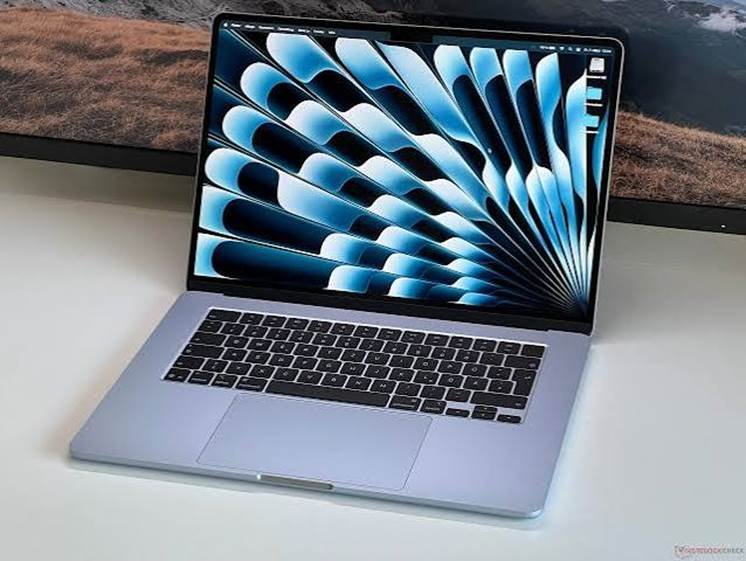
The 14-inch MacBook Pro is the stronger choice for developers who need a better display, more built-in ports, active cooling, or the additional performance available in higher-end chip configurations.
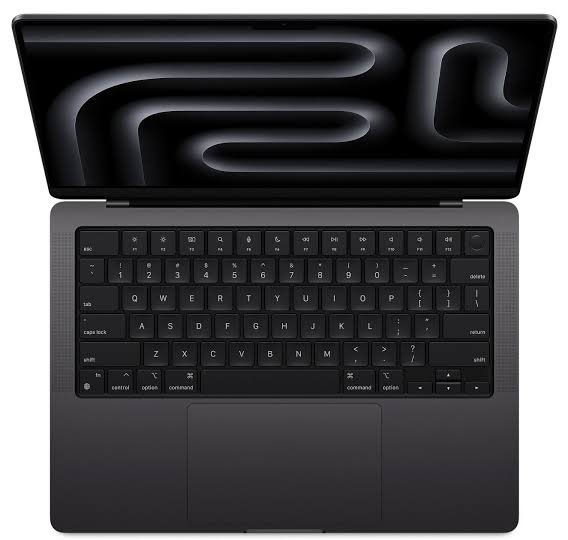
| Feature | MacBook Air M3 13-inch | MacBook Pro 14-inch M3 |
| Processor | Apple M3, 8-core CPU | Apple M3, 8-core CPU on base model |
| Cooling | Fanless design | Active cooling with fans |
| Display | 13.6-inch Liquid Retina | 14.2-inch Liquid Retina XDR |
| Refresh rate | Up to 60Hz | ProMotion up to 120Hz |
| Memory options | 8GB or 16GB base configurations, configurable up to 24GB | 8GB or 16GB base configurations, configurable up to 24GB |
| Storage | Starts at 256GB | Starts at 512GB on the original base M3 model |
| Ports | Two Thunderbolt/USB 4 ports, MagSafe, headphone jack | Two Thunderbolt/USB 4 ports, HDMI, SDXC, MagSafe, headphone jack |
| Battery life claim | Up to 18 hours of video playback | Up to 22 hours of video playback |
| Portability | Lighter and thinner | Heavier, with a more substantial chassis |
| Best for | Web development, study, general coding | Long workloads, external devices, premium display |
| Overall recommendation | Best value for most programmers | Best for demanding workflows and display quality |
Specifications vary by model and configuration. Apple’s published figures are maximum video-playback estimates, not guaranteed programming battery life.
1. Performance: Which MacBook Is Faster for Coding?
Both laptops can provide a responsive programming experience. They use Apple’s M3 family of chips, but the exact processor configuration and cooling system affect performance.
MacBook Air M3 performance
The MacBook Air M3 has an eight-core CPU with four performance cores and four efficiency cores. This is enough power for many everyday development tasks, including:
- Writing HTML, CSS, and JavaScript.
- Building websites with React, Vue, or similar frameworks.
- Developing applications with Python.
- Running code editors such as Visual Studio Code.
- Working with Git and common command-line tools.
- Building smaller applications.
- Studying computer science and learning programming languages.
For these tasks, the Air feels fast because programming is often a mixture of typing, testing, browsing documentation, and running short commands. The processor does not need to operate at maximum capacity all day.
The M3 Air can also handle multiple open applications. You can work in a code editor, run a local development server, keep documentation open in a browser, and use messaging applications without necessarily experiencing slowdowns.
MacBook Pro 14 performance
The base 14-inch MacBook Pro with the M3 chip also has an eight-core CPU. This means you should not assume that every base-model Pro is dramatically faster at every programming task simply because it has the Pro name.
The MacBook Pro becomes more attractive when you consider its active cooling and the higher-performance M3 Pro and M3 Max configurations available in the 14-inch family.
Its fans help move heat away during long, demanding tasks. That can help the laptop sustain performance during repeated builds, intensive data processing, and other workloads that keep the processor busy for extended periods.
If you are comparing an M3 Air with a 14-inch MacBook Pro fitted with an M3 Pro chip, the Pro has a more substantial performance advantage for demanding multithreaded work. That is a different comparison from the Air M3 versus the base M3 Pro model.
Performance verdict: The MacBook Air M3 is fast enough for most programming. Choose the 14-inch Pro when your particular workload benefits from active cooling or a higher-tier chip.
2. Programming Languages and Development Tools
The best laptop depends partly on the software you intend to use. Fortunately, the MacBook Air M3 supports a wide range of common development workflows.
Web development
For frontend and backend web development, the MacBook Air M3 is an excellent option.
It can run tools such as:
- Visual Studio Code.
- Node.js and npm.
- React and Next.js.
- Python frameworks.
- PHP development tools.
- Git and GitHub workflows.
- Local development servers.
- Database clients and browser testing tools.
You can build a website, test responsive layouts, work with APIs, and manage source control without needing a MacBook Pro.
The Pro is useful if you work with many projects simultaneously or prefer its larger, brighter screen. However, the base M3 Air is already capable of handling most standard web development workflows.
Python and data analysis
Python programmers can use the Air M3 for scripting, automation, backend development, and many data-analysis tasks.
It is suitable for tools such as JupyterLab, pandas, NumPy, and a range of common Python development environments. Your exact software requirements may vary, especially when working with specialist libraries or hardware-dependent packages.
The MacBook Pro becomes more appealing when your work involves large datasets, frequent local processing, multiple services, or other memory-intensive tasks.
For machine learning, distinguish between writing code, experimenting with small models, and training large models locally. The Air can support development and smaller experiments, but a larger-memory Pro configuration or a dedicated remote GPU environment may be more appropriate for heavy training.
iOS and macOS development with Xcode
Both laptops can run Xcode on supported macOS versions and can be used to build Apple-platform applications.
The Air M3 is a sensible choice for students learning Swift, independent developers building smaller apps, and programmers working on modest Xcode projects.
The Pro is worth considering if you frequently build large applications, use multiple simulators, or repeatedly perform lengthy compilations. Its active cooling and higher-tier configurations can be helpful during these workloads.
For either model, memory matters. Xcode, an iOS simulator, a browser, and other development tools can consume a substantial amount of unified memory when open together.
Java, C++, and other compiled languages
The Air M3 is suitable for Java, C++, Rust, Go, and many other programming languages. It can compile projects and run common development tools.
The difference becomes more noticeable when projects are large and compilation is frequent. If a build takes a long time and you repeat it throughout the day, even small improvements can save time.
For small projects, learning exercises, and moderate development, the Air is usually sufficient. For large codebases, extensive automated tests, and repeated full builds, consider a 14-inch MacBook Pro with an appropriate Pro-level chip and more memory.
3. RAM: How Much Memory Does a Programmer Need?
Memory is one of the most important buying decisions when comparing these MacBooks.
Apple silicon uses unified memory, which is shared by the CPU, GPU, and other system components. You cannot upgrade the memory later, so it is worth choosing carefully before buying.
Is 8GB enough for programming?
An 8GB configuration can handle basic coding, simple scripts, introductory programming lessons, and lightweight web development. However, it leaves less room for demanding multitasking.
You may notice more memory pressure when you open a large browser session, an IDE, a simulator, a database, and several background services at the same time.
For a new programming laptop, I would generally look for at least 16GB of unified memory rather than choosing 8GB solely to reduce the initial cost.
Is 16GB enough?
For many programmers, 16GB is a practical starting point.
It works well for web development, Python, general application development, and a reasonable collection of open applications. It can also support many moderate Xcode workflows.
If you primarily write code, run one or two local services, and use an external monitor, 16GB may be enough for your needs.
Should developers choose 24GB or more?
Consider 24GB or more if you regularly use:
- Several Docker containers.
- Multiple virtual machines.
- Large IDE projects.
- Android or iOS simulators alongside other tools.
- Large local databases.
- Multiple development environments at once.
- Memory-intensive data-science workflows.
The 13-inch MacBook Air M3 can be configured with up to 24GB of unified memory. The original base M3 14-inch MacBook Pro also had configurations up to 24GB, while higher-tier M3 Pro and M3 Max models offer different memory options.
Do not buy more memory simply because a product sounds more professional. Match it to the tools and projects you actually expect to use.
4. Storage: Is 256GB Enough for Programming?
Storage is another important difference between configurations.
The MacBook Air M3 starts with a 256GB SSD, while the original base 14-inch MacBook Pro M3 starts with 512GB. Other configurations may offer more storage.
When 256GB can work
A 256GB MacBook Air can be sufficient if you mainly work on small projects, use cloud storage, and keep large media files off your laptop.
It may suit a student who is learning Python, building basic websites, and using Git to manage source code.
However, the operating system, applications, caches, downloaded files, development dependencies, and project assets all take up space. Available capacity is lower than the advertised total.
Why 512GB is more comfortable
For professional development, 512GB offers more breathing room.
Docker images, local databases, virtual-machine files, mobile simulators, package caches, and several code repositories can consume storage faster than expected. Large projects can also require extra space for build artifacts and test data.
If your budget allows, I recommend a 512GB SSD for a development laptop you plan to use for several years.
You can also use an external SSD for archives, large datasets, and backups. Just remember that an external drive is not a replacement for a reliable backup strategy.
5. Display: Which Is Better for Reading and Writing Code?
The display is one of the clearest advantages of the 14-inch MacBook Pro.
MacBook Air M3 display
The 13-inch Air has a 13.6-inch Liquid Retina display with a resolution of 2560 × 1664 and a rated brightness of up to 500 nits.
It offers sharp text, good color reproduction, and enough space for a code editor and a few panels. Its display is comfortable for everyday programming, although some developers will find the smaller screen limiting when viewing long files or several windows side by side.
If you regularly travel, work in cafés, or code between classes, the compact display is a reasonable trade-off.
MacBook Pro 14 display
The 14-inch Pro has a 14.2-inch Liquid Retina XDR display with a resolution of 3024 × 1964. It also supports ProMotion refresh rates up to 120Hz and offers higher brightness capabilities.
For programming, these features can make a difference in everyday comfort. Text and interface elements look crisp, scrolling is smoother, and the display can be especially useful when working with several windows.
The extra screen space is helpful when you want to view code beside a browser, terminal, or debugging panel.
However, a better display does not automatically make you a faster programmer. Your workflow, keyboard, memory, and development tools may matter more than the screen upgrade.
Display verdict: The 14-inch MacBook Pro wins for display quality. The Air remains perfectly usable for coding, especially if you plan to connect an external monitor at your desk.
6. Cooling and Long Programming Sessions
The MacBook Air M3 uses a fanless design. This makes it quiet because there is no internal fan that needs to spin up during ordinary work.
That design is a benefit for libraries, classrooms, shared offices, and quiet rooms. For typical coding sessions, it is not a major disadvantage.
The trade-off appears during sustained workloads. When the processor generates heat over a long period, the Air may reduce performance to manage temperatures.
The 14-inch MacBook Pro has active cooling. Its fans can help it sustain performance during long builds, extended data processing, and demanding workloads that keep the CPU or GPU busy.
This does not mean the Air is unsuitable for serious programming. Many real-world coding tasks are intermittent: you edit code, run a test, inspect the result, and make another change.
The Pro becomes more valuable when heavy workloads are continuous rather than occasional.
7. Battery Life: Which MacBook Is Better for Developers?
Apple rates the 13-inch MacBook Air M3 for up to 18 hours of Apple TV app video playback and the 14-inch base M3 MacBook Pro for up to 22 hours. These are official video-playback estimates, not direct measurements of coding time.
Programming battery life depends on what you run. A code editor and terminal usually place a different load on the system than several simulators, containers, virtual machines, and external devices.
The Air has a smaller battery but also a compact, efficient design. It is an attractive choice for students and developers who carry a laptop around all day.
The Pro has a larger battery and can offer longer playback time under Apple’s test conditions. Its actual battery life during programming will depend on workload, brightness, network use, and connected devices.
For either laptop, reduce unnecessary background tasks, manage screen brightness, and check battery health if you are buying a used model.
8. Ports and External Monitors
The MacBook Air M3 and the 14-inch MacBook Pro both include two Thunderbolt/USB 4 ports and MagSafe charging. The Pro adds useful built-in connections.
MacBook Air M3 connectivity
The Air includes:
- Two Thunderbolt/USB 4 ports.
- A MagSafe 3 charging port.
- A 3.5mm headphone jack.
The limited port selection is fine if you use wireless accessories or connect a single hub. But developers who regularly attach several devices may need a dock or adapter.
The M3 Air supports up to two external displays when its lid is closed. If you plan to use multiple monitors, check Apple’s exact display-support requirements and your preferred monitor resolutions before buying.
MacBook Pro 14 connectivity
The base 14-inch M3 Pro includes:
- Two Thunderbolt/USB 4 ports.
- HDMI.
- An SDXC card slot.
- MagSafe 3.
- A 3.5mm headphone jack.
These extra ports are convenient if you frequently connect a monitor, storage device, presentation display, or other peripherals.
External-display support depends on the exact chip and model. Do not assume that every 14-inch MacBook Pro configuration has identical capabilities.
Connectivity verdict: The Pro is more convenient if you want HDMI and an SD card slot without carrying a hub. The Air works well with a suitable USB-C dock.
9. Portability and Everyday Comfort
The MacBook Air M3 is designed for portability. It is thinner and lighter than the 14-inch MacBook Pro, making it easier to carry to classes, meetings, coworking spaces, or a daily commute.
If you travel frequently, work remotely, or move between different desks, this can matter more than a small performance advantage.
The 14-inch MacBook Pro is still portable, but it has a thicker chassis and weighs more. In return, you get the better display, more built-in ports, and active cooling.
Think about where you spend most of your programming time. If you work at a fixed desk with external displays, the extra weight may be less important. If you carry your laptop all day, the Air’s lighter design is a strong advantage.
10. Which MacBook Is Better for Different Types of Programmers?
| Programming workload | Better choice | Reason |
| Learning to code | MacBook Air M3 | Plenty of performance for introductory work |
| Frontend development | MacBook Air M3 | Good for editors, browsers, and local servers |
| Backend development | MacBook Air M3 for moderate work | Suitable for many common frameworks and services |
| Python scripting | MacBook Air M3 | Efficient for everyday scripts and automation |
| Large local data processing | MacBook Pro 14 | More suitable when memory and sustained performance matter |
| iOS development | Either | Air for smaller projects; Pro for heavier Xcode workloads |
| Large C++ or Rust projects | MacBook Pro 14 with a suitable chip | Active cooling and higher-tier configurations can help |
| Docker and multiple services | MacBook Pro 14 with more memory | Better fit for demanding concurrent workloads |
| University programming | MacBook Air M3 | Portable and capable for typical coursework |
| Multi-monitor desk setup | Depends on display requirements | Check exact model support; Pro offers convenient built-in HDMI |
| Long builds throughout the day | MacBook Pro 14 | Active cooling can help sustain performance |
11. Best Configuration for Programming
The right configuration is often more important than choosing Air or Pro based on the product name alone.
Best MacBook Air M3 configuration
For most students and general programmers, look for:
- Memory: 16GB minimum where possible.
- Storage: 512GB if your budget allows.
- Screen size: 13-inch for portability or 15-inch if you prefer more workspace.
- Accessories: An external monitor or USB-C hub if you work at a desk.
A 16GB/512GB Air M3 is a balanced option for everyday development. If you can find a well-priced 24GB model, that extra memory may be worthwhile for heavier multitasking.
Best MacBook Pro 14 configuration
For developers who need the Pro, consider:
- Memory: 18GB or more on suitable higher-tier models, or the largest practical amount for your workload.
- Storage: 512GB minimum, with 1TB useful for larger local environments.
- Chip: Choose M3 Pro or a newer Pro-level chip if your workloads justify the cost.
- Cooling: Use the active-cooling design to your advantage during repeated, demanding builds.
Do not pay for a high-end chip if your daily work consists mostly of editing websites and running small scripts. Spend that money on memory, storage, a monitor, or other equipment that solves a real problem.
12. Is the MacBook Air M3 Still Worth Buying in 2026?
The MacBook Air M3 can still be a sensible programming laptop in 2026 if you find it at a competitive price and choose a suitable configuration.
However, it is no longer Apple’s newest MacBook Air generation. Newer models are available, so compare the M3 with current alternatives before buying. A newer Air may offer improved performance or a better configuration for a similar total cost.
The same advice applies to the 14-inch MacBook Pro. Check the chip generation, memory, storage, warranty, and condition rather than buying based only on the words “MacBook Pro.”
For used machines, inspect battery health, display condition, keyboard, ports, charger, and activation status. Make sure the seller can remove the device from their Apple Account and that you can complete setup yourself.
The best deal is not always the cheapest laptop. It is the model that meets your programming needs without requiring expensive upgrades or replacement too soon.
Frequently Asked Questions
Is the MacBook Air M3 good for programming?
Yes. The MacBook Air M3 is good for web development, Python, scripting, many app-development tasks, and computer science coursework. A configuration with 16GB of memory and 512GB of storage is a practical starting point for many developers.
Is the MacBook Pro 14 better than the MacBook Air M3 for coding?
It can be. The 14-inch Pro has a better display, more built-in ports, and active cooling. A model with an M3 Pro or newer Pro-level chip can also deliver a substantial performance advantage for demanding workloads. The base M3 versions are closer in processor capability.
Can the MacBook Air M3 run Xcode?
Yes. It can run Xcode on a compatible version of macOS and build Apple-platform apps. The Pro is worth considering for large projects, repeated long builds, or workflows that use multiple simulators and other demanding tools.
Is 8GB RAM enough for coding on a MacBook Air M3?
It can work for basic programming and light projects, but it offers less headroom for multitasking. For a laptop intended to last several years, 16GB is a better target for most programming workloads.
Is 256GB storage enough for programming?
It can be enough for lightweight coding, but development tools, package caches, containers, simulators, and datasets can use space quickly. If possible, choose 512GB or plan to use an external SSD for larger files.
Does the MacBook Air M3 overheat during programming?
It can become warm under sustained heavy workloads, as any compact laptop can. Its fanless design may limit performance during long periods of intensive work. Everyday coding is usually less demanding than continuous compilation or heavy local processing.
Which is better for Docker: MacBook Air M3 or MacBook Pro 14?
Both can run Docker-based workflows, but the right choice depends on the number and size of containers. For a few development containers, the Air can be sufficient. For multiple services running all day, a Pro with more memory and a suitable chip is a safer choice.
Should I buy the 13-inch Air or the 14-inch Pro for university?
The Air is usually the better fit if you want a lighter laptop for lectures, studying, and general programming. Choose the Pro if your coursework requires heavier development environments and you value its display and ports enough to justify the extra weight and cost.
Is the base M3 MacBook Pro much faster than the M3 Air?
Not necessarily for every task. Both base models use an eight-core M3 CPU. The Pro’s active cooling can help with sustained workloads, while the M3 Pro chip configuration is a more meaningful step up for demanding compilation and other parallel workloads.
Should I buy a newer MacBook instead of the M3 Air?
Compare current-generation Air models and 14-inch Pro models before making a purchase. If a newer laptop costs only slightly more and offers more memory or storage, it may be the better long-term value. A discounted M3 Air can still be attractive if it meets your requirements.
Final Verdict: MacBook Air M3 vs MacBook Pro 14 for Programming
For most programmers, the MacBook Air M3 is the better value. It is portable, quiet, and powerful enough for web development, Python, general coding, and many student projects. Choose a model with 16GB of memory and preferably 512GB of storage if your budget allows.
The 14-inch MacBook Pro is the better investment for demanding professional workflows. Its superior display, extra ports, active cooling, and higher-tier chip options make it more appealing for large codebases, repeated long builds, intensive local services, and heavy multitasking.
My recommendation is simple:
- Choose the MacBook Air M3 if you want an affordable, lightweight laptop for everyday programming.
- Choose the 14-inch MacBook Pro if you regularly run demanding workloads or want its display and connectivity.
- Compare newer models before buying in 2026, especially if you are paying close to current-generation prices.
You do not need the most expensive MacBook to become a good programmer. Choose the configuration that supports your tools, projects, and budget.