

As an Amazon Associate, I earn from qualifying purchases
Best MacBook for Data Science in 2026: The Quick Answer
The 14-inch MacBook Pro with the M5 chip is the best MacBook to consider for data science if you want a balance of processing performance, memory options, battery life, and a high-quality display. However, it is important to distinguish the standard M5 MacBook Pro from the more expensive M5 Pro and M5 Max configurations, which offer different levels of performance.
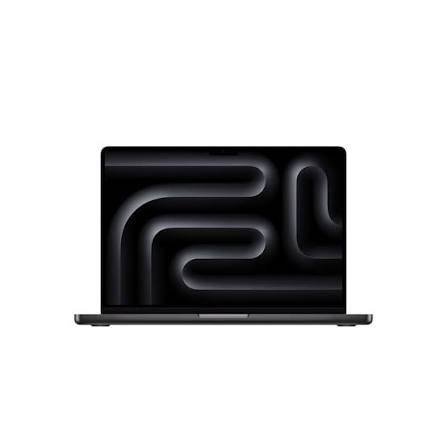
For students, beginners, and data analysts, the 13-inch MacBook Air M5 with at least 16GB of unified memory is a strong, more affordable alternative. It can handle Python programming, Jupyter notebooks, SQL, data visualization, statistics, and many traditional machine learning exercises. Apple lists 512GB as the M5 Air’s starting storage capacity, which is useful for datasets, development environments, and project files.
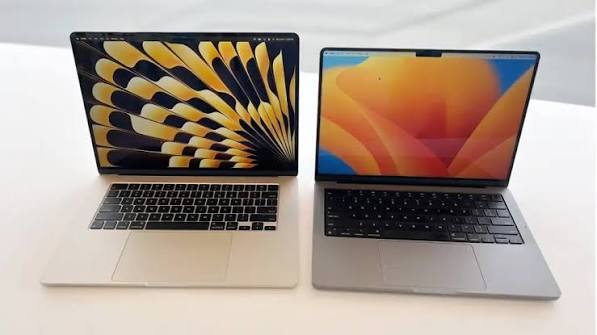
If your work involves large datasets, demanding machine learning experiments, several virtual environments, or long-running computational workloads, prioritize memory and sustained performance over a thinner design. For deep learning that specifically requires NVIDIA CUDA, a compatible Windows or Linux workstation—or a cloud GPU—may be a better choice than any MacBook.
The right MacBook depends on the data science work you intend to do, not simply on which model is the newest.
1. Best MacBooks for Data Science in 2026 at a Glance
| MacBook | Best For | Recommended Configuration | Main Limitation |
| 14-inch MacBook Pro M5 | Best overall for many data scientists | 24GB or more memory where available; 1TB SSD if affordable | Costs more than the Air |
| 13-inch MacBook Air M5 | Students and beginners | 16GB minimum; 24GB for heavier work | Fanless cooling can limit sustained workloads |
| 15-inch MacBook Air M5 | Analysts who want a larger screen | 16GB or more memory; 512GB or larger SSD | Larger and heavier than the 13-inch Air |
| MacBook Pro with M5 Pro | Advanced analytics and demanding development | 24GB or more memory, depending on configuration | Higher purchase price |
| Discounted MacBook Air M4 | Budget-conscious learners | Prefer 16GB or 24GB memory and 512GB storage | Older chip and configuration options |
Configurations and availability vary by model and market. Check the exact model before purchasing, especially when comparing memory and chip options.
2. 14-Inch MacBook Pro M5: Best Overall MacBook for Data Science
The 14-inch MacBook Pro M5 is a strong choice for data scientists who need more than a basic laptop but do not necessarily require the most expensive Pro or Max chip.
It combines Apple’s M5 processor, an integrated GPU, unified memory, a high-quality display, and active cooling. That makes it suitable for many everyday data science workflows, from cleaning datasets and exploring statistics to developing machine learning models and testing code.
Apple’s published specifications list the standard M5 MacBook Pro with a 10-core CPU, 10-core GPU, 16GB of starting unified memory, and a 1TB starting SSD. Higher memory configurations are available.
Why it is suitable for data science
Strong CPU performance: Many common data science operations depend heavily on the CPU. Examples include cleaning data, transforming tables, joining datasets, preparing features, running statistical calculations, and executing Python scripts.
Active cooling: Data science jobs can run for several minutes or hours. The MacBook Pro’s fans help manage heat during sustained workloads, which can make it more suitable than a fanless Air for repeated heavy computations.
Useful GPU capabilities: Apple’s GPU can accelerate supported workloads, including some machine learning tasks. However, GPU acceleration depends on the framework, model, and available backend. It does not mean every machine learning library will automatically run faster on the GPU.
Good display: The 14-inch display offers room for code, notebooks, charts, and terminal windows. Its high contrast and sharp text can make long working sessions more comfortable.
More connectivity: MacBook Pro models include more built-in ports than the Air. Depending on the model, these can include HDMI, an SDXC card slot, and additional Thunderbolt ports, making it easier to connect monitors and external storage.
What configuration should you buy?
For general data analysis, 16GB of memory can be sufficient. However, if you regularly run Jupyter notebooks, large pandas DataFrames, multiple development tools, and local machine learning experiments, more memory is preferable.
Aim for 24GB or more if your budget allows and your work involves larger datasets or several memory-intensive applications. Consider a 1TB SSD if you expect to store multiple datasets, environments, models, and project files locally.
The standard M5 Pro is not the same as an M5 Pro-chip MacBook Pro. The latter is designed for more demanding workloads and offers a different performance tier.
Best for: Data analysts, professional Python developers, graduate students, and data scientists who want a capable laptop for both everyday analysis and more demanding tasks.
3. 13-Inch MacBook Air M5: Best for Data Science Students and Beginners
The 13-inch MacBook Air M5 is the best value-oriented choice for many students learning data science. It is compact, quiet, and capable of running the main tools used in introductory and intermediate data analysis.
Apple’s M5 Air starts with 16GB of unified memory and 512GB of SSD storage. It also features two Thunderbolt 4 ports and supports up to two external displays, according to Apple’s product information.
What can you do with the MacBook Air M5?
You can use it for tasks such as:
- Learning Python and SQL.
- Working with Jupyter notebooks.
- Cleaning and transforming datasets with pandas.
- Performing statistical analysis with NumPy and SciPy.
- Building traditional machine learning models with scikit-learn.
- Creating charts and visualizations.
- Working with spreadsheets and business intelligence tools.
- Completing university assignments and data science projects.
For these tasks, the laptop’s compact design and battery life can be just as useful as its processing performance. Students can carry it to lectures, libraries, group projects, and internships without carrying a heavier workstation.
What are the limitations?
The MacBook Air uses a fanless design. This makes it silent, but it can become warm during prolonged, demanding calculations. When a workload continues for a long time, thermal limits can affect sustained performance.
Memory is another consideration. A small dataset may fit comfortably in memory, while a much larger dataset can consume several times as much RAM during processing. Loading, transforming, and joining tables can require more memory than simply storing the original file.
If you expect to work with large datasets or demanding machine learning experiments regularly, consider a higher-memory configuration or a MacBook Pro.
Best for: Data science students, beginners, educators, analysts, and people who mainly perform local data analysis rather than heavy model training.
4. 15-Inch MacBook Air M5: Best for Analysts Who Want a Larger Screen
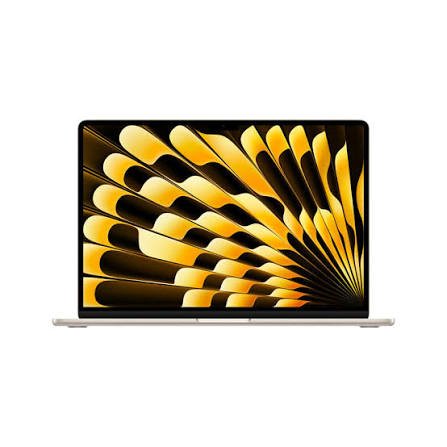
The 15-inch MacBook Air M5 is worth considering if you spend many hours working with code, spreadsheets, charts, and notebooks.
Its larger display makes it easier to keep several windows visible at once. You can arrange a Jupyter notebook beside a dataset preview, keep documentation open while writing code, or examine a chart without constantly switching between applications.
Why screen size matters in data science
Data science often involves several tools at the same time. You may have:
- A code editor or notebook.
- A browser with documentation.
- A terminal.
- A chart or visualization.
- A spreadsheet or database client.
On a smaller screen, these windows can become cramped. A larger display makes multitasking more comfortable, particularly if you do not plan to connect an external monitor.
The 15-inch Air still offers a portable design, but it is larger and heavier than the 13-inch version. Like the smaller Air, it has a fanless design, so it is best for workloads that do not require sustained maximum performance for long periods.
Who should buy it?
Choose the 15-inch Air if you prioritize screen space, regularly work with multiple windows, and mostly run CPU-based analysis, coding, and visualization tasks.
If your primary concern is training demanding models for long periods, a MacBook Pro may be a better investment than choosing a larger Air.
5. MacBook Pro With M5 Pro: Best for More Demanding Data Science Work
If your projects involve substantial datasets, complex model development, or long-running computational workloads, consider a MacBook Pro with an M5 Pro chip.
The M5 Pro is a higher performance tier than the standard M5. Apple’s published specifications for the 16-inch M5 Pro model list an 18-core CPU, a 20-core GPU, and 24GB of starting unified memory, with larger memory configurations available.
Availability and pricing differ across screen sizes and configurations, so verify the model you are considering.
Why the M5 Pro can be useful
More CPU resources: Some data processing and model development workloads can benefit from additional CPU cores, particularly when the software is designed to use them effectively.
Greater memory capacity options: Large datasets, complex pipelines, and simultaneous applications can require substantial memory. More unified memory allows compatible workloads to keep more data accessible without relying as heavily on disk swapping.
Higher GPU capability: The more powerful GPU can help with workloads that support Apple’s GPU computing frameworks. Actual benefits depend on framework support and the operations being performed.
Active cooling: The MacBook Pro is better suited than a fanless Air to workloads that keep the processor busy for extended periods.
Is it necessary for beginners?
Usually not. If you are learning Python, practicing SQL, studying statistics, or building models with small and medium-sized datasets, a MacBook Air can be enough.
The more powerful Pro configuration becomes easier to justify when the laptop is part of your professional workflow and reducing computation time has a real benefit.
Best for: Experienced data scientists, machine learning engineers, researchers, and developers who routinely work with more demanding local workloads.
6. How Much RAM Do You Need for Data Science?
Memory is one of the most important specifications to consider when buying a MacBook for data science.
Unified memory is shared by the CPU and GPU. It is not the same as having a separate pool of system RAM plus dedicated graphics memory, as on some other computers.
The amount you need depends on the size of your data, the applications you run, and whether you train models locally.
| Memory | Best Use | Recommendation |
| 16GB | Learning Python, SQL, statistics, and smaller datasets | Good starting point |
| 24GB | More multitasking and medium-sized analytical projects | A sensible upgrade for many users |
| 32GB or more | Larger datasets, local model development, and demanding applications | Better for advanced workloads |
These are practical guidelines, not strict technical limits. A well-optimized workflow can run on less memory than a poorly optimized workflow, and dataset size alone does not tell the whole story.
Why 16GB may be enough
If you mostly work with structured datasets that fit comfortably in memory, 16GB can be suitable. You can write Python scripts, visualize results, use SQL tools, and run many traditional machine learning exercises.
Why more memory can help
When a dataset is loaded into pandas, the in-memory representation can be much larger than the source CSV or compressed file. Operations such as merging tables, creating temporary arrays, and encoding features can require additional memory.
If memory becomes exhausted, the operating system may use storage as temporary memory. This is much slower than working with data in RAM and can make an analysis feel unresponsive.
My recommendation: Choose 16GB as the practical starting point for learning and general analytics. If you can afford it, 24GB or more offers additional flexibility for larger projects and multitasking.
7. How Much Storage Do Data Scientists Need?
Storage matters because data science projects can include datasets, source code, notebooks, virtual environments, libraries, cached files, trained models, and exported results.
For many users, 512GB is a practical minimum. The M5 MacBook Air now starts with 512GB, while the standard M5 MacBook Pro starts with a 1TB SSD according to Apple’s current specifications. <Cite refs={[“turn872365search0″,”turn872365search2”]}/>
When 512GB is enough
512GB may be sufficient if you:
- Use public datasets for learning.
- Store most projects in cloud storage.
- Work mainly with smaller structured datasets.
- Keep only a few development environments installed.
- Archive completed projects to external storage.
When 1TB or more is useful
Consider 1TB or more if you regularly store large datasets, local model files, several virtual environments, or multiple projects at once.
Machine learning model weights and data archives can take up significant space. It is also helpful to leave free space for macOS, applications, caches, and temporary files.
Can you use an external SSD?
Yes. A fast external SSD can store datasets, archived projects, model files, and backups. It is a useful way to expand storage without paying for the largest internal drive.
However, an external drive does not replace RAM. A large dataset may still need to be loaded into memory for processing, depending on the software and workflow.
8. Is a MacBook Good for Python, Jupyter, and SQL?
Yes. MacBooks with Apple silicon are suitable for many common data science development tools.
Python, Jupyter notebooks, pandas, NumPy, SciPy, scikit-learn, and SQL clients are commonly used in data science workflows. The official scikit-learn documentation includes installation methods for macOS, including pip and conda environments.
Python and Jupyter notebooks
A MacBook can run Python scripts and Jupyter notebooks locally. You can explore data, test hypotheses, build visualizations, and create reproducible analyses.
For a stable setup, use virtual environments or a suitable Python distribution rather than installing every package into one shared environment. This helps prevent dependency conflicts between projects.
SQL and databases
MacBooks can run many SQL clients and development tools. Depending on the database, you may connect to a remote server or run a local database for learning and development.
If your course or workplace requires a specific database platform, confirm that the version you need works on macOS or can be accessed through a supported alternative.
R and statistical analysis
R is also available for macOS, making MacBooks suitable for statistics, visualization, and research workflows. Check that the packages you need support Apple silicon and your chosen R version.
Docker and virtual machines
Containerized development can be useful for reproducible data science projects. However, architecture compatibility matters: many Apple silicon Macs use ARM64, while some container images or older tools may target x86-64.
Before choosing a MacBook for a course or job, check whether your required development images, virtual machines, and specialized software support Apple silicon.
9. Can a MacBook Handle Machine Learning and AI?
Yes, but the answer depends on what kind of machine learning you want to do.
A MacBook is suitable for learning machine learning, preprocessing datasets, developing models, testing algorithms, and running many inference workloads. More demanding deep learning projects may require a more specialized system.
Traditional machine learning
Libraries such as scikit-learn are widely used for classification, regression, clustering, and other common tasks. Many of these workflows are CPU-oriented and can run well on an Apple silicon MacBook, provided the dataset fits comfortably in memory.
For a student learning linear regression, decision trees, random forests, or model evaluation, a MacBook Air can be sufficient.
Deep learning with PyTorch
PyTorch provides an MPS backend that allows compatible operations to use the GPU on supported macOS devices through Apple’s Metal framework. However, not every operation or model configuration is supported in the same way as on other hardware.
You should test the actual framework and operations your project requires. Do not assume that installing PyTorch automatically makes every model run on the GPU.
What about NVIDIA CUDA?
This is an important buying consideration. Apple’s GPU uses its own software ecosystem, while many deep learning tutorials and research workflows are built around NVIDIA CUDA.
If your work depends on CUDA-specific libraries, a MacBook may not be the best local training machine. You may still write code on a Mac and train models on a remote Linux server, cloud GPU, or compatible workstation.
Can you train large language models locally?
You can experiment with smaller models and supported tools, but model size, memory needs, inference speed, and software compatibility determine what is practical.
Large models can require substantial memory and compute resources. If local large-model training is a core requirement, compare a high-memory workstation or cloud GPU option before investing in a MacBook.
10. MacBook Air vs. MacBook Pro for Data Science
Both Air and Pro models can be good data science laptops, but they are designed for different types of work.
| Feature | MacBook Air M5 | MacBook Pro M5 or M5 Pro |
| Best for | Students and general analytics | More demanding development and analysis |
| Cooling | Fanless | Active cooling |
| Portability | Slim and lightweight | Heavier, depending on model |
| Memory options | Suitable for many everyday projects | Higher-capacity options on selected configurations |
| Display | Liquid Retina | Liquid Retina XDR on applicable models |
| Ports | Two Thunderbolt 4 ports and MagSafe | More ports on many models |
| Long-running workloads | Can be limited by heat | Better suited to sustained workloads |
| Typical cost | Lower | Higher |
Choose the MacBook Air if:
- You are learning data science.
- Your datasets are relatively small or medium-sized.
- You mostly use Python, SQL, spreadsheets, and visualization tools.
- You want a lightweight laptop for university or travel.
- You prefer to keep your budget under control.
Choose the MacBook Pro if:
- You regularly work with large datasets.
- You run computationally intensive scripts for long periods.
- You need more memory than the Air configuration you can afford.
- You use several demanding applications at the same time.
- You need the additional ports or display features.
Do not buy a Pro model simply because data science sounds demanding. Match the hardware to the size and type of work you actually do.
11. Should You Buy an Older or Refurbished MacBook for Data Science?
An older Apple silicon MacBook can be a good purchase if the price is significantly lower and the specifications fit your needs.
For example, a discounted MacBook Air M4 may provide sufficient performance for learning Python, working with notebooks, and analyzing datasets. Reviews comparing the M4 and M5 Air note that the M5 brings improvements, including faster performance and a larger base storage capacity, but the M4 remains a reasonable choice at a substantial discount.
Before buying refurbished, check:
- The exact chip and year.
- Unified memory capacity.
- SSD storage.
- Battery health and service history.
- Screen, keyboard, trackpad, and port condition.
- Warranty and return policy.
- Whether the seller has removed activation locks.
- Compatibility with your required software.
For data science, memory is especially important. A slightly older MacBook with 24GB of memory may be more useful for some analytical workloads than a newer model with less memory, depending on the price and processing requirements.
Avoid buying an old Intel MacBook solely because it is cheap without checking software compatibility, battery condition, and expected support.
12. What to Check Before Buying a MacBook for Data Science
Use this checklist to choose the right laptop for your workload.
- Identify your main work. Decide whether you will focus on analytics, statistical research, machine learning, or deep learning.
- Check required software. Verify macOS and Apple silicon compatibility for your course, workplace, or research project.
- Choose enough memory. Start with 16GB for general work; consider 24GB or more for larger projects.
- Choose suitable storage. A 512GB SSD is a reasonable starting point, while 1TB or more is useful for larger local datasets.
- Consider sustained performance. If jobs run for long periods, a MacBook Pro’s active cooling may be worthwhile.
- Check GPU requirements. If you need NVIDIA CUDA, evaluate a Windows or Linux workstation or cloud GPU instead.
- Plan for external displays. A monitor can improve productivity when working with notebooks, charts, and documentation.
- Budget for accessories. An external SSD, adapter, or backup drive may be more useful than a premium configuration.
- Compare warranty and local pricing. Check the final price, return terms, and service options in your market.
- Think about future projects. Buy for the workloads you realistically expect to handle over the next few years, not just your first Python course.
Frequently Asked Questions
1. What is the best MacBook for data science in 2026?
The 14-inch MacBook Pro M5 is a strong overall option for users who need sustained performance and a high-quality display. The 13-inch MacBook Air M5 is a better value for students and analysts working with typical datasets.
2. Is a MacBook Air good enough for data science?
Yes. A MacBook Air with Apple silicon can handle Python, Jupyter, SQL, statistics, data visualization, and many traditional machine learning tasks. A MacBook Pro is more suitable for heavier workloads that run for long periods.
3. Is 16GB RAM enough for data science?
It is enough for many learning and general analytics workflows. If you regularly process large DataFrames, run multiple applications, or develop more demanding machine learning models, 24GB or more may be beneficial.
4. Is 512GB storage enough for data science?
It can be enough for students and analysts who use modest datasets and archive completed work. If you store large datasets, model weights, and several development environments locally, consider 1TB or more or use an external SSD.
5. Can I use a MacBook for machine learning?
Yes. You can develop and run many machine learning projects on a MacBook. Traditional machine learning and smaller experiments are often practical, while large-scale training may require additional resources.
6. Can a MacBook run PyTorch?
Yes. PyTorch provides an MPS backend for GPU acceleration on supported macOS devices. Compatibility varies by operation and model, so test your actual workload before relying on GPU acceleration.
7. Is a MacBook good for deep learning?
It can be suitable for learning, prototyping, and some local inference tasks. For large training jobs or CUDA-dependent workflows, an NVIDIA GPU workstation or cloud GPU may be a better fit.
8. Should I buy a MacBook Air or MacBook Pro for a data science degree?
For most students, a MacBook Air M5 with at least 16GB of memory is a reasonable starting point. Choose a MacBook Pro if your course involves large datasets, intensive local computation, or software with more demanding hardware requirements.
9. Is the 15-inch MacBook Air better for data science?
It offers a larger screen, which can make it easier to view code, charts, and documentation together. It is not automatically faster than the 13-inch Air, so choose it mainly for the larger workspace.
10. Can I use a MacBook for data science if my team uses Linux?
Yes, but you should verify your development environment. Many Python tools are available on macOS, and you can connect to remote Linux systems or use compatible containers. Architecture differences may affect some packages and container images.
Final Verdict: Which MacBook Should You Buy for Data Science in 2026?
The 14-inch MacBook Pro M5 is the best overall choice for many data science professionals who want strong CPU performance, active cooling, a high-quality display, and room for more demanding projects.
The 13-inch MacBook Air M5 is the best value for students, beginners, and analysts whose work mainly involves Python, SQL, Jupyter notebooks, data cleaning, statistics, and traditional machine learning. Its lightweight design makes it particularly convenient for study and travel.
The 15-inch MacBook Air M5 is ideal if you prefer a larger screen for code, charts, and multiple windows. For heavier local workloads, a MacBook Pro with an M5 Pro chip is worth considering if your budget allows.
Before making a decision, prioritize memory, storage, software compatibility, and the type of computation you expect to perform. If your work depends on NVIDIA CUDA or large-scale deep learning, compare a compatible workstation or cloud GPU solution rather than assuming a MacBook is always the best option.
For most people starting data science in 2026, a well-configured MacBook Air is enough. For professionals who regularly run demanding workloads, investing in a MacBook Pro can make more sense.
Affiliate Disclosure
This article may contain affiliate links. If you purchase through qualifying links, this website may earn a commission at no additional cost to you. Recommendations are based on the intended use of each type of device; always verify current prices, specifications, and warranty conditions before purchasing.
Suggested Internal Links
- Best MacBook for Programming
- Best MacBook for College Students
- MacBook Air vs MacBook Pro for Students
- MacBook M2 Still Worth Buying in 2026?