

As an Amazon Associate, I earn from qualifying purchases
Starting college is exciting, but choosing the right laptop can be surprisingly difficult. You want something powerful enough for assignments and projects, light enough to carry around campus, and reliable enough to last through several years of school.
For most college students in 2026, the 13-inch MacBook Air with M5 is the best overall choice. It offers an excellent balance of performance, portability, battery life, and everyday usability.
However, it isn’t the right MacBook for everyone. Students studying computer science, engineering, video production, 3D design, or other demanding subjects may benefit from a MacBook Pro. Meanwhile, students who mainly need a laptop for writing, browsing, presentations, and basic coursework can consider the MacBook Neo.
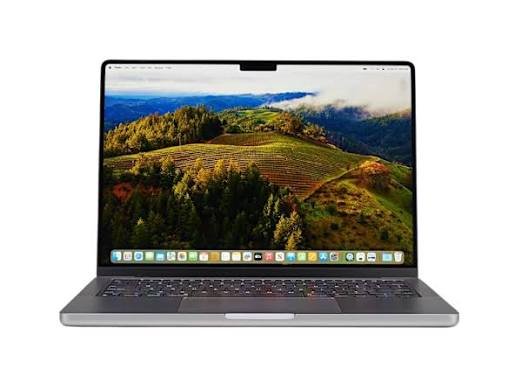
Best MacBooks for College Students in 2026
| MacBook | Best For | Why |
| MacBook Air 13-inch (M5) | Most college students | Lightweight, powerful, long battery life |
| MacBook Air 15-inch (M5) | Students who want a bigger screen | More workspace without Pro-level weight |
| MacBook Pro 14-inch | Demanding majors | Better sustained performance and display |
| MacBook Neo | Basic college work | Good for everyday assignments and productivity |
1. MacBook Air 13-inch M5 — Best MacBook for Most College Students
The 13-inch MacBook Air with M5 is the easiest MacBook to recommend to most college students.
It’s thin and lightweight enough to carry between lectures, the library, and study sessions without becoming a burden. Its fanless design also means it operates quietly, which is useful when you’re sitting in a lecture hall or studying in a quiet library.
Performance is another major advantage.
The M5 MacBook Air is more than capable of handling common college workloads such as:
- Writing essays and research papers
- Browsing with multiple tabs
- Microsoft Office and Google Workspace
- Online classes and video calls
- Presentations
- Programming
- Note-taking
- Photo editing
- Light video editing
Apple positions the MacBook Air as a versatile laptop for students, while current testing and buying guides continue to recommend it as the best MacBook for most students.
Why college students should choose the 13-inch Air
Its biggest advantage is portability.
A college student may carry a laptop for several hours every day. A lighter computer can make a noticeable difference when you’re walking across campus with textbooks, notebooks, and other equipment.
The MacBook Air also offers long battery life, making it well suited to students who spend most of the day away from a power outlet.
Best for: Almost every college major and general student use.
2. MacBook Air 15-inch M5 — Best for Students Who Want a Bigger Screen
The 15-inch MacBook Air is essentially the bigger-screen alternative to the 13-inch model.
The extra screen space can be particularly useful if you frequently work with multiple windows.
For example, you could have a research paper open beside your browser, lecture notes, or a PDF without constantly switching between windows.
It’s also useful for students studying subjects that involve large documents, spreadsheets, programming environments, or creative applications.
The tradeoff is portability. The larger Air is still relatively easy to carry, but the 13-inch model is better if you move around campus constantly.
Best for: Students who prioritize screen space and multitasking.
3. MacBook Pro 14-inch — Best for Demanding College Majors
Most students don’t need a MacBook Pro.
But some do.
If you’re studying a demanding subject and regularly perform intensive tasks, the MacBook Pro becomes much more attractive.
It’s particularly well suited to students studying:
- Computer science
- Engineering
- Data science
- Architecture
- Video production
- 3D design
- Animation
- Music production
- Advanced photography
The MacBook Pro has active cooling, which allows it to maintain high performance during long workloads better than the fanless MacBook Air.
It also has a more advanced display, additional ports, and higher-end configurations.
For example, a student compiling large software projects or rendering a long video may benefit from the Pro’s sustained performance.
Best for: Students with demanding technical or creative workloads.
4. MacBook Neo — Best for Basic College Work
The MacBook Neo is Apple’s entry-level MacBook and is designed around everyday tasks.
It can handle common student activities such as:
- Web browsing
- Writing assignments
- Online research
- Video calls
- Streaming
- Presentations
- Basic productivity apps
Apple specifically describes the MacBook Neo as a Mac for everyday assignments.
However, there are compromises.
The Neo has 8GB of unified memory, fewer high-speed connectivity options than the Air, and is less suited to demanding professional applications.
That doesn’t make it a bad college laptop. It simply means you should choose it based on your workload rather than assuming that every MacBook will provide the same experience.
Best for: Students whose coursework mainly involves writing, research, browsing, and everyday productivity.
MacBook Air vs MacBook Pro for College
The biggest question for many students is whether they should buy the Air or Pro.
For most students, the answer is MacBook Air.
| Feature | MacBook Air | MacBook Pro |
| Portability | Excellent | Very good |
| Everyday performance | Excellent | Excellent |
| Sustained heavy workloads | Good | Excellent |
| Display | Excellent | Superior |
| Ports | Limited | More extensive |
| Fan | Fanless | Active cooling |
| Best for | Most students | Demanding majors |
The MacBook Pro is more powerful, but that doesn’t automatically make it better for college.
If your day consists of lectures, essays, research, coding, presentations, and web browsing, much of the Pro’s extra capability may go unused.
How Much RAM Does a College Student Need?
For most students buying a modern MacBook Air or Pro, 16GB of unified memory is a sensible starting point.
It’s enough for typical academic work and provides more breathing room when you’re running multiple applications and browser tabs.
Students working with demanding software may want more memory.
For example, someone studying video production, 3D animation, advanced data science, or software development may benefit from a higher-memory configuration.
The MacBook Neo is different because it is limited to 8GB of unified memory. That’s acceptable for basic workloads, but it gives you less headroom for demanding multitasking.
How Much Storage Does a College Student Need?
Storage requirements depend heavily on your major.
For basic coursework, 256GB can work, especially if you regularly use cloud storage.
However, 512GB is a more comfortable choice for most college students.
That’s because college isn’t only about documents. Over several years, you may accumulate:
- Lecture recordings
- Photos
- Research files
- Applications
- Programming projects
- Creative projects
- Videos
- Large course materials
Students studying media, design, engineering, or other storage-heavy subjects may want even more.
Is the MacBook Air Good for Computer Science Students?
Yes.
The MacBook Air is capable of handling programming, development environments, web development, and many college-level computer science workloads.
However, students working with virtual machines, large codebases, containers, local databases, or other resource-intensive development environments should consider a higher-memory configuration or a MacBook Pro.
Your university’s course requirements should also be checked before buying, since some specialized programs require Windows-only software.
Is a MacBook Good for Engineering Students?
It depends on the engineering program.
For coding, documentation, research, and many general engineering tasks, a MacBook can be excellent.
The problem is software compatibility.
Some engineering applications are designed specifically for Windows. If your university requires software that doesn’t run natively on macOS, you may need a Windows computer or access to a university computer lab.
Always check your department’s required software before purchasing a MacBook.
What Should College Students Look for in a MacBook?
Don’t focus only on the processor.
Consider the entire student experience.
Portability
You’ll probably carry your laptop frequently. A lighter model can be much more convenient.
Battery Life
Long battery life is extremely useful when you’re moving between classes and study locations.
RAM
Choose enough memory for your major and the applications you’ll use throughout college.
Storage
Think beyond your first semester. A little extra storage can prevent headaches later.
Screen Size
Choose the 13-inch Air for maximum portability or the 15-inch Air if you want more workspace.
Ports
If you frequently connect cameras, external displays, storage drives, or other equipment, the MacBook Pro’s additional ports may be valuable.
Best MacBook for College Students by Major
Most majors: MacBook Air 13-inch M5
Business students: MacBook Air 13-inch or 15-inch
Computer science: MacBook Air with adequate memory, or MacBook Pro for demanding development
Engineering: MacBook Pro if your required software supports macOS
Graphic design: MacBook Air for lighter work; MacBook Pro for professional workloads
Video production: MacBook Pro
Photography: MacBook Air for general editing; MacBook Pro for heavier workflows
Writing and journalism: MacBook Air 13-inch
Music production: MacBook Pro for demanding projects
Final Verdict
The best MacBook for college students in 2026 is the 13-inch MacBook Air with M5.
It offers the combination most students actually need: strong performance, excellent battery life, silent operation, a lightweight design, and enough power for years of academic work.
Choose the 15-inch MacBook Air if you want more screen space.
Choose the MacBook Pro if your major involves demanding workloads such as video editing, 3D work, advanced programming, or intensive data processing.
And choose the MacBook Neo if your college work is primarily writing, browsing, research, presentations, and other everyday tasks.
The best MacBook isn’t necessarily the most powerful one. It’s the one that fits your major, workload, and daily life as a student.

Frequently Asked Questions
What is the best MacBook for college students in 2026?
The 13-inch MacBook Air with M5 is the best overall choice for most college students because it combines portability, battery life, and strong performance.
Is MacBook Air good enough for college?
Yes. For most students, the MacBook Air is more than powerful enough for essays, research, presentations, programming, online classes, and everyday academic work.
Should a college student buy a MacBook Pro?
Only if you regularly need sustained high performance. Video editing, 3D work, advanced programming, engineering workloads, and other demanding applications can justify choosing a MacBook Pro.
Is 16GB RAM enough for college?
For most students, yes. 16GB provides plenty of room for normal academic multitasking and is a good choice for long-term use.
Is 512GB enough storage for college?
For most students, 512GB is a comfortable amount of storage. Students with large video, photography, design, or engineering projects may need more.
Is the MacBook Neo good for college students?
Yes, if your workload is relatively light. It is suitable for writing, research, browsing, presentations, video calls, and general productivity. Students with demanding technical or creative workloads should consider the MacBook Air or Pro instead.
Can engineering students use a MacBook?
Yes, but it depends on the engineering program. Some specialized engineering applications require Windows, so check your college’s software requirements before choosing a MacBook.