

As an Amazon Associate, I earn from qualifying purchases
Best overall choice: A model-specific, soft silicone anti-dust plug set is the best option for MacBook Air owners who want to keep unused ports cleaner while carrying their laptop in a backpack, laptop sleeve, or travel bag.
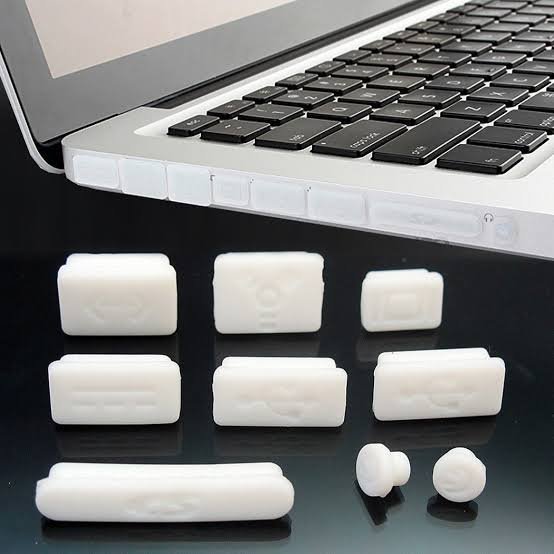
For newer MacBook Air models, consider a compatible USB-C dust plug set from PortPlugs or a MacBook-specific silicone set such as the one sold by Vowenx. Before buying, confirm that the plugs fit your exact MacBook Air generation and port layout. These accessories are optional, and they should never be forced into a port
Best Anti-Dust Plug Sets for MacBook Air Ports at a Glance
| Product | Best for | Main advantage | What to check |
| PortPlugs USB-C Dust Plug Set | Everyday USB-C protection | Flexible plugs and an easy-removal design | Confirm the exact plug size and case clearance |
| Vowenx Silicone Dust Plugs for MacBook | MacBook-specific coverage | Options based on MacBook model and port layout | Verify the correct Air size and generation |
| Enkay Anti-Dust Silicone Plug Pack | Older MacBook Air models | Multiple shaped plugs for older port layouts | Check the supported model numbers carefully |
| PortPlugs USB-C Dust Plugs with Cleaning Brush | Buyers wanting spare plugs | Pack-size options and a cleaning accessory | Confirm that the selected pack contains the plugs you need |
| Generic model-specific silicone plug set | Budget-conscious buyers | Simple, reusable port covers | Inspect the seller’s compatibility list and return policy |
The products above are based on published product descriptions and compatibility information, not independent laboratory testing. Product availability, kit contents, and prices may change.
1. PortPlugs USB-C Dust Plug Set — Best for Everyday Protection
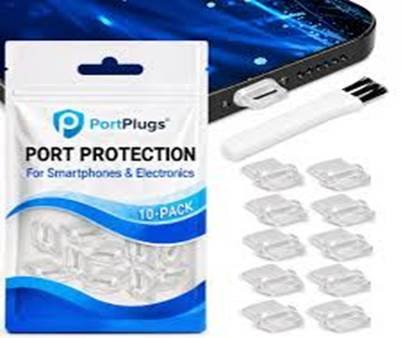
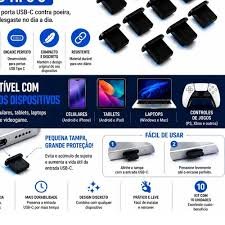
PortPlugs is worth considering if your main concern is keeping dust and lint out of unused USB-C ports. Its USB-C plug sets are designed for a range of devices, including laptops, tablets, and phones. The seller describes its plugs as reusable and offers designs with a small tab to make removal easier. Some sets also include a cleaning brush.
Why consider this set?
A MacBook Air is often carried between classrooms, offices, homes, cafés, and airports. During travel, dust and loose fibers can collect around exposed openings, especially when the laptop is frequently placed in a bag.
A removable USB-C dust plug offers a simple way to cover an unused port between uses. Flexible material can also be more convenient to handle than a small, rigid accessory, although the fit depends on the individual product and laptop.
Look for a design that sits securely without needing excessive pressure. A removal tab can be helpful because tiny accessories are easier to remove when you have something to grip.
Pros
- Designed for standard USB-C openings.
- Reusable options are available.
- Some kits include a cleaning brush.
- Several pack sizes and colors may be available.
Cons
- A USB-C plug does not automatically fit every laptop perfectly.
- A case opening may interfere with the plug.
- The plug must be removed before connecting a cable.
- A large multipack may include more accessories than a MacBook Air owner needs.
Best for: People who want a straightforward USB-C port cover and are willing to verify fit before using it.
2. Vowenx Silicone Dust Plugs — Best MacBook-Specific Option
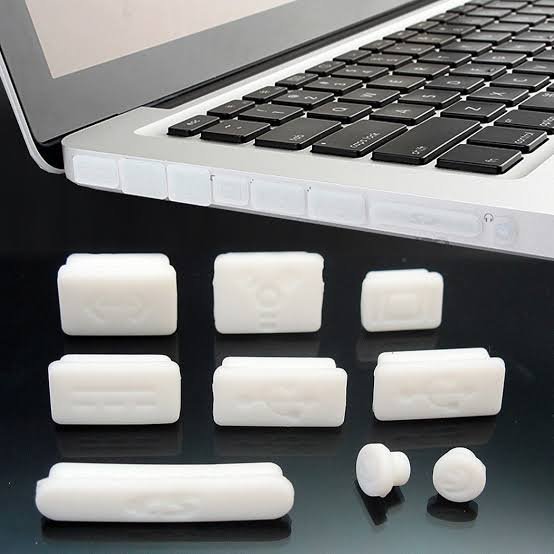
If you prefer an accessory advertised specifically for MacBook models, consider the silicone dust plug set from Vowenx. Its listing offers versions for different MacBook Air and MacBook Pro layouts, with several color options. The manufacturer describes the plugs as flexible silicone pieces intended to cover unused ports.
Why model-specific coverage matters
Not every MacBook Air has the same connectors. Port layouts vary across generations, and a newer model may have a different arrangement from an older Intel-based MacBook Air.
A MacBook-specific set can make selection easier because the listing is intended to match a particular device layout. However, a product page that mentions “MacBook Air” is not enough on its own. Confirm the exact screen size, generation, and supported model number before ordering.
Also check which ports the kit actually covers. Some sets focus on USB-C ports, while others may include pieces for a headphone jack or MagSafe connector when applicable.
Pros
- Designed around selected MacBook port layouts.
- Soft silicone construction.
- Several color choices may be available.
- Convenient for owners who want a coordinated set rather than individual USB-C plugs.
Cons
- Compatibility depends on the exact version selected.
- The set may include pieces for ports your laptop does not have.
- You must remove the relevant plug whenever you need to use that port.
- Model-specific claims should still be checked against your actual MacBook.
Best for: Buyers who want a set marketed specifically for MacBook models and are prepared to check compatibility carefully.
3. Enkay Anti-Dust Silicone Plug Pack — Best for Certain Older MacBook Air Models
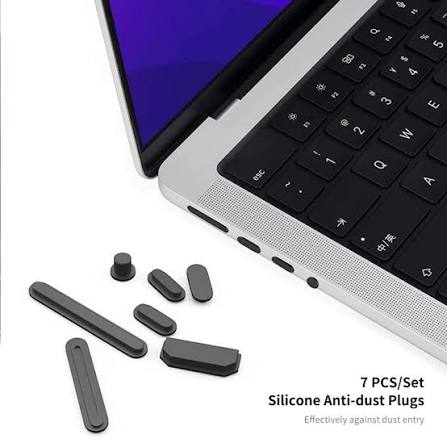
Enkay sells an anti-dust silicone plug pack for selected older MacBook Air and MacBook Pro models. The listing describes a 12-piece set with differently shaped plugs for legacy connections, including older USB, Thunderbolt, MagSafe, and audio openings. Its published compatibility information names specific older model numbers.
This matters if you own an older MacBook Air rather than one of the more recent USB-C models. A generic kit made for a modern USB-C port layout will not necessarily cover older connectors.
What makes it useful?
Older MacBook Air models may have several connector types and port shapes. A multi-piece set can be convenient if you want to cover more than one kind of opening.
However, do not assume an older multi-port kit is compatible with every MacBook Air. Its listing names particular models, so check the model identifier printed on your laptop’s underside or find the model information in macOS before purchasing.
Pros
- Multiple plug shapes in one pack.
- Designed for selected legacy MacBook layouts.
- Useful for owners of supported older models.
- Silicone pieces are intended to be removable.
Cons
- Not a universal solution for newer MacBook Air models.
- Some pieces may not match the ports on your laptop.
- Availability can vary by retailer and country.
- A large set may be unnecessary if you only want to cover USB-C ports.
Best for: Owners of older MacBook Air models whose exact model number appears on the product’s compatibility list.
4. PortPlugs USB-C Dust Plugs with Cleaning Brush — Best for Buyers Who Want Spares
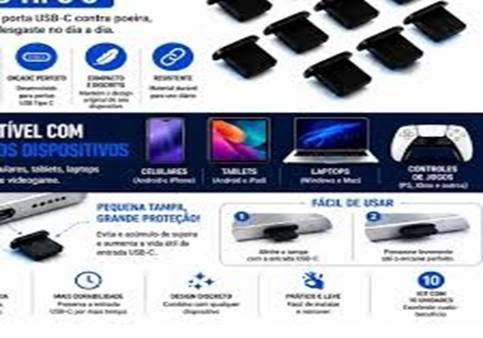
Another option is the PortPlugs USB-C dust plug pack with a cleaning brush. The seller offers different pack sizes and describes the plugs as covers for unused USB-C ports. It also warns buyers to check the opening around a case because matching the connector does not guarantee that the plug will clear the case.
Why buy a pack with spare plugs?
Small accessories are easy to misplace. If you want to cover more than one device or keep spares in a laptop bag, a multipack can be practical.
Still, buying more plugs does not mean you need to fill every opening on your MacBook Air. Only use a plug that matches the port and sits securely. Avoid any design that requires force or is difficult to remove.
A cleaning brush can be a useful extra for general device care, but it should not be pushed deep into a port. If you suspect compacted debris or damage, do not attempt to solve the problem by inserting tools into the connector.
Pros
- Multiple pack sizes.
- A cleaning brush may be included.
- Useful if you want spare USB-C plugs.
- Simple design for covering unused ports.
Cons
- The pack may not include covers for MagSafe or headphone ports.
- Fit varies by port opening and case design.
- A brush is not a substitute for professional service when a port is damaged.
- Extra pieces can be unnecessary for a laptop with only a few ports.
Best for: Buyers who want spare USB-C plugs or intend to use compatible plugs with several devices.
5. Generic Model-Specific Silicone Plug Set — Best Budget Approach
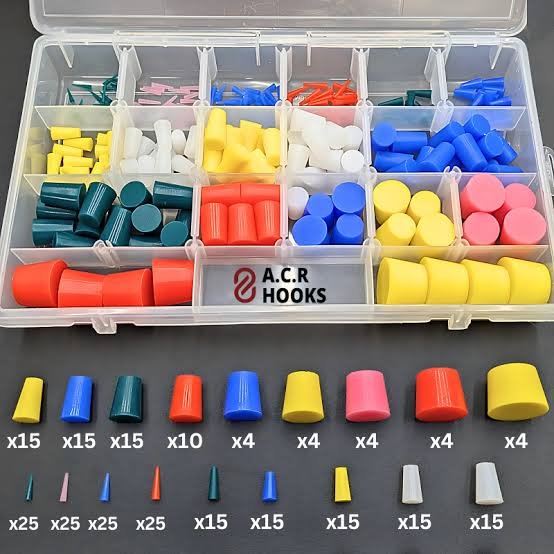
Generic silicone plug sets are widely marketed for laptops and other electronics. Some are made for a particular MacBook Air generation, while others are universal-style USB-C covers. They can be inexpensive, but the quality and compatibility information varies from seller to seller.
A generic set can be a reasonable purchase if the listing clearly identifies your laptop model, shows the shape of each plug, and provides a straightforward return policy.
What should you look for?
Choose a product with clear photographs and a compatibility list rather than relying on a title that simply says “for MacBook Air.” Check whether the set covers USB-C, MagSafe, or a headphone jack, depending on your needs.
Look for flexible material, an accessible removal edge, and dimensions or model details that make sense for your laptop. Avoid listings that make unsupported claims about waterproofing or guarantee that the plugs will prevent all charging problems.
Best for: Buyers who want a low-cost accessory and can verify the exact fit before use.
How to Choose the Best Anti-Dust Plug Set for Your MacBook Air
The best MacBook Air dust plug set is not necessarily the one with the most pieces. Fit, safe removal, and compatibility matter more than pack size.
1. Check your exact MacBook Air model
Start by identifying your MacBook Air’s generation and screen size. If necessary, click the Apple menu, choose About This Mac, and note the model information shown there. You can also check the model number on the underside of the laptop.
Use those details to compare your laptop with the seller’s compatibility list. Do not assume that a set for a 13-inch MacBook Air fits every 13-inch model.
2. Identify the ports you want to cover
Depending on the generation, a MacBook Air may have USB-C/Thunderbolt ports, a MagSafe charging port, and a headphone jack. Older models may have a different layout.
A USB-C plug only covers a matching USB-C opening. It is not interchangeable with a headphone-jack cover or a MagSafe-specific cover.
For most owners, covering an unused USB-C port is the main goal. If you want to cover additional ports, confirm that the kit contains the right pieces for those openings.
3. Choose flexible material and easy removal
Silicone is commonly used in dust plugs because it is flexible and easy to handle. Material alone, however, does not guarantee a safe fit.
Prefer a design that can be removed without tools and without pulling hard. If the plug has no practical grip, sits crooked, or feels wedged in place, remove it carefully and stop using it if removal is difficult.
Never force a plug into a MacBook Air port. Apple’s handling guidance says connectors should not be forced and ports should be free of debris before a cable is connected.
4. Check whether your case affects the fit
A laptop sleeve normally will not affect the fit of a plug when the laptop is outside the sleeve. A fitted case or shell around the laptop can be different.
The case may narrow the opening around a USB-C port, preventing a plug from sitting properly or making it hard to remove. Measure or inspect the available clearance and review the seller’s case-compatibility guidance.
If the plug presses against the case or catches on its edge, choose another design or skip port plugs altogether.
5. Consider whether you need plugs at all
Anti-dust plugs are optional accessories, not a requirement for owning a MacBook Air. If you mainly use your laptop at a clean desk, rarely carry it around, and keep it in a suitable sleeve, you may not need them.
They are more appealing if you often work in dusty environments, travel frequently, or carry your MacBook in a bag where lint and small particles are common.
Remember that a dust plug is a cover for an unused port. It does not repair a dirty connector, guarantee a waterproof seal, or eliminate the need for normal laptop care.
Are Anti-Dust Plugs Safe for MacBook Air Ports?
They can be a practical accessory when correctly sized and used carefully, but poor fit or rough handling can create problems.
The safest approach is to use a compatible plug only when the port is unused, remove it before connecting a cable, and stop using it if it feels tight or becomes difficult to remove.
Important safety rules
- Never charge through a fitted dust plug. Remove the plug completely before inserting a USB-C or MagSafe cable.
- Do not force the plug. If it does not fit easily, it may be the wrong size or shape.
- Keep the port dry. Do not insert a plug into a wet or damp opening.
- Do not use plugs as a waterproofing solution. A dust cover should not be treated as a guarantee against liquid damage.
- Inspect plugs regularly. Stop using a piece that is cracked, deformed, sticky, or shedding material.
- Avoid loose accessories when packing. Keep spare plugs in a small container so they do not become lost inside a bag.
- Remove plugs before cleaning the port. A cover does not clean existing debris.
Apple advises keeping moisture out of openings and avoiding direct spraying of cleaning liquids onto a MacBook. It also advises checking that a port is clear of debris before connecting a cable. <Cite refs={[“turn313570search0″,”turn313570search4”]}/>
Can a dust plug damage a USB-C port?
A correctly fitted, easy-to-remove plug is intended to cover an unused opening. However, a plug that is oversized, inserted at an angle, or forced into the connector could create unnecessary stress. A loose piece can also fall out and get misplaced.
There is no reason to tolerate a poor fit. If you feel resistance, stop rather than pushing harder. Select a different product or leave the port uncovered.
Should you cover the MagSafe port?
Only use a cover designed for the exact MagSafe port on your MacBook Air. Do not put a generic USB-C plug into a MagSafe opening, and do not assume a kit designed for an older MagSafe generation will fit a newer one.
If you are uncertain about the fit, it is safer to leave the port uncovered and keep the laptop in a clean, protective sleeve.
How to Install and Remove MacBook Air Dust Plugs
Installation should be simple. If it is not, the plug may not be the right fit.
- Shut down or disconnect the laptop as appropriate. Make sure no cable is connected to the port you intend to cover.
- Inspect the opening. Do not insert a plug into a port that appears wet, damaged, or filled with debris.
- Match the plug to the connector. Confirm that the shape and size correspond to the port.
- Insert gently. Follow the product’s instructions and use only light pressure. Do not push a plug deeply into the port.
- Check the fit. The plug should sit as intended without bending, wobbling excessively, or interfering with a case.
- Remove it before use. Pull it out gently by its grip or removal tab before connecting a cable.
- Store spare plugs safely. Keep unused pieces in a small container instead of loose in your laptop bag.
If a plug is stuck, do not use a sharp metal tool to pry it out. Stop and seek appropriate repair assistance if you cannot remove it safely.
How to Keep MacBook Air Ports Clean Without Dust Plugs
You can protect your MacBook Air’s ports with a few simple habits, even if you decide not to buy a plug set.
Use a suitable laptop sleeve
A well-fitting sleeve helps protect your laptop during transport and can reduce exposure to dust, lint, and loose objects in a backpack. Before putting the laptop away, check that the bag does not contain loose coins, paper clips, or other small objects that could enter openings.
Apple specifically warns users to avoid loose items getting into the computer through openings or becoming stuck in USB-C ports while carrying a MacBook Air.
Inspect the ports occasionally
Look at the ports under good lighting. If they appear clean and cables connect normally, there may be nothing you need to do.
If you notice charging interruptions, an unusually loose connection, visible debris, or damage, do not push objects into the port to investigate. Follow Apple’s support guidance or seek service when necessary.
Avoid liquids and improvised tools
Do not spray cleaner into a port or use liquid to flush out debris. Avoid pins, needles, paper clips, and other sharp objects that can damage internal contacts.
Apple’s cleaning guidance emphasizes keeping moisture out of openings and using appropriate cleaning methods for the product.
Do not mistake a dust plug for a repair
If a MacBook Air stops charging reliably, a dust plug is not the solution. A connection problem may have several causes, including a damaged cable, power adapter, port, or other hardware issue.
Apple recommends inspecting USB-C ports for debris when troubleshooting certain charging problems. If you cannot safely resolve the issue, use Apple’s support guidance rather than repeatedly inserting and removing accessories.
Who Should Buy an Anti-Dust Plug Set?
A plug set may be useful if you:
- Carry your MacBook Air in a backpack every day.
- Work or study in an environment where dust and lint are common.
- Want to cover unused ports while storing your laptop.
- Prefer a small, inexpensive accessory for routine device care.
- Can confirm that the plugs fit your exact model without force.
You may want to skip one if you:
- Rarely move your MacBook Air from a clean desk.
- Frequently connect and disconnect external drives, monitors, or charging cables.
- Cannot find a set with reliable compatibility details.
- Find the plugs difficult to remove or easy to lose.
- Prefer to minimize accessories and use a protective sleeve instead.
Frequently Asked Questions
1. What is the best anti-dust plug set for MacBook Air ports?
A compatible, soft silicone set is a sensible starting point. PortPlugs offers USB-C dust plug options, while Vowenx lists MacBook-specific silicone sets for selected models. The best choice depends on your MacBook Air generation, port layout, and case clearance. Check the current product listing before purchasing.
2. Do MacBook Air dust plugs fit every model?
No. MacBook Air models have different port layouts and dimensions. Some sets are intended for specific generations, while others are designed for standard USB-C openings. Confirm the exact model and connector type before ordering.
3. Are silicone dust plugs better than hard plastic plugs?
Silicone is flexible and can be easy to handle, but that does not make every silicone plug a good fit. Fit, removal design, material quality, and compatibility matter more than the material name alone. Avoid plugs that need force to insert or remove.
4. Can I leave dust plugs in my MacBook Air while charging?
No. Remove the relevant plug completely before connecting a charging cable or another accessory. A dust plug occupies the port and is not designed to carry power or data.
5. Can dust plugs protect my MacBook Air from water?
Do not rely on them for water protection. A dust plug is intended to cover an unused port against some dust and debris. It does not make the MacBook Air waterproof or guarantee protection from liquid damage.
6. Do I need a separate plug for MagSafe?
If you want to cover a MagSafe port, use only a cover specifically designed for the exact port on your model. A USB-C plug will not substitute for a MagSafe cover. If compatibility is uncertain, leave the port uncovered.
7. Can I use a dust plug if my MacBook Air has a protective case?
Possibly, but check clearance. A case can narrow the opening and interfere with the plug. Do not use a plug that catches on the case, sits at an angle, or is difficult to remove.
8. How often should I remove and clean my dust plugs?
Inspect them periodically and whenever you notice visible dirt or a change in fit. Follow the manufacturer’s cleaning instructions, and make sure the plug is fully dry before reuse. Do not insert a wet plug into your MacBook Air.
9. What should I do if a dust plug gets stuck?
Do not force it or pry at it with a sharp metal object. If gentle removal using the intended grip does not work, stop and seek appropriate assistance. A damaged port can be more expensive to address than replacing the accessory.
10. Are MacBook Air dust plugs worth buying?
They can be worthwhile if you frequently carry your laptop in dusty environments or want to cover unused ports during storage. For someone who mainly uses a MacBook Air at a clean desk, a protective sleeve and sensible handling may be enough.
11. Can a dust plug clean an already dirty port?
No. A plug covers an opening; it does not remove existing debris. Do not push a plug into a port that appears dirty or obstructed. Use appropriate manufacturer guidance or professional service if debris is stuck inside.
12. Should I buy a large multipack or a MacBook-specific kit?
Choose based on the ports you actually need to cover. A multipack is useful if you want spare USB-C plugs or have several compatible devices. A MacBook-specific kit may be easier to match to a particular port layout, provided you verify the model compatibility.
Final Verdict: Which Anti-Dust Plug Set Should You Choose?
For most MacBook Air owners who want to cover unused USB-C ports, a compatible PortPlugs USB-C dust plug set is a practical option to investigate. If you prefer a kit advertised specifically for MacBook port layouts, compare it with the Vowenx silicone set and verify that the exact MacBook Air size and generation are supported.
Owners of older MacBook Air models should pay particular attention to compatibility. A multi-piece set such as Enkay’s may suit certain legacy layouts, but it should not be assumed to fit newer models.
The most important buying rule is simple: choose a plug that fits without force, is easy to remove, and does not interfere with your case. Remove it before charging or connecting accessories, and never use it as a substitute for proper cleaning or repair.
If your MacBook Air stays mostly on a clean desk, you may not need dust plugs at all. A protective sleeve, careful storage, and sensible port care can be enough.
Affiliate Disclosure
This article may contain affiliate links. If you purchase a product through a qualifying link, we may earn a commission at no additional cost to you. Product details, compatibility, prices, and availability can change, so confirm the current listing before buying.
Suggested Internal Link
- Best Cleaning Kit for MacBook Screen and Keyboard — for general MacBook maintenance.