

As an Amazon Associate, I earn from qualifying purchases
Best MacBook Pro 16 Inch Bags for Travel at a Glance
| Bag | Best For | Main Advantage | Potential Drawback |
| Pakt Travel Backpack 3.0 | Long trips and one-bag travel | Spacious layout and travel organization | Premium price |
| tomtoc 360 Protective Laptop Shoulder Bag | Short trips and daily commuting | Protective padding and compact storage | Less comfortable for heavy loads over long distances |
| Troubadour Apex Briefcase | Business travel | Professional appearance and organized storage | More expensive than basic bags |
| Peak Design Everyday Backpack | Work trips and carrying camera gear | Flexible organization and versatile design | Check exact laptop fit and preferred capacity |
| Bellroy laptop backpack | Minimalist business travel | Clean design and practical everyday carrying | Model-specific capacity and protection vary |
These options suit different travel styles rather than offering one perfect solution for everyone. Product features and compatibility can vary by model and generation, so confirm the current specifications before ordering. Macworld’s 2026 guide to MacBook bags also covers different categories, including travel backpacks, briefcases, sleeves, and protective cases.
Pakt Travel Backpack 3.0: Best for Long Trips
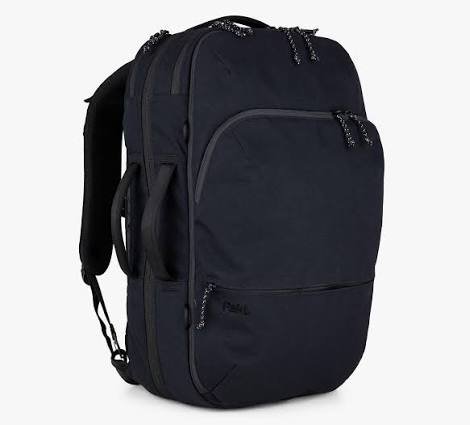
The Pakt Travel Backpack 3.0 is worth considering if you travel frequently and want one bag for your laptop, clothes, accessories, and other essentials.
Unlike a simple laptop backpack, this bag is designed around travel organization. Its clamshell layout opens more like a suitcase, making it easier to separate your belongings and find what you need.
According to Macworld, the backpack has a padded compartment for laptops up to 16 inches, a front organizer for tech accessories, and multiple storage sections. The guide lists 35-liter and 45-liter versions.
Why it works for travel
- Dedicated laptop storage: A separate padded compartment helps keep your MacBook away from loose items.
- Travel-friendly organization: Separate sections make it easier to organize clothes, chargers, documents, and smaller accessories.
- Useful for longer trips: The larger capacity can suit travelers who want to carry more in one bag.
- Laptop access: A dedicated laptop compartment is useful when you need to take your computer out at security or during a work stop.
What to consider
This is a larger investment than a simple laptop sleeve or shoulder bag. Its capacity may also be unnecessary if you only carry your MacBook and a charger.
Before flying, check the packed bag’s dimensions against your airline’s cabin baggage allowance. A bag that works as a carry-on with one airline may not meet another airline’s limits.
Best for: Frequent travelers, remote workers, and people who want a travel backpack that carries more than a laptop.
- tomtoc 360 Protective Laptop Shoulder Bag: Best Compact Option
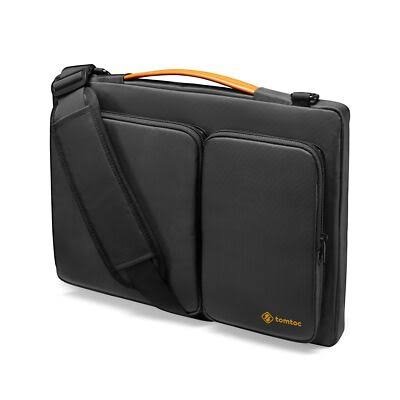
If you want a relatively simple bag for your MacBook Pro, the tomtoc 360 Protective Laptop Shoulder Bag is another option to consider.
This style combines a dedicated laptop compartment with space for accessories. It can be useful for carrying your computer between home, the airport, a hotel, and a meeting.
Digital Trends has highlighted the tomtoc 360 range for its protective padding, corner protection, and accessory pockets. Features can differ between versions, so check the exact model before purchasing.
Why it works for travel
- Protective design: Padding and reinforced corners can help reduce the effects of everyday bumps.
- Compact storage: It can carry a laptop and selected accessories without requiring a large backpack.
- Flexible carrying: Depending on the version, you may be able to use a handle or shoulder strap.
- Useful for short journeys: A shoulder bag is convenient when you want your laptop close at hand.
What to consider
A shoulder bag places much of its weight on one side of your body. That may become uncomfortable if you carry your laptop, charger, power bank, documents, and other heavy items for hours.
It may also have less room for clothing and travel essentials than a dedicated travel backpack.
Check that the exact bag accommodates the 16-inch MacBook Pro, including any protective shell or sleeve you plan to use.
Best for: Short business trips, commuting, and travelers who prefer a compact bag over a large backpack.
- Troubadour Apex Briefcase: Best for Business Travel
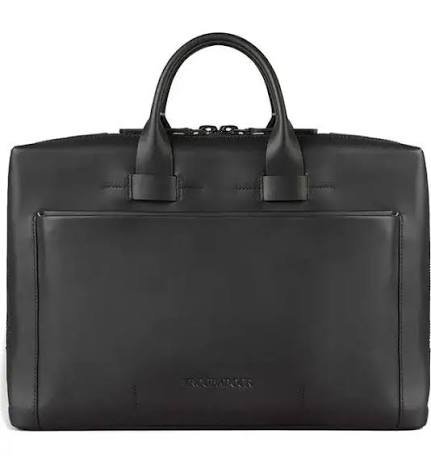
Some travelers want their laptop bag to look professional in an office, conference room, or client meeting. In that case, a laptop briefcase may be a better choice than a casual backpack.
The Troubadour Apex Briefcase is a premium option in this category. Macworld describes it as a 15-liter bag designed for laptops up to 16 inches, with padded, suspended storage for a laptop and tablet. It also has multiple internal pockets for organizing accessories.
Why it works for travel
- Professional appearance: A briefcase-style bag can suit formal work settings.
- Organized interior: Separate pockets help keep cables, chargers, and documents together.
- Laptop protection: A padded, suspended compartment is a useful feature when carrying an expensive computer.
- Compact profile: It may be easier to manage than a large travel backpack when your luggage needs are limited.
What to consider
Premium briefcases can cost considerably more than basic laptop bags. You should decide whether the materials, design, and organizational features justify the extra expense.
Also consider how you will carry it through a large airport. If you expect to walk long distances with a heavy load, a backpack with two shoulder straps may be more comfortable.
Best for: Business travelers, consultants, and professionals who want a polished laptop bag.
- Peak Design Everyday Backpack: Best for Flexible Organization
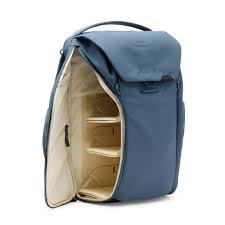
A travel bag can be even more useful if you carry photography equipment, headphones, a tablet, or other work tools alongside your MacBook Pro.
The Peak Design Everyday Backpack range is known for adaptable internal organization. It may appeal to travelers who want to arrange their gear around different activities instead of using a traditional laptop-only backpack.
Before buying, check the specific model’s laptop compartment dimensions, capacity, and protection features. Do not assume every size in the range will fit a 16-inch MacBook Pro comfortably.
Why it may suit you
- Flexible storage: Adjustable dividers can help separate accessories and other equipment.
- Multiple uses: The bag can be useful for work, photography, and everyday travel.
- Organized carrying: Separate sections help prevent smaller items from getting lost among larger belongings.
- Versatile design: It can suit travelers who carry more than a computer.
What to consider
A highly configurable bag is not necessarily the best choice for everyone. If you only carry a MacBook, a charger, and a notebook, you may not need its extra organization features.
Check the bag’s weight, too. A heavier backpack can become tiring when you add a large laptop, charging adapter, camera equipment, and personal items.
Best for: Creators, photographers, and travelers who carry several types of equipment.
- Bellroy Laptop Backpack: Best for Minimalist Travel
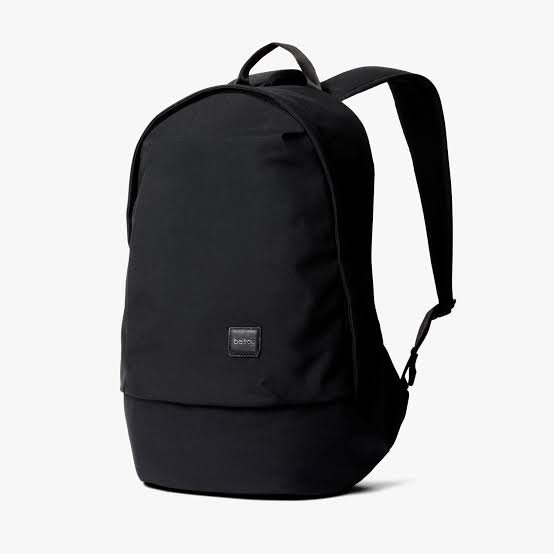
Bellroy offers laptop backpacks with a clean, understated design that can suit both everyday use and business travel.
A minimalist backpack can be a good choice if you want something that looks appropriate at work without feeling overly formal. Depending on the model, useful features may include a padded laptop section, organized pockets, and storage for daily essentials.
Why it may suit you
- Simple appearance: A restrained design works in professional and casual settings.
- Everyday practicality: It can serve as both a commuter backpack and a travel bag.
- Organized storage: Dedicated pockets can help separate accessories from the laptop.
- Flexible use: A suitable model may work for short business trips as well as daily travel.
What to consider
Bellroy sells different bag styles and sizes, so compatibility should be checked carefully. Confirm that the exact model supports your MacBook Pro’s dimensions rather than relying on the brand name or general product category.
Look for a padded laptop compartment, sufficient space around the device, and a stable base. If you regularly travel in wet weather, check the bag’s water-resistance claims and use additional protection when necessary.
Best for: Travelers who prefer a minimalist backpack for work, commuting, and short trips.
How to Choose the Best Travel Bag for a 16-Inch MacBook Pro
The right bag depends on how you travel, what else you carry, and how much protection you need. These are the most important features to compare before making a purchase.
1. Check the Laptop Compartment Dimensions
This is the first thing to check.
A 16-inch screen measurement describes the diagonal of the display, not the overall size of the laptop. Apple’s 16-inch MacBook Pro is approximately 35.57 cm wide, 24.81 cm deep, and 1.68 cm thick.
A bag labeled “16-inch” may still be too tight if its compartment has little extra space or a narrow opening.
Before ordering, compare the laptop’s dimensions with the manufacturer’s internal compartment measurements. Allow additional room if you use a protective sleeve or shell.
Buying tip: Look for a bag that specifically lists compatibility with a 16-inch MacBook Pro or provides measurements that comfortably accommodate your computer.
2. Prioritize Padding and Base Protection
A travel bag should do more than prevent scratches. It should help protect your laptop from everyday bumps and accidental knocks.
Look for:
- Padding around the laptop compartment.
- Reinforced corners or protective panels.
- A padded bottom that reduces direct contact with the floor.
- A secure closure that keeps the computer from slipping out.
- A structured compartment that prevents the laptop from shifting excessively.
A suspended laptop compartment is especially useful because it can leave space between the laptop and the bottom of the bag. This may reduce the force transferred when the bag is set down. However, no ordinary padded bag guarantees protection against serious drops.
Do not place heavy objects such as power adapters, metal bottles, or camera equipment loose against the laptop.
3. Choose Between a Backpack and a Shoulder Bag
Both designs can work well, but they suit different travel habits.
| Feature | Travel Backpack | Shoulder Bag or Briefcase |
| Carrying comfort | Usually better for heavier loads | Can strain one shoulder |
| Storage capacity | Often larger | Usually more compact |
| Professional appearance | Depends on the design | Often more formal |
| Airport walking | Convenient for longer distances | Convenient for short distances |
| Access to laptop | Depends on compartment design | Often easy to access |
| Best use | Long journeys and multiple accessories | Meetings and short trips |
If you walk through airports, train stations, or city streets for long periods, a backpack is usually the more practical option. If you mainly travel between a car, an airport lounge, and an office, a briefcase or shoulder bag may be sufficient.
4. Look for Comfortable Straps
A 16-inch MacBook Pro takes up a meaningful amount of space and adds weight to your bag. The charger, cables, water bottle, and other belongings increase that load.
For a backpack, look for padded shoulder straps, a comfortable back panel, and a design that distributes weight evenly. An adjustable chest strap can also help stabilize a loaded backpack.
For a shoulder bag, check that the strap is wide enough and comfortable for the way you carry it. A detachable strap can be useful if you sometimes prefer carrying the bag by its handles.
Remember that the bag itself has weight. A feature-rich backpack may offer good organization but still feel uncomfortable if it is heavy before you pack anything.
5. Consider Water Resistance
Travel can expose your laptop bag to rain, spills, damp floors, and crowded transport. Water-resistant fabric and weather-resistant zippers can help reduce the risk of moisture reaching your computer.
However, water-resistant does not mean waterproof. Some bags offer only limited protection from light rain.
For extra security, consider placing your MacBook inside a separate sleeve before putting it in the bag. This adds another layer against scratches and minor moisture exposure.
If you travel frequently in wet conditions, check the manufacturer’s water-resistance guidance and consider using a suitable rain cover. Never assume a bag can be submerged or left in heavy rain simply because it uses water-resistant material.
6. Check Carry-On Compatibility
A laptop bag can be perfect for your computer but unsuitable for your airline’s baggage rules.
Airlines set their own limits for cabin bags and personal items. Those limits may differ by ticket type, route, and carrier.
Before a flight, check:
- The airline’s current personal-item dimensions.
- The maximum cabin-bag size and weight.
- Whether your laptop backpack counts as a personal item or carry-on.
- Whether the bag fits under the seat if that is where you intend to store it.
- Whether your packed bag expands beyond its stated dimensions.
A large travel backpack may work as your main cabin bag but leave no room for a separate suitcase. A compact laptop bag may be easier to carry alongside rolling luggage.
Do not rely only on a bag’s advertised capacity in liters. Its actual dimensions determine whether it meets airline restrictions.
7. Make Sure There Is Room for Your Accessories
Your MacBook Pro is only part of your travel setup. You may also carry a charging adapter, USB-C cables, a phone, headphones, a mouse, an external SSD, or a power bank.
A useful travel bag keeps these items organized without pressing them against the laptop.
Look for separate accessory pockets, a small zippered compartment for cables, and space for documents or a tablet. A removable tech pouch can also be helpful because you can take your accessories out without unpacking the whole bag.
Avoid overfilling the laptop compartment. When a bag is packed too tightly, its contents may place pressure on the computer’s lid or corners.
8. Compare Materials, Zippers, and Build Quality
The bag’s materials affect its weight, durability, appearance, and resistance to everyday wear.
Nylon and polyester are common practical choices because they can be lightweight and relatively easy to maintain. Premium fabrics may offer improved abrasion resistance or a different appearance, but a higher price does not automatically mean better laptop protection.
Inspect the quality of the zippers, stitching, handles, and strap attachment points. These parts experience repeated stress during travel.
If you expect to use the bag frequently, consider the warranty and the availability of replacement parts. A durable bag that remains comfortable over several years may provide better value than the cheapest option.
Which MacBook Pro 16 Inch Travel Bag Should You Buy?
The best choice depends on your travel routine.
- For long trips: Consider the Pakt Travel Backpack 3.0 if you need space for your laptop, clothing, and accessories.
- For short trips: The tomtoc 360 Protective Laptop Shoulder Bag is worth considering if you prefer compact carrying and dedicated laptop protection.
- For business meetings: The Troubadour Apex Briefcase suits travelers who want a professional look and organized storage.
- For creative work: Consider the Peak Design Everyday Backpack if you carry photography equipment or other gear alongside your MacBook.
- For minimalist everyday travel: Explore Bellroy’s laptop backpack range, checking the exact model dimensions and features.
Do not buy a bag based on appearance alone. Fit, padding, comfort, and practical storage matter more than a fashionable design.
Tips for Traveling Safely With Your MacBook Pro
Even a well-designed bag cannot prevent every accident. A few simple habits can help protect your computer while traveling.
- Use a sleeve if needed. An additional sleeve can help protect against scratches and provide another layer of padding.
- Keep liquids separate. Store bottles securely and away from the laptop compartment.
- Avoid overpacking. Do not force the zipper closed when the bag is full.
- Secure your accessories. Keep chargers and cables in separate pockets so they do not rub against the laptop.
- Keep the bag close in busy areas. Crowded airports and public transport can increase the risk of accidental knocks or theft.
- Follow airline instructions. Be ready to remove your laptop if the security process requires it.
- Avoid extreme temperatures. Do not leave your MacBook in a hot vehicle or expose it to excessive heat or cold for long periods.
These habits are simple, but they can make a meaningful difference when you travel regularly with an expensive computer.
Frequently Asked Questions
What is the best MacBook Pro 16 inch bag for travel?
The best bag depends on your needs. A travel backpack is generally suitable for longer journeys and heavier loads, while a shoulder bag or briefcase can work well for short business trips. Compare the laptop compartment dimensions, padding, comfort, and storage before buying.
Does every 16-inch laptop bag fit a 16-inch MacBook Pro?
No. The advertised screen size does not guarantee a comfortable fit. Check the internal dimensions and opening of the laptop compartment, and allow for any protective sleeve or shell you use.
Is a backpack better than a briefcase for traveling with a MacBook Pro?
A backpack is usually more comfortable when you carry your computer over long distances or pack several accessories. A briefcase can be more convenient for short journeys and formal work settings. Choose the style that suits your travel routine.
Should I use a laptop sleeve inside my travel bag?
A sleeve is a useful extra layer against scratches and minor bumps. It can be especially helpful if your travel bag has a large main compartment or if you sometimes carry your laptop separately. Make sure the sleeve itself fits your MacBook Pro properly.
Can I put my MacBook Pro in a carry-on bag?
Yes. You can generally carry a laptop in cabin baggage, but the airline’s baggage size, weight, and security requirements still apply. Check your airline’s current rules before departure.
Is a water-resistant laptop bag enough for rainy travel?
It may help protect against light rain, but water resistance does not guarantee that the bag will keep your laptop dry in heavy rain or if it becomes submerged. A separate sleeve and a suitable rain cover can provide additional protection.
How much should I spend on a MacBook Pro travel bag?
Set your budget according to how often you travel and how much gear you carry. A simple, well-fitting bag may be sufficient for occasional trips. Frequent travelers may benefit from better organization, comfortable straps, stronger materials, and a more protective laptop compartment. A high price alone does not guarantee superior protection.
Can I carry a charger and accessories in the same bag as my MacBook?
Yes, provided the bag has enough room and the accessories are secured separately. Use dedicated pockets or a tech pouch to prevent hard objects from pressing against the laptop.
Final Verdict
Choosing the right MacBook Pro 16 inch bag for travel means balancing protection, comfort, storage, and convenience. The best bag is not necessarily the biggest or most expensive one. It is the one that fits your computer properly and works with the way you travel.
For longer journeys, a dedicated travel backpack such as the Pakt Travel Backpack 3.0 is worth considering. For compact carrying, look at the tomtoc 360 Protective Laptop Shoulder Bag. If you prefer a professional appearance, the Troubadour Apex Briefcase may be a better match.
Before purchasing, verify the exact laptop compartment dimensions, check the protection features, and confirm your airline’s baggage limits. A little research now can help you avoid an uncomfortable or poorly fitting bag later.
Affiliate Disclosure: This article may contain affiliate links. If you purchase through qualifying links, we may earn a commission at no additional cost to you. Our recommendations should help you choose a bag that suits your needs and budget.
Suggested Internal Links:
- Best MacBook Pro 14 Inch Sleeve
- Best Dock for MacBook Pro
- Best External SSD for MacBook
- Best Wireless Keyboard for MacBook Air
- Best Headphones for MacBook