As an Amazon Associate, I earn from qualifying purchases
The MacBook Air M1 vs M2 comparison remains relevant in 2026. Although the two laptops are no longer Apple’s newest MacBook Air models, they continue to attract buyers looking for affordable and reliable Macs.
The MacBook Air M1 launched in 2020 and introduced Apple’s first-generation M-series chip for the Mac. Two years later, Apple released the MacBook Air M2 with a completely redesigned body, a larger display, MagSafe charging, an improved webcam, and better performance.
So, which one should you buy in 2026?
The MacBook Air M2 is the better overall choice, especially if you plan to keep your laptop for several years. However, the M1 can still be an excellent bargain if you find a well-maintained model at a significantly lower price.
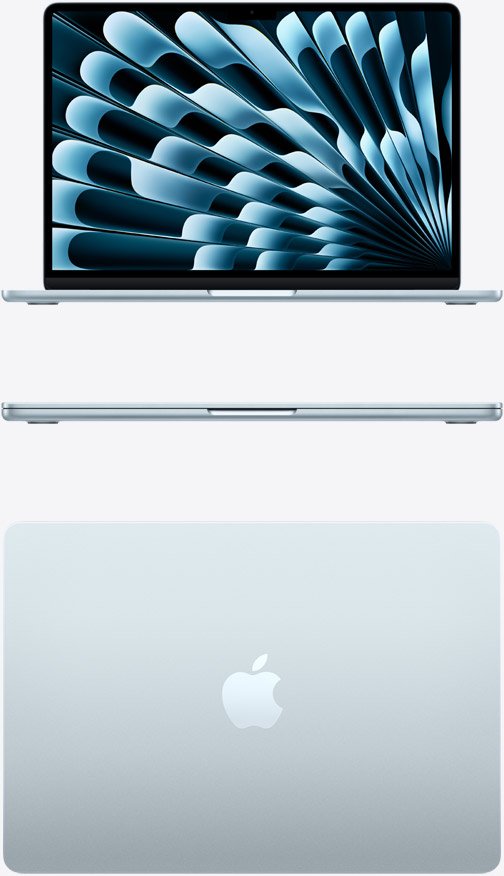
Let’s compare both MacBooks and see which one offers the best value in 2026.
MacBook Air M1 vs M2: Quick Comparison
| Feature | MacBook Air M1 | MacBook Air M2 |
| Release year | 2020 | 2022 |
| Chip | Apple M1 | Apple M2 |
| Display | 13.3-inch Retina | 13.6-inch Liquid Retina |
| Webcam | 720p | 1080p |
| Charging | USB-C | MagSafe + USB-C |
| Memory | Up to 16GB | Up to 24GB |
| Storage | Up to 2TB | Up to 2TB |
| Design | Tapered | Flat, modern design |
| Best for | Budget buyers | Most buyers |
The M1 was a major performance breakthrough when it launched. It delivered impressive speed and efficiency compared with the Intel-based MacBook Air models that came before it.
Even in 2026, the M1 remains fast enough for everyday activities such as:
- Web browsing
- Microsoft Office
- Google Docs
- Video calls
- Online classes
- Streaming
- Photo editing
- Programming
- General productivity
The M2 is faster than the M1, particularly for demanding workloads. It provides additional performance for video editing, software development, photo editing, and heavier multitasking.
For basic schoolwork and office tasks, however, the difference may not be noticeable enough to justify paying significantly more.
Performance winner: MacBook Air M2
Display: Which MacBook Air Has the Better Screen?
The display is one of the clearest advantages of the M2.
The M1 features a 13.3-inch Retina display, while the M2 has a larger 13.6-inch Liquid Retina display.
The M2’s screen is also brighter and provides a more modern viewing experience. The thinner bezels give the laptop a larger display without making the overall computer dramatically larger.
For students, office workers, content consumers, and anyone who spends several hours looking at a laptop, the M2’s display is a worthwhile upgrade.

Display winner: MacBook Air M2
Design and Build Quality
The two MacBook Air models have noticeably different designs.
The M1 uses Apple’s classic tapered MacBook Air shape. It is slim, lightweight, and still looks attractive despite being several years old.
The M2 introduced a flatter design that resembles Apple’s newer MacBook models. It has a more modern appearance and gives the laptop a newer-generation feel.
If you prefer the traditional MacBook Air design, the M1 still looks good. But if you want a modern-looking laptop, the M2 is clearly ahead.
Design winner: MacBook Air M2
MagSafe Charging
One of the most useful improvements on the M2 is MagSafe charging.
The M1 charges through USB-C, meaning one of its USB-C ports is occupied whenever the laptop is plugged in.
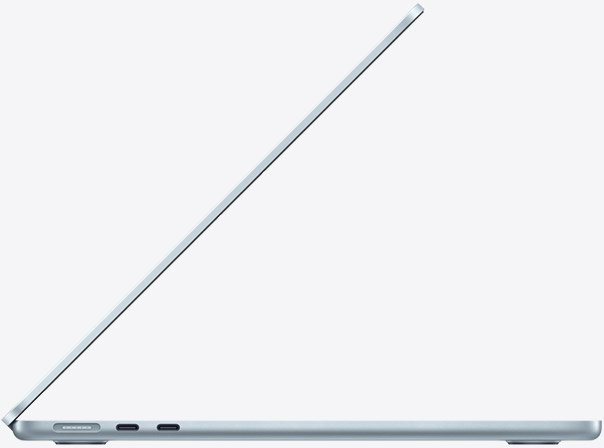
The M2 has a dedicated MagSafe charging port. This allows both USB-C ports to remain available while charging.
This is useful when connecting external drives, monitors, USB hubs, headphones, or other accessories.
MagSafe also disconnects easily if someone accidentally pulls the charging cable, which can help prevent the laptop from being pulled off a desk.
Charging winner: MacBook Air M2
The M2 also has a better webcam.
The M1 uses a 720p FaceTime HD camera, while the M2 features a 1080p camera.
This makes the M2 better for video calls, online classes, remote work, and virtual meetings.
If you frequently use Zoom, FaceTime, Google Meet, or other video-conferencing services, the improved camera is a meaningful advantage.
Webcam winner: MacBook Air M2
Battery Life
Both the M1 and M2 MacBook Air offer excellent battery efficiency.
The exact battery life you get will depend on your workload, screen brightness, applications, Wi-Fi usage, and other factors.
For most everyday users, both laptops can comfortably provide a full day of productivity under suitable conditions.
However, battery health becomes especially important when buying an M1 in 2026. An original M1 purchased in 2020 may now have several years of battery wear.
When purchasing a used MacBook, check its battery health and cycle count rather than assuming it will perform like a new machine.
Battery winner: Tie for new units; M2 has an advantage in the used market because it is newer.
RAM and Storage
Memory and storage are important when buying an older MacBook.
The M1 MacBook Air was available with up to 16GB of unified memory, while the M2 can be configured with up to 24GB.
For most users, 16GB of memory is the configuration we recommend if you want the laptop to remain useful for several years.
Storage is also worth considering. The base configurations can be sufficient for documents, browsing, and basic applications, but 512GB is more comfortable for long-term use.
Students and professionals who store large videos, photos, games, or creative projects may need additional storage.
MacBook Air M1 vs M2: Price in 2026
Price is where the M1 becomes particularly interesting.
Because the M1 is older, you can often find it at a much lower price on the used and refurbished market.
This makes the M1 an attractive option for students, first-time Mac buyers, and anyone working with a limited budget.
However, the price difference is what should determine your decision.
If an M2 costs only slightly more than an M1 with similar memory and storage, choosing the M2 makes more sense because you get a newer design, better display, improved webcam, MagSafe, and newer hardware.
If the M1 is substantially cheaper, it can still provide excellent value.
Value winner: MacBook Air M1 when heavily discounted.
Is the MacBook Air M1 Still Worth Buying in 2026?
Yes, the M1 is still worth considering in 2026.
It remains capable of handling everyday computing, including schoolwork, office applications, web browsing, streaming, video calls, and programming.
The main reason to buy it today is value.
If you find a 16GB M1 MacBook Air with healthy battery condition at a very attractive price, there is little reason to dismiss it simply because it is an older model.
However, avoid paying too much for an M1. If the price is close to that of a newer M2, the M2 is the smarter purchase.
Is the MacBook Air M2 Still Worth Buying in 2026?
Yes. The M2 is arguably the better choice for most buyers in 2026.
Its newer design, larger display, improved webcam, MagSafe charging, and stronger performance make it more appealing for long-term use.
It is particularly suitable for students, professionals, remote workers, programmers, and content creators who want a capable everyday laptop.
The main consideration is price. If an M2 is significantly more expensive than an M1, you need to decide whether its additional features are worth the difference.
MacBook Air M1 vs M2 for Students
Both models are excellent student laptops.
The M1 can handle essays, presentations, research, online classes, browsing, programming, and entertainment with ease. It is particularly attractive for students on a tight budget.
The M2 is better for students who can afford the extra cost and want a newer design, better webcam, larger display, and MagSafe charging.
For a student planning to keep the laptop for several years, the M2 is our preferred option, assuming the price is reasonable.
Which MacBook Air Should You Buy in 2026?
Buy the MacBook Air M1 if:
- You want the lowest possible price.
- You mainly perform everyday tasks.
- You find a well-maintained refurbished model.
- The M2 costs substantially more.
- You can find a 16GB model at a good price.
Buy the MacBook Air M2 if:
- You want a modern design.
- You prefer a larger, brighter display.
- You regularly make video calls.
- You want MagSafe charging.
- You plan to keep the laptop for several years.
- The price difference is relatively small.
Final Verdict
So, is the MacBook Air M1 still worth it in 2026?
Yes, if the price is right.
The M1 remains a surprisingly capable laptop and can be an excellent choice for budget-conscious buyers. However, its age means you should pay close attention to battery health and physical condition when buying used.
The MacBook Air M2 is the better overall choice. Its modern design, improved display, 1080p webcam, MagSafe charging, and additional performance make it more suitable for buyers who want a laptop that will remain useful for years.
Our recommendation is simple:
Best budget choice: MacBook Air M1
Best overall choice: MacBook Air M2
Best for long-term ownership: MacBook Air M2
Best value when heavily discounted: MacBook Air M1
If the M2 costs only a little more, choose the M2. If the M1 is significantly cheaper and in good condition, it remains a smart purchase in 2026.
Frequently Asked Questions
Is the MacBook Air M1 still good in 2026?
Yes. The M1 remains capable of handling everyday tasks such as browsing, documents, video calls, streaming, programming, and schoolwork. Its biggest advantage is its lower price.
Is the MacBook Air M2 better than the M1?
Yes. The M2 offers better performance, a larger and brighter display, a 1080p webcam, MagSafe charging, and a newer design.
Should I buy an M1 MacBook Air in 2026?
Yes, if you find one at a significantly lower price and in good condition. Check battery health, RAM, storage, and warranty before buying.
Is 8GB RAM enough for a MacBook Air in 2026?
8GB can handle basic tasks, but 16GB is preferable for multitasking and long-term use.
Is 512GB enough storage for a student?
Yes. For most students, 512GB provides plenty of space for documents, applications, photos, and school projects.
Is the MacBook Air M2 worth the extra money?
Usually, yes, when the price difference is reasonable. The M2’s newer design, display, webcam, and MagSafe charging make it a better long-term choice.
Which is better for students, M1 or M2?
The M1 is better for students on a tight budget. The M2 is better for students who want a newer laptop and plan to use it for several years.
Should I buy a refurbished MacBook Air?
A refurbished M1 or M2 can be an excellent way to save money. Check the seller’s warranty, return policy, battery condition, and physical condition before purchasing.