

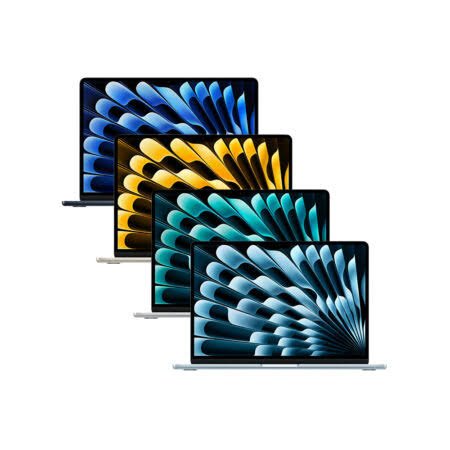
As an Amazon Associate, I earn from qualifying purchases
MacBook Air 13 vs 15 Inch for Students: The Quick Answer
The 13-inch MacBook Air is the best choice for most students because it is lighter, easier to carry around campus, and generally costs less than the 15-inch model. It is ideal for taking notes, writing assignments, researching online, attending lectures, and studying in libraries or coffee shops.
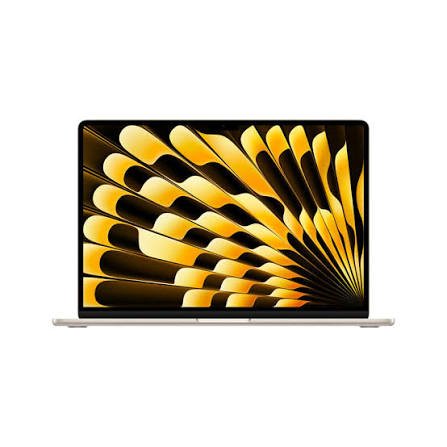
However, the 15-inch MacBook Air is better for students who want a larger screen for multitasking, coding, spreadsheets, reading research papers, or editing photos and videos. Its bigger display gives you more room to work without connecting an external monitor.
Apple’s 2026 MacBook Air M5 lineup includes a 13.6-inch model and a 15.3-inch model. Both offer an M5 chip, 16GB of starting unified memory, 512GB of starting SSD storage, and advertised battery life of up to 18 hours of video streaming. The main differences are screen size, physical dimensions, weight, and the graphics configuration of the entry-level models.
If you carry your laptop to class every day, choose the 13-inch MacBook Air. If you spend long hours working with several windows open, the 15-inch MacBook Air may be worth the extra money.
1. MacBook Air 13-Inch vs 15-Inch: Main Differences
Before choosing a MacBook for school, compare the features that will affect your everyday experience.
| Feature | 13-inch MacBook Air M5 | 15-inch MacBook Air M5 |
| Display size | 13.6 inches | 15.3 inches |
| Chip | Apple M5 | Apple M5 |
| Starting memory | 16GB unified memory | 16GB unified memory |
| Starting storage | 512GB SSD | 512GB SSD |
| Weight | About 2.7 pounds | About 3.3 pounds |
| Display resolution | 2560 × 1664 | 2880 × 1864 |
| Advertised video streaming battery life | Up to 18 hours | Up to 18 hours |
| Display technology | Liquid Retina | Liquid Retina |
| Charging | MagSafe 3 and two Thunderbolt 4 ports | MagSafe 3 and two Thunderbolt 4 ports |
| Best for | Portability and everyday student work | Multitasking and a larger workspace |
Specifications are based on Apple’s M5 technical information. Actual battery life varies with settings, applications, network use, and workload.
Both laptops are powerful enough for most school and university tasks. You can write essays, browse the web, prepare presentations, join online classes, and use common productivity applications on either model.
The biggest decision is whether you value a smaller, lighter laptop or a larger screen more.
2. 13-Inch MacBook Air: Best for Students Who Travel Around Campus
The 13-inch MacBook Air is the more practical option for students who need to carry a laptop throughout the day. It fits more easily into many backpacks, takes up less desk space, and is comfortable to use in crowded lecture halls.
At around 2.7 pounds, the M5 version is also lighter than the 15-inch model, which weighs approximately 3.3 pounds. That difference may sound small, but carrying a laptop alongside textbooks, a charger, a water bottle, and other school supplies can make every pound matter.
Why the 13-inch model works well for students
Easy to carry: If you move between classrooms, libraries, dormitories, and public transport, the smaller model is convenient. It is especially appealing to students who prefer travelling light.
Comfortable for note-taking: The screen is large enough for lecture notes, online learning platforms, PDFs, and research. You can also split the screen between a document and a browser, although each window will have less room than on the 15-inch model.
Suitable for small desks: Students often work in shared spaces where desk space is limited. The smaller footprint makes it easier to use the laptop alongside a notebook, textbook, or other study materials.
Good for everyday productivity: The M5 chip is more than capable of handling word processing, web research, spreadsheets, video calls, presentations, and numerous browser tabs for typical student workflows.
Usually the more affordable option: The 13-inch version generally costs less than the comparable 15-inch model. The savings can go toward a backpack, headphones, an external SSD, or other study essentials.
What are the disadvantages?
The main drawback is the smaller screen. If you regularly compare several documents, work with large spreadsheets, code with multiple panels open, or edit videos, you may find the workspace restrictive.
You can connect an external monitor when studying at home, but that adds cost and reduces the benefit of having a compact laptop if you need a large screen everywhere.
Best for: High school students, college students, university students, commuters, and anyone who prioritizes portability.
3. 15-Inch MacBook Air: Best for Students Who Want a Larger Screen
The 15-inch MacBook Air is ideal for students who spend long periods working on their laptop and want more room to see their work. Its 15.3-inch display gives you more space for documents, research, coding tools, spreadsheets, and creative applications.
The extra screen space can make multitasking more comfortable. You may be able to keep a lecture slide beside your notes or a research paper beside a browser without constantly switching between windows.
Why students may prefer the 15-inch model
More room for multitasking: Students often need several windows open at the same time. A larger display makes it easier to arrange those windows and read their contents.
Better for coding: Programming students may appreciate the additional room for a code editor, file browser, terminal, and documentation. It can make long coding sessions feel less cramped.
Useful for spreadsheets: Business, finance, accounting, and data-related courses often involve tables with many columns. A larger display can reduce the need to scroll horizontally.
More comfortable for reading: Students who frequently read research papers, textbooks, or lengthy PDFs may prefer the larger screen. It can also make comparing two documents easier.
A better laptop-only workspace: If you study at home, in a dorm, or in a shared apartment without an external monitor, the 15-inch model offers more screen space wherever you work.
What are the disadvantages?
The 15-inch MacBook Air is larger and heavier. Although it is still a thin, portable laptop, it occupies more room in a backpack and on a small classroom desk.
It also generally costs more than the 13-inch version. If you are on a tight student budget, the larger screen may not be worth the extra expense.
The 15-inch model is not automatically faster for every task. Both use the M5 chip family, and performance depends on the specific configuration and application. The entry-level 15-inch M5 configuration has a 10-core GPU, while the base 13-inch version starts with an 8-core GPU and can be configured with a 10-core GPU.
Best for: Programming students, business students, creative students, researchers, and anyone who prefers working on a larger built-in display.
4. Which MacBook Air Is Better for College Students?
For most college students, the 13-inch MacBook Air is the better overall purchase. It provides enough performance for common academic tasks while being easy to carry between classes.
However, your course and study habits should influence your decision.
Students studying business, finance, or accounting
The 15-inch model may be more comfortable if you regularly work with spreadsheets, financial reports, charts, and several browser windows.
The larger display can make it easier to see more columns and compare information. Nevertheless, the 13-inch model can still handle these tasks well, particularly if you use an external monitor at home.
Students studying computer science
Both sizes can handle programming, web development, and many university coding assignments. The M5 chip offers plenty of capability for common development tools.
The 15-inch model has an advantage when you want to keep code, a terminal, and documentation visible together. On the other hand, the 13-inch version is easier to carry around campus.
If your course requires virtual machines, large development environments, or specialized engineering software, check the software’s memory and system requirements before purchasing. The amount of memory you choose can matter more than the screen size.
Students studying writing, literature, or journalism
The 13-inch MacBook Air is usually the better choice. It is suitable for typing essays, researching sources, preparing reports, and attending online classes.
If you regularly compare long documents or read multiple PDFs at once, the 15-inch model may be more comfortable. However, most writing-focused students do not need the larger screen to complete their work.
Students studying design, photography, or media
The 15-inch MacBook Air is worth considering if you use image editors, presentation software, or video editing applications. A larger display provides more space for timelines, toolbars, and image previews.
Both models can handle many creative tasks, but students who work with demanding visual effects or complex projects should also consider memory requirements and whether a MacBook Pro would be more suitable.
5. Screen Size: Is 13.6 Inches Enough for Studying?
Yes. A 13.6-inch display is large enough for most student tasks, including writing essays, reading course materials, joining online classes, preparing presentations, and researching on the web.
The key is how you use your screen.
If you normally work with one application at a time, the 13-inch model is unlikely to feel too small. You can write in a document, switch to your browser to check sources, and return to your assignment without difficulty.
The screen may feel smaller if you frequently work with two or three applications side by side. For example, you might want to view a textbook PDF, take notes, and search for additional information at the same time. The 15-inch model gives those windows more room.
Can you use split-screen on a 13-inch MacBook Air?
Yes. macOS supports arranging applications side by side. This is useful for students who want to take notes while watching a lecture or read a source while writing an assignment.
However, split-screen windows will naturally be narrower on the smaller display. You may need to adjust the window sizes or switch between applications more often.
Does the 15-inch screen improve productivity?
It can, especially when your work requires multiple windows, detailed tables, or visual content. But a bigger screen does not automatically make every student more productive.
If you mostly write notes, browse the web, and attend lectures, the difference may not justify the extra cost. If you work with complex documents or code for several hours daily, the larger workspace could be valuable.
6. Battery Life: Which MacBook Air Lasts Longer?
Battery life is important for students who attend lectures throughout the day and do not always have access to a power outlet.
Apple advertises up to 18 hours of video streaming for both the 13-inch and 15-inch MacBook Air M5. Its testing also lists up to 15 hours of wireless web use for the 13-inch model. These figures come from controlled testing and should not be treated as a guarantee of real-world classroom battery life.
Your actual battery life will depend on screen brightness, Wi-Fi, video calls, applications, and how much processing your work requires.
For example, writing notes and reading PDFs generally place different demands on the laptop than editing video, running demanding software, or keeping numerous applications active.
Neither screen size is an automatic winner for battery life based on Apple’s advertised video-streaming figure. Both models are designed for portable use, so choose based on your display and carrying preferences rather than expecting a major battery advantage from one size.
Battery tips for students
- Reduce screen brightness when you do not need it at full power.
- Close applications and browser tabs you are not using.
- Download important reading materials before travelling if internet access is unreliable.
- Carry your charger when you expect to be away from power outlets for a long day.
- Use low-power settings when you need to extend battery life.
7. Performance: Are the 13-Inch and 15-Inch Models Equally Fast?
Both M5 MacBook Air models are designed for everyday productivity and many demanding student workloads. They can run common office applications, browsers, online learning tools, coding software, and compatible creative applications.
For most students, the difference in screen size is more important than the difference in basic performance.
Both models start with 16GB of unified memory and a 512GB SSD in the M5 generation. Apple lists configurable options with 24GB or 32GB of memory and larger storage capacities.
What about multitasking?
Both laptops can handle everyday multitasking, such as running a browser, word processor, messaging application, and video call software.
The 15-inch model makes it easier to see several applications at once, but that does not mean it can automatically run more demanding applications faster. The chip, memory, software, and workload determine performance.
What about gaming?
Neither MacBook Air is primarily designed as a gaming laptop. Both can run compatible games, but game availability, graphics demands, and performance vary.
Students who only play occasional compatible games may find either model adequate. Those who want high-performance gaming should compare dedicated gaming laptops before deciding.
What about demanding university software?
Check your course requirements before buying. Some engineering, architecture, scientific, and specialist applications have specific operating-system or hardware requirements.
If the required software runs best on Windows, or needs dedicated graphics hardware, a MacBook Air may not be the most suitable choice regardless of screen size.
8. Storage and Memory: What Should Students Choose?
The right memory and storage configuration can help your MacBook remain useful throughout your studies.
Is 16GB of RAM enough for students?
For most students, 16GB is a good starting point. It is suitable for web research, documents, presentations, online classes, and everyday multitasking.
Students who work with large development environments, virtual machines, complex creative projects, or specialized applications may benefit from 24GB or 32GB.
Because unified memory is built into the system, it is important to select the right amount when purchasing. Do not assume you can upgrade it later as easily as you might upgrade memory in some traditional laptops.
Is 512GB of storage enough?
For many students, 512GB is a practical starting point. It provides room for applications, assignments, downloaded course materials, photos, and a reasonable collection of personal files.
You may need more storage if you work with large video files, design projects, virtual machines, or extensive offline media.
Cloud storage can help keep documents accessible across devices, while an external SSD can store large files and archives. However, cloud services depend on internet access, and an external drive is another item to carry and protect.
Should you spend more on memory or screen size?
If you regularly use memory-intensive software, additional memory may provide more practical value than a larger screen. If your workload is mostly writing, research, and presentations, the base memory configuration may be sufficient, and screen size may be the more important decision.
Choose the configuration that matches your course rather than paying for specifications you are unlikely to use.
9. Price and Value: Which MacBook Air Is Better for a Student Budget?
The 13-inch MacBook Air generally offers better value for students because it costs less than the comparable 15-inch model. The 15-inch version is worth the premium if you will use the larger display every day.
The right decision also depends on student discounts, retailer promotions, refurbished stock, and the configuration you choose. Prices vary by country, so confirm the current price in your market before buying.
Choose the 13-inch model if:
- You want to spend less on your laptop.
- You carry it around campus daily.
- You mainly write, research, browse, and attend online classes.
- You plan to use an external monitor at home.
- You want to save money for books, software, and accessories.
Choose the 15-inch model if:
- You frequently use several windows at once.
- You work with spreadsheets, code, or creative applications.
- You do not plan to buy an external monitor.
- You value a larger screen enough to pay more for it.
- You often study at a desk rather than moving between classrooms.
Remember that the most expensive configuration is not always the best student laptop. A good backpack, a reliable backup drive, and the right software can be more valuable than an unnecessary hardware upgrade.
10. What Should Students Check Before Buying?
Before making your final choice, consider the following checklist.
- Check your course requirements. Confirm that your required applications support macOS and Apple silicon.
- Think about portability. Consider how often you will carry your laptop and what else you put in your backpack.
- Compare screen sizes in person if possible. The best size depends on your eyesight, working habits, and desk space.
- Choose enough memory. Consider your applications and whether you need virtual machines or demanding creative software.
- Choose suitable storage. Think about how much data you keep locally.
- Check available ports. Both M5 Air sizes have MagSafe and two Thunderbolt 4 ports, so you may need a hub for some accessories.
- Compare final prices. Include taxes, student discounts, and necessary accessories.
- Review the warranty. Understand the coverage and return policy offered by the seller.
- Plan for backups. Keep important assignments and projects backed up to a trusted cloud service or external drive.
Frequently Asked Questions
1. Is the 13-inch or 15-inch MacBook Air better for students?
The 13-inch MacBook Air is better for most students because it is lighter, easier to carry, and generally more affordable. The 15-inch version is better for students who want a larger workspace for multitasking, coding, spreadsheets, and creative projects.
2. Is the 13-inch MacBook Air too small for college?
No. Its 13.6-inch display is sufficient for writing, research, online classes, presentations, and everyday university work. It may feel cramped if you regularly need several applications visible at once.
3. Is the 15-inch MacBook Air worth the extra money?
It is worth considering if you spend many hours working with multiple windows or need a larger display for coding, data, or creative work. If you mainly write assignments and browse the web, the 13-inch model is likely better value.
4. Which MacBook Air is easier to carry around campus?
The 13-inch MacBook Air is easier to carry. The M5 version weighs about 2.7 pounds, compared with approximately 3.3 pounds for the 15-inch model.
5. Do both MacBook Air sizes have the same battery life?
Apple advertises up to 18 hours of video streaming for both M5 models. Actual battery life varies with the applications you use, screen brightness, network conditions, and workload.
6. Is the 15-inch MacBook Air faster than the 13-inch model?
Not necessarily. Both use the M5 chip family, although the base GPU configuration differs. The 15-inch screen gives you more workspace, but that does not automatically make every application run faster.
7. Which MacBook Air is better for computer science students?
Both sizes are suitable for many programming courses. The 15-inch model provides more room for code, terminals, and documentation, while the 13-inch model is easier to carry. Check your course requirements if you need virtual machines or specialized software.
8. Is 512GB enough storage for university?
For many students, yes. It can hold applications, documents, and course materials. Students working with large video files, creative projects, or virtual machines may need more storage or an external SSD.
9. Should students buy the latest MacBook Air?
Not always. A discounted previous-generation MacBook Air may be a better value if it meets your course requirements and has enough memory and storage. Compare the full specifications, warranty, and final price before buying.
10. Can a student use the 13-inch MacBook Air for four years?
It can be a suitable laptop for a typical four-year course if the configuration meets your needs and the device is properly maintained. Longevity also depends on software requirements, battery condition, storage space, and the intensity of your workload.
Final Verdict: MacBook Air 13 vs 15 Inch for Students
The 13-inch MacBook Air is the best overall choice for most students. It is lightweight, powerful enough for everyday academic tasks, and easier to carry between classes. It is especially suitable for students who spend much of their time writing, researching, taking notes, and attending lectures.
The 15-inch MacBook Air is the better choice for students who prioritize screen space. Its larger display is useful for coding, spreadsheets, multitasking, reading research papers, and creative work. If you often study at a desk and rarely connect an external monitor, the extra space can make a meaningful difference.
Both M5 models offer 16GB of starting memory, 512GB of starting storage, and advertised video-streaming battery life of up to 18 hours. Your decision should therefore focus on how you study, how often you carry your laptop, and whether the larger display justifies its additional cost.
My recommendation: Choose the 13-inch MacBook Air if you want the best balance of portability and value. Choose the 15-inch MacBook Air if you regularly work with several windows and want a larger screen without moving to a MacBook Pro.
Affiliate Disclosure
This article may contain affiliate links. If you purchase through qualifying links, this website may earn a commission at no additional cost to you. Always check current pricing, specifications, and warranty terms before purchasing.
Suggested Internal Links
- MacBook Air vs MacBook Pro for Students
- Best MacBook Under $1000
- Best Wireless Keyboard for MacBook Air
- Is 256GB Enough for MacBook Students?
- MacBook M2 Still Worth Buying in 2026?
- Best MacBook for College Students
- MacBook Air M5, M4, M3, M2, M1 Models Compared