

As an Amazon Associate, I earn from qualifying purchases
If you’re asking which is the best MacBook to buy currently in 2026, you’re not alone. Apple’s MacBook lineup has become powerful enough that even the entry-level models can handle tasks that once required a much more expensive laptop.
But that doesn’t mean every MacBook is right for every person.
For most buyers in 2026, the MacBook Air M5 is the best MacBook to buy. It offers a strong combination of performance, portability, battery life, display quality, memory, and storage without going as far into professional hardware as the MacBook Pro.
However, the best MacBook for you depends on what you actually plan to do with it.
A student who needs a laptop for research, assignments, Zoom calls, browsing, and everyday productivity doesn’t need the same MacBook as a professional video editor working with large 4K projects. Likewise, someone who mainly checks email and browses the web may be perfectly happy with the more affordable MacBook Neo.
Apple’s current lineup includes the MacBook Neo, MacBook Air M5, and MacBook Pro models powered by M5-series chips. The key is understanding where each model fits.
So, which MacBook should you buy right now? Let’s break it down.
Quick Answer: Which MacBook Is Best to Buy in 2026?
For most people, the 13-inch MacBook Air M5 is the best overall choice.
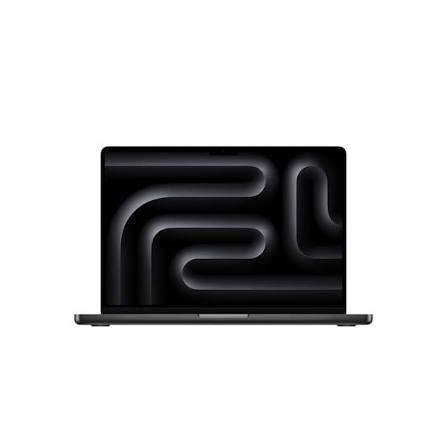
Here is how the current lineup breaks down:
| MacBook | Best For |
| MacBook Air M5 13-inch | Best overall |
| MacBook Air M5 15-inch | Best for a larger screen |
| MacBook Pro 14-inch M5 | Professional users |
| MacBook Pro M5 Pro/Max | Heavy professional workloads |
| MacBook Neo | Basic everyday computing |
The M5 MacBook Air starts with 16GB of unified memory and 512GB of SSD storage, while Apple offers configurations with up to 32GB of memory and 4TB of storage. It also has an M5 chip with a 10-core CPU, an 8-core or 10-core GPU depending on configuration, and a 16-core Neural Engine.
That combination makes the MacBook Air M5 much more versatile than an entry-level laptop.
Best MacBook Overall: MacBook Air M5
If you don’t want to spend hours comparing specifications, the MacBook Air M5 is the MacBook I’d recommend looking at first.
The biggest reason is balance.
You get enough performance for demanding everyday work without paying for hardware designed primarily for professional workloads.
The 13-inch MacBook Air M5 has a 13.6-inch Liquid Retina display with 500 nits of brightness, P3 wide color, and True Tone. It starts with 16GB of unified memory and 512GB of SSD storage.
It is also rated for up to 18 hours of video streaming and up to 15 hours of wireless web use under Apple’s testing conditions.
For everyday users, that’s a very useful combination.
What can the MacBook Air M5 handle?
The M5 MacBook Air is suitable for:
- College and university work
- Microsoft Office
- Google Workspace
- Web browsing
- Video meetings
- Programming
- Photo editing
- Content creation
- Business applications
- Research
- Social media management
- Light and moderate video editing
- Multitasking
- Everyday AI-assisted workflows
It also includes two Thunderbolt 4 USB-C ports, MagSafe 3 charging, and a 3.5mm headphone jack.
For many people, there simply isn’t a strong reason to move to a MacBook Pro.
Why the MacBook Air M5 Is Such a Good Choice in 2026
One of the biggest mistakes people make when buying a laptop is assuming that the most expensive model must be the best.
That’s not necessarily true.
The MacBook Air M5 gives you a lot of the performance most people actually need without adding the extra size, weight, and cost associated with Apple’s professional machines.
It is also fanless, which means normal use is silent.
If your day consists of writing articles, browsing dozens of tabs, attending online meetings, editing photos, working on spreadsheets, managing a business, coding, or watching videos, the Air is already a very capable machine.
You don’t need an M5 Max simply because it exists.
MacBook Air M5 13-inch vs 15-inch: Which Should You Buy?
Apple offers the MacBook Air M5 in two sizes.
The 13-inch model is the better choice if portability is your priority.
The 15-inch model makes more sense if you want a larger workspace.
A larger display can be useful if you spend a lot of time working with spreadsheets, documents, research, timelines, browser windows, or multiple applications at once.
Choose the 13-inch MacBook Air if:
- You travel frequently
- You carry your laptop to school or university
- You work from different locations
- You value portability
- You don’t need a huge screen
- You want the easiest MacBook to carry
Choose the 15-inch MacBook Air if:
- You want more screen space
- You work with spreadsheets
- You multitask frequently
- You edit photos or videos
- You work mostly from a desk
- You don’t mind a larger laptop
Neither size is automatically better. It comes down to how you use your laptop.
For a student who carries a laptop around campus every day, the 13-inch model is particularly convenient. For someone working from home who rarely moves the computer, the 15-inch model can provide a more comfortable workspace.
Best MacBook for Students in 2026
For most students, the MacBook Air M5 13-inch is the model to consider first.
Students generally need a laptop that can handle research, writing, presentations, web browsing, video calls, online learning platforms, programming, and multitasking.
The Air is designed for exactly this type of workload.
Its 16GB starting memory is also useful because students often have multiple browser tabs and applications open simultaneously.
You could be working on a Google Docs assignment while researching in Safari, attending a video call, listening to music, and having several other applications running.
The M5 Air has enough performance for this type of multitasking.
What about students studying demanding subjects?
If you’re studying video production, 3D design, engineering, advanced software development, or another field that requires sustained heavy computing, you may benefit from a MacBook Pro.
But don’t assume that simply being a college student means you need a MacBook Pro.
For typical university work, the MacBook Air is more than capable.
Best MacBook for Business
The MacBook Air M5 is also an excellent fit for many business users.
A business laptop needs to handle more than just raw processing power. Portability, battery life, reliability, multitasking, and the ability to work away from a desk all matter.
The Air checks many of those boxes.
You can use it for:
- Microsoft Office
- Google Workspace
- Accounting software
- Video conferencing
- Presentations
- CRM platforms
- Project management
- Web applications
- Content management
- Business research
- Social media management
The 15-inch model can be particularly useful for business owners who spend hours working directly from their laptop screen.
If your business involves professional video production, advanced development, 3D rendering, or other sustained workloads, the MacBook Pro becomes more relevant.
Best MacBook for Professional Work: MacBook Pro
If your laptop is a professional production tool rather than primarily a productivity device, the MacBook Pro deserves serious consideration.
Apple’s MacBook Pro lineup includes M5, M5 Pro, and M5 Max configurations, depending on the model. The 14-inch M5 MacBook Pro starts with 16GB of unified memory and can be configured with up to 32GB, while storage options extend to 4TB.
The Pro also has one of the biggest display advantages over the Air.
The 14-inch MacBook Pro features a 14.2-inch Liquid Retina XDR display with a 3024-by-1964 resolution, up to 1,000 nits sustained full-screen brightness, up to 1,600 nits peak HDR brightness, a 1,000,000:1 contrast ratio, P3 wide color, and ProMotion with adaptive refresh rates up to 120Hz.
That’s a significant advantage for professional creative work.
The MacBook Pro makes sense for:
- Professional video editing
- Large photo projects
- 3D rendering
- Advanced programming
- Large software builds
- Professional music production
- Demanding graphics workloads
- Long periods of sustained processing
- Workflows requiring more ports
- HDR content creation
The MacBook Pro M5 is also rated for up to 24 hours of video streaming in Apple’s testing, although actual battery life depends heavily on what you’re doing.
MacBook Pro M5 Pro vs M5 Max
If you’re looking at the higher-end MacBook Pro models, the choice becomes more specialized.
The M5 Pro and M5 Max are designed for people whose workloads genuinely benefit from additional CPU and GPU resources.
Think professional video editors, 3D artists, developers working on large projects, technical professionals, and other users who regularly push their computers hard.
For these users, additional memory and processing power can reduce waiting time and make demanding workflows smoother.
For everyone else, buying the highest-end configuration may be unnecessary.
If you mainly browse the web, write documents, edit occasional photos, and attend video calls, an M5 Max is excessive for your needs.
Is the MacBook Neo Worth Buying in 2026?
The MacBook Neo is Apple’s more affordable MacBook option and is aimed at users with simpler computing requirements.
It uses Apple’s A18 Pro chip, has 8GB of unified memory, and comes with either 256GB or 512GB SSD storage. It has a 13-inch Liquid Retina display with 500 nits of brightness and is rated for up to 16 hours of video streaming.
The Neo can make sense for basic computing.
It’s suitable for things like:
- Web browsing
- Word processing
- Online classes
- Streaming
- Video calls
- Basic productivity
- Light everyday computing
However, there are some important differences between the Neo and MacBook Air.
The Neo has only two USB-C ports, with one supporting USB 3 speeds and the other supporting USB 2 speeds. It also supports one external display up to 4K at 60Hz.
The M5 Air, on the other hand, includes two Thunderbolt 4 ports and starts with twice as much unified memory and storage as the Neo.
If you’re buying a MacBook for several years and your budget allows it, those differences are worth considering.
How Much RAM Should You Get in a MacBook in 2026?
For most buyers, 16GB of unified memory is the sweet spot.
The MacBook Air M5 starts at 16GB and can be configured to 24GB or 32GB.
16GB is suitable for:
- Students
- Office workers
- Business users
- Writers
- Programmers
- Researchers
- Everyday users
- General multitasking
Consider 24GB or 32GB if:
- You work with large creative projects
- You regularly use professional applications
- You run virtual machines
- You work with large datasets
- You develop demanding software
- You keep many resource-intensive applications open
- You want additional memory headroom
You don’t need 32GB simply because it sounds better on a specification sheet.
Buy the amount of memory that matches your workload.
How Much Storage Should You Get?
Storage is another area where it’s easy to overspend.
The M5 MacBook Air starts with 512GB of SSD storage and can be configured to 1TB, 2TB, or 4TB.
For most people, 512GB is a good starting point.
You may want 1TB or more if you regularly work with:
- Large video files
- RAW photographs
- Music libraries
- Large software projects
- Games
- Offline media
- Large document archives
If you primarily use cloud storage and don’t keep huge files locally, 512GB may be plenty.
Another option is using an external SSD for large files instead of paying for a much larger internal drive.
Best MacBook for Video Editing
The answer depends on the type of video editing you do.
For casual YouTube videos, social media clips, school projects, and occasional editing, the MacBook Air M5 can be a very capable option.
For professional video production, the MacBook Pro makes more sense.
The Pro’s stronger configurations, advanced display, additional connectivity, and higher memory options are valuable when editing large projects regularly.
If you’re working with demanding 4K or higher-resolution footage every day, look toward the M5 Pro or M5 Max configurations rather than automatically choosing the base model.
Best MacBook for Photo Editing
For photographers, the MacBook Air M5 is already a strong choice.
Its Liquid Retina display supports P3 wide color and up to 1 billion colors, making it suitable for a wide range of photo-editing workflows.
However, professionals who need the best display experience should consider the MacBook Pro.
The Pro’s Liquid Retina XDR display offers higher brightness, deeper contrast, ProMotion up to 120Hz, and HDR capabilities.
Again, the right choice depends on whether you’re editing photos casually or professionally.
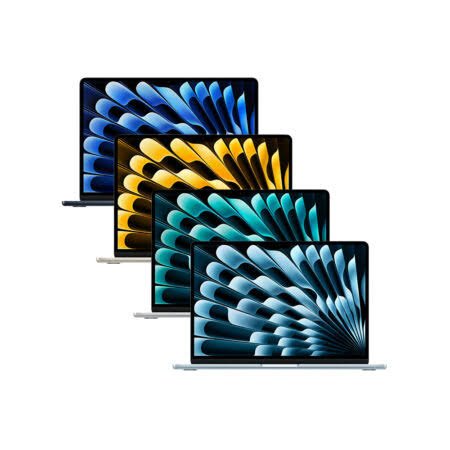
MacBook Air vs MacBook Pro: Which Should You Buy?
The simplest way to think about the two is this:
MacBook Air: Buy it if you want a powerful, portable computer for everyday and moderately demanding work.
MacBook Pro: Buy it if your computer is a professional tool and you regularly need sustained high performance, a better display, or additional connectivity.
Here’s a quick comparison:
| Feature | MacBook Air M5 | MacBook Pro |
| Everyday use | Excellent | Excellent |
| Students | Excellent | Excellent |
| Business | Excellent | Excellent |
| Programming | Excellent | Excellent |
| Photo editing | Excellent | Excellent |
| Video editing | Very good | Excellent |
| Professional workloads | Good | Excellent |
| Portability | Excellent | Very good |
| Display | Liquid Retina | Liquid Retina XDR |
| Refresh rate | Standard | Up to 120Hz ProMotion |
| Best for | Most users | Professionals |
What MacBook Should You Buy Right Now?
If you’re still unsure, use this simple guide.
Buy the MacBook Air M5 13-inch if:
You want the best combination of portability, performance, battery life, and everyday usability.
Buy the MacBook Air M5 15-inch if:
You want the Air but prefer a larger screen for work and multitasking.
Buy the MacBook Pro 14-inch if:
You regularly perform demanding professional tasks or want a better display and more connectivity.
Buy the MacBook Pro M5 Pro or M5 Max if:
Your workload involves professional video, 3D, advanced development, or other intensive tasks.
Buy the MacBook Neo if:
You primarily need a Mac for basic computing and want the most affordable entry into Apple’s current MacBook lineup.
Final Verdict: Which Is the Best MacBook to Buy Currently?
So, which is the best MacBook to buy currently in 2026?
For the majority of people, the answer is the MacBook Air M5.
More specifically, the 13-inch MacBook Air M5 with 16GB of unified memory and 512GB of storage is a sensible starting configuration for students, professionals, business users, writers, programmers, creators, and everyday users.
It offers a combination of performance and portability that makes it difficult to justify buying a more powerful MacBook Pro unless you actually need the additional capabilities.
If you want more screen space, the 15-inch MacBook Air M5 is the natural alternative.
If you’re a professional who works with demanding applications for hours at a time, the MacBook Pro is the better fit. And if you’re primarily interested in basic tasks and want a lower-cost MacBook, the MacBook Neo is worth considering.
The important thing is not to buy the most expensive MacBook simply because it’s the most powerful.
Instead, choose the MacBook that gives you enough performance, memory, storage, and screen space for the work you actually do.
For most people in 2026, that balance is found in the MacBook Air M5.
Frequently Asked Questions
Which MacBook is the best to buy right now in 2026?
For most people, the MacBook Air M5 is the best overall choice. It starts with 16GB of unified memory and 512GB of storage and offers up to 18 hours of video-streaming battery life under Apple’s testing conditions.
Is the MacBook Air M5 worth buying in 2026?
Yes. The M5 MacBook Air offers enough performance for most productivity, school, business, programming, photo-editing, and everyday workloads. Its 16GB starting memory and 512GB starting storage also make the base configuration more practical for many users.
Is MacBook Air better than MacBook Pro?
Neither is universally better. The MacBook Air is designed around portability and everyday performance, while the MacBook Pro offers a more advanced display, broader connectivity, and higher-performance configurations for demanding workloads.
Which MacBook is best for college students?
For most college students, the 13-inch MacBook Air M5 is a strong choice. It is portable, has 16GB of starting memory, and provides enough performance for research, writing, presentations, browsing, programming, and online classes.
Which MacBook is best for business?
The MacBook Air M5 is suitable for many business users because it combines performance, portability, battery life, and a high-quality display. The 15-inch model can be useful if you prefer a larger workspace.
Which MacBook is best for video editing?
For occasional or moderate video editing, the MacBook Air M5 can be suitable. For professional video editing and sustained demanding workloads, consider a MacBook Pro with a higher-end M5-series chip.
Is 16GB RAM enough for a MacBook in 2026?
For most users, yes. The M5 MacBook Air starts at 16GB of unified memory. Users working with demanding professional applications, large datasets, virtual machines, or complex creative projects may benefit from 24GB or 32GB.
Is 512GB enough storage for a MacBook?
For many users, 512GB is enough. People who store large video libraries, RAW photos, games, or large professional projects locally may want 1TB or more.
Is the MacBook Neo good for students?
The MacBook Neo can handle basic student tasks such as browsing, writing, video calls, streaming, and online learning. It has 8GB of unified memory and 256GB or 512GB storage. Students with more demanding workloads may want to consider the MacBook Air M5 instead.
Should I buy a MacBook Air or MacBook Pro in 2026?
Choose the MacBook Air if you want a portable computer for everyday and moderately demanding work. Choose the MacBook Pro if you regularly need sustained professional performance, a higher-end HDR display, or additional connectivity.