

As an Amazon Associate, I earn from qualifying purchases
Finding the best wireless keyboard for MacBook Air can make your daily work much more comfortable.
Your MacBook Air already has a good built-in keyboard. However, an external keyboard gives you more flexibility when working at a desk. It can also help you create a cleaner workspace and improve your typing experience.
The challenge is choosing the right one.
Some wireless keyboards are designed for office work. Others are better for travel, gaming, or long writing sessions. Some offer backlighting, while others focus on portability and long battery life.
In this guide, we’ll compare the best wireless keyboards for MacBook Air, explain their main advantages, and help you choose the right option for your budget.
Best Wireless Keyboards for MacBook Air at a Glance
| Keyboard | Best for | Main advantage |
| Logitech MX Keys S for Mac | Best overall | Comfortable typing and backlighting |
| Apple Magic Keyboard with Touch ID | Apple users | Native Mac layout and Touch ID |
| Logitech Pebble Keys 2 K380s | Travel and portability | Compact design |
| Keychron B6 Pro | Budget buyers | Affordable, versatile connectivity |
| Keychron K3 Max | Mechanical typing | Compact layout and tactile switches |
These keyboards suit different needs. Your ideal choice depends on your budget, preferred typing style, and whether you use other devices besides your MacBook Air.
- Logitech MX Keys S for Mac — Best Overall
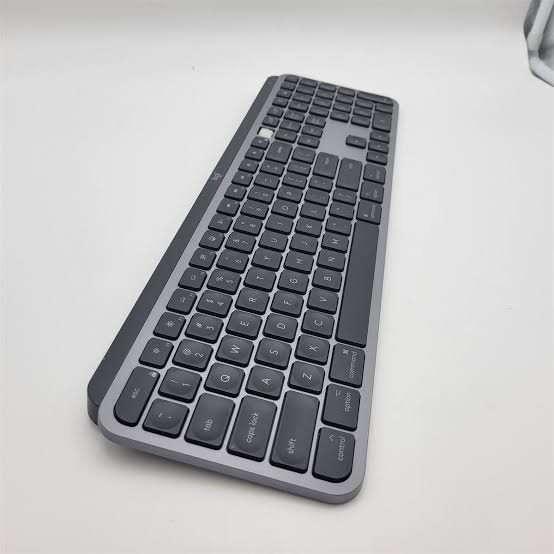
The Logitech MX Keys S for Mac is an excellent choice for people who spend several hours a day typing.
It has a slim design, comfortable low-profile keys, and adjustable white backlighting. The key shape helps guide your fingers while typing, making it suitable for long work sessions.
The dedicated Mac layout is another advantage. It includes Mac-specific modifier keys, so familiar shortcuts feel natural.
Why it’s worth considering
- Comfortable low-profile keys
- Adjustable backlighting
- Dedicated Mac key layout
- Rechargeable battery
- Support for switching between multiple devices
- Useful shortcuts for everyday productivity
The MX Keys S for Mac is particularly suitable for writers, students, programmers, and office workers.
You can connect it to your MacBook Air and use it with a monitor and laptop stand. This setup lets you work without keeping your hands close to the laptop screen.
It can also work with other compatible devices, making it useful if you switch between a MacBook, iPad, or another computer.
What are the drawbacks?
The keyboard is larger than compact travel models. It also costs more than basic wireless keyboards.
Its backlighting can use more battery power, so your results will depend on how frequently you use it.
Best for: People who want a comfortable, feature-rich wireless keyboard for everyday work.
- Apple Magic Keyboard with Touch ID — Best for Mac Users
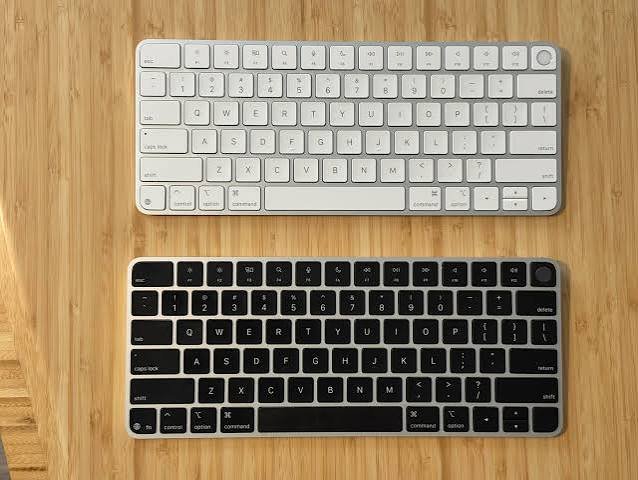
If you want a keyboard that feels like a natural extension of your MacBook Air, consider the Apple Magic Keyboard with Touch ID.
Its minimalist design matches Apple’s hardware. The low-profile keys also provide a familiar typing experience for people who enjoy the MacBook Air’s built-in keyboard.
The biggest attraction is Touch ID.
On compatible Apple silicon Macs, Touch ID lets you authenticate supported actions using your fingerprint. This can make unlocking your Mac and approving certain requests more convenient.
Key benefits
- Clean Apple design
- Familiar Mac keyboard layout
- Rechargeable battery
- Touch ID on compatible models and Macs
- Compact options for smaller desks
- Simple Bluetooth connectivity
The Magic Keyboard is a strong option if you mainly use Apple devices and want a straightforward typing experience.
It is also a good choice for a home office where appearance and simplicity matter.
What should you consider?
Not every Magic Keyboard includes Touch ID. Check the exact model before purchasing.
Touch ID support also depends on Mac compatibility. If you want this feature, make sure the keyboard and your MacBook Air support it.
Some versions lack backlighting. If you regularly type in a dark room, a backlit alternative may be more suitable.
Best for: MacBook Air owners who prefer Apple’s design and want Touch ID on a compatible setup.
- Logitech Pebble Keys 2 K380s — Best Compact Keyboard
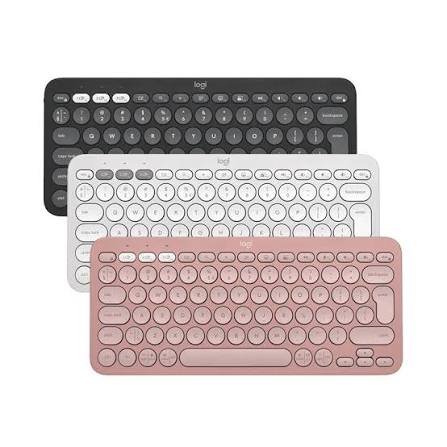
The Logitech Pebble Keys 2 K380s is worth considering if you want a lightweight keyboard for travel or a small workspace.
Its compact shape takes up less desk space than a full-size keyboard. This makes it suitable for students, remote workers, and people who frequently move between locations.
The keyboard supports Bluetooth connections with multiple devices. You can switch between paired devices without going through the pairing process each time.
Why choose it?
- Compact, lightweight design
- Bluetooth connectivity
- Multi-device switching
- Quiet typing experience
- Easy to carry in a bag
- Suitable for smaller desks
The Pebble Keys 2 is useful if you work with a MacBook Air at home and occasionally use a tablet or another compatible device.
Its small footprint also leaves more room for a mouse, notebook, or other desk accessories.
Are there any disadvantages?
The compact layout means some keys are smaller or positioned differently than on a full-size keyboard.
It also lacks some premium features found on more expensive models.
If you spend hours working with spreadsheets, a keyboard with a dedicated numeric keypad may be more comfortable.
Best for: Students, travelers, and anyone who wants a small wireless keyboard.
4. Keychron B6 Pro — Best Budget Wireless Keyboard
The Keychron B6 Pro is a useful option for buyers who want a full-size keyboard without spending too much.
It has a low-profile design and supports Bluetooth, 2.4GHz wireless, and wired USB-C connections.
This flexibility can be helpful if you want to use the keyboard with different devices or prefer having a wired backup option.
Main advantages
- Budget-friendly design
- Full-size layout
- Bluetooth and 2.4GHz wireless options
- Wired USB-C connectivity
- Multi-device support
- Suitable for everyday typing
The B6 Pro works well for basic office tasks, schoolwork, email, browsing, and document editing.
It is particularly attractive if your main goal is to get a separate keyboard for your MacBook Air without paying for premium features.
What are the trade-offs?
The keyboard does not offer the same premium feel as more expensive models. It also lacks backlighting, which may be inconvenient in low-light environments.
If you want illuminated keys or a more refined typing experience, compare it with the Logitech MX Keys S before buying.
Best for: Budget-conscious users who want a versatile wireless keyboard.
5. Keychron K3 Max — Best Compact Mechanical Keyboard
Mechanical keyboards are popular with people who prefer more noticeable feedback while typing.
The Keychron K3 Max offers a low-profile mechanical design with a compact layout. It supports Bluetooth, 2.4GHz wireless, and wired USB-C connectivity.
This makes it a flexible option for a MacBook Air desk setup.
Why mechanical keyboards are different
Many standard wireless keyboards use scissor-style keys or similar low-profile mechanisms. Mechanical keyboards use individual mechanical switches.
Depending on the switch type, the keys may feel tactile, linear, or clicky.
This gives you more choice over how the keyboard feels and sounds.
The K3 Max is also relatively compact, so it leaves room for a mouse without taking up the space of a traditional full-size mechanical keyboard.
Who should buy it?
Consider the K3 Max if you:
- Type for long periods
- Prefer mechanical switches
- Want a compact desk setup
- Like customizing your keyboard
- Need more than one connection option
However, mechanical keyboards are not always quiet. Some switch types produce noticeable noise, which may be distracting in a shared office.
Best for: Programmers, enthusiasts, and people who prefer mechanical typing.
How to Choose the Best Wireless Keyboard for MacBook Air
Before buying a keyboard, think about how you use your MacBook Air.
The best model is not necessarily the most expensive. It is the one that matches your daily routine.
1. Check macOS Compatibility
Most modern Bluetooth keyboards can work with a MacBook Air.
However, compatibility can vary when it comes to function keys, media controls, shortcuts, and special software features.
Look for a keyboard that explicitly supports macOS.
A Mac-specific layout is helpful because it places Command and Option labels where Mac users expect them.
Some keyboards include both Mac and Windows key labels. These can be useful if you use multiple operating systems.
2. Choose Between Compact and Full-Size
Keyboard size affects comfort and portability.
A compact keyboard takes up less space. It is also easier to carry when traveling.
A full-size keyboard provides more room for navigation keys and may include a numeric keypad.
Choose a compact model if you have a small desk or frequently work away from home.
Choose a full-size model if you regularly enter numbers, work with spreadsheets, or prefer a traditional layout.
3. Decide Whether You Need Backlighting
Backlighting illuminates the keys in dim environments.
It can be useful when working at night or in a room with limited lighting.
However, backlighting may increase battery consumption.
If you mainly work in a bright office, you may not need this feature. A keyboard without backlighting can also be a practical way to save money.
4. Consider Battery Life
Wireless keyboards use rechargeable batteries or replaceable batteries, depending on the model.
Rechargeable keyboards are convenient because you can charge them with a cable. Models with replaceable batteries may last a long time before needing new ones.
Remember that battery life depends on usage.
Backlighting, connection settings, and daily typing habits can affect how long a keyboard lasts between charges.
Check the manufacturer’s battery estimates before making your decision.
5. Look at the Connection Type
Bluetooth is usually the simplest option for a MacBook Air.
It does not require a separate USB receiver, which is useful because MacBook Air models have a limited number of physical ports.
Some keyboards also support 2.4GHz wireless through a USB receiver.
This can be useful for certain workflows, but you may need a compatible adapter or hub if the receiver uses USB-A.
If you want to keep your setup simple, choose a keyboard with reliable Bluetooth support.
6. Think About Typing Comfort
Typing comfort is personal.
Some people prefer flat, laptop-style keys. Others enjoy the stronger feedback of mechanical switches.
If possible, try the keyboard before buying it.
Pay attention to key spacing, key travel, noise, and overall layout.
If you type for several hours each day, these details can matter more than extra features.
Is a Wireless Keyboard Better Than the Built-In MacBook Air Keyboard?
A wireless keyboard is not automatically better than the built-in keyboard.
The MacBook Air’s built-in keyboard is convenient because it is always available. You do not need to charge or carry another device.
An external keyboard becomes more useful when you work at a desk.
For example, you can place your MacBook Air on a stand and position the keyboard at a more comfortable height. This can make your workspace more flexible.
You can also choose a layout that better suits your hands or work habits.
If you frequently travel, the built-in keyboard may be all you need. If you work from home or use an external monitor, a wireless keyboard can be a worthwhile upgrade.
Frequently Asked Questions
What is the best wireless keyboard for MacBook Air?
The Logitech MX Keys S for Mac is a strong overall choice for productivity because it combines comfortable typing, backlighting, and multi-device support. Apple Magic Keyboard is a good alternative for users who prefer Apple’s design and Touch ID on compatible models.
Can I use any Bluetooth keyboard with a MacBook Air?
Most standard Bluetooth keyboards can connect to a MacBook Air. However, some function keys and special features may not work as expected. Check macOS compatibility before purchasing.
Is the Apple Magic Keyboard worth buying?
It can be worth buying if you value Apple’s design, a familiar Mac layout, and Touch ID on compatible models. If you need backlighting or multi-device switching, compare it with Logitech alternatives.
What is the best budget keyboard for MacBook Air?
The Keychron B6 Pro is worth considering if you want an affordable keyboard with multiple connection options. The Logitech Pebble Keys 2 K380s is another option if portability is more important than a full-size layout.
Is a mechanical keyboard good for MacBook Air?
Yes. Mechanical keyboards can offer more tactile feedback and customization. The Keychron K3 Max is a compact option to consider. Keep in mind that some mechanical switches are louder than standard laptop-style keys.
Do wireless keyboards work with MacBook Air M1, M2, M3, M4, and M5?
Most standard Bluetooth keyboards work with recent MacBook Air models, including M-series versions. Check the keyboard’s compatibility information and supported software features before buying.
Should I buy a compact or full-size wireless keyboard?
Choose a compact keyboard if portability and desk space are important. Choose a full-size keyboard if you need a numeric keypad or prefer more room for navigation keys.
Final Verdict: Which Wireless Keyboard Should You Buy?
The best wireless keyboard for MacBook Air depends on your budget and how you work.
For most people, the Logitech MX Keys S for Mac is an excellent starting point. It offers comfortable typing, backlighting, and useful features for everyday productivity.
If you prefer Apple’s design, consider the Magic Keyboard with Touch ID, provided your Mac supports the feature.
For travel, the Logitech Pebble Keys 2 K380s is a practical compact option. If you’re shopping on a budget, compare the Keychron B6 Pro. If you prefer mechanical switches, the Keychron K3 Max deserves a look.
Before purchasing, check the exact model, keyboard layout, macOS compatibility, and current price.
A good keyboard should make your daily work easier, not more complicated. Choose the one that feels comfortable, fits your workspace, and offers the features you will actually use.