

As an Amazon Associate, I earn from qualifying purchases
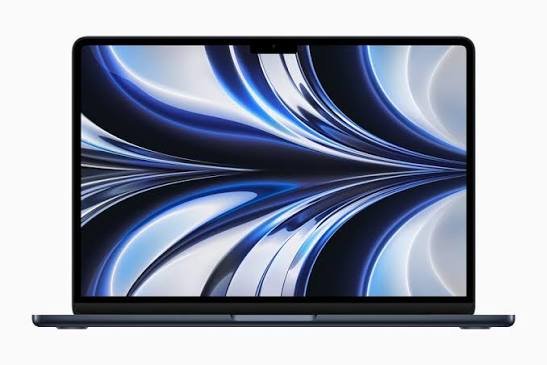
The Apple MacBook Air M2 is designed for portability, everyday productivity, quiet operation, and long battery life. It is a good option for students, writers, business users, and people who work while traveling.
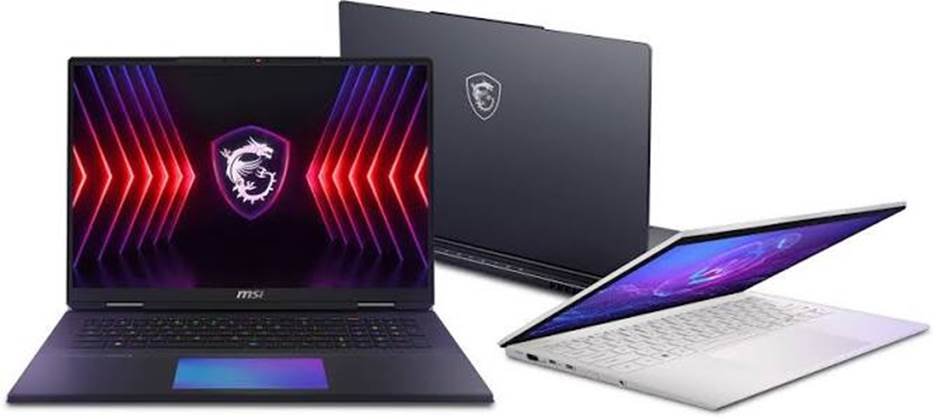
MSI offers a much broader range of laptops. Its lineup includes gaming machines, creative workstations, and lightweight productivity laptops. Some MSI models prioritize graphics performance, while others focus on portability and professional work.
That difference matters because there is no single MSI laptop that represents the entire brand. An entry-level MSI gaming laptop may have very different capabilities from a premium MSI gaming machine or a lightweight Prestige laptop.
In this guide, we compare the MacBook Air M2 with the typical strengths of MSI laptops. We will look at performance, gaming, battery life, display quality, portability, software compatibility, and value.
By the end, you should have a clearer idea of which laptop fits your budget and everyday needs.
MacBook Air M2 vs MSI: Quick Comparison
| Feature | MacBook Air M2 | MSI Laptops |
| Operating system | macOS | Windows on most consumer models |
| Processor | Apple M2 chip | Varies by model |
| Graphics | Integrated Apple GPU | Integrated graphics or dedicated NVIDIA GPU, depending on model |
| Gaming | Suitable for supported games and lighter gaming | Often better for demanding PC gaming on gaming models |
| Battery life | Designed for efficient, mobile use | Varies widely; gaming models may need frequent charging |
| Cooling | Fanless design | Many performance models use active cooling |
| Display | 13.6-inch Liquid Retina display | Options include different sizes, resolutions, and refresh rates |
| Ports | Two Thunderbolt/USB 4 ports, MagSafe, headphone jack | Varies by model; often includes USB-A and HDMI |
| Upgradeability | Memory and internal storage are not user-upgradable | Some models allow RAM or SSD upgrades |
| Best for | Students, office work, travel, everyday productivity | Gaming, Windows software, and configurable performance |
Apple’s official specifications list the M2 MacBook Air with a 13.6-inch display, up to 500 nits of brightness, and a fanless design. MSI’s specifications depend on the exact product series and configuration.
1. Design and Build Quality
The MacBook Air M2 has a slim aluminum design with a clean, minimalist appearance. It is built for people who want a laptop that looks professional without being bulky.
Its compact design makes it convenient to carry between classes, meetings, cafés, and home. The aluminum enclosure also gives it a solid feel.
MSI laptops have more varied designs. Productivity models often look understated, while gaming models may feature angular styling, larger cooling vents, RGB keyboard lighting, or a more aggressive appearance.
Neither approach is automatically better. It depends on your preferences.
Which laptop has the better design?
Choose the MacBook Air M2 if you prefer:
- A slim, minimalist laptop.
- A professional appearance for work or school.
- A compact design for frequent travel.
- A quiet computer without cooling fans.
Choose an MSI laptop if you want:
- More design choices across different categories.
- A gaming-focused appearance and customizable lighting.
- A larger chassis designed to accommodate powerful components.
- A model with additional ports or upgrade options.
Winner for minimalist portability: MacBook Air M2.
MSI may be the better fit if you want a gaming laptop or a specific Windows-based design.
2. Performance: Is the M2 Better Than MSI?
The Apple M2 chip remains capable of handling many everyday computing tasks. It can run web browsers, office applications, video calls, photo-editing tools, and numerous creative applications smoothly.
For students and professionals, this means the MacBook Air M2 can handle research, writing, spreadsheets, presentations, online meetings, and multitasking without requiring a bulky computer.
However, MSI performance depends heavily on the processor, graphics hardware, memory, and cooling system in the specific model.
A basic MSI laptop with integrated graphics may perform differently from an MSI gaming laptop equipped with a dedicated NVIDIA GeForce RTX GPU. Higher-end gaming models can offer considerably more graphics performance for supported applications and games.
Everyday performance
For everyday work, the MacBook Air M2 is a strong option.
It can handle common productivity tasks while remaining quiet. Apple’s unified memory architecture also allows the CPU and GPU to share system memory efficiently.
An MSI productivity laptop can perform equally well or better in particular workloads, depending on its hardware. Windows also supports a broad range of business applications and specialized software.
For ordinary browsing, email, writing, and video calls, either platform can be suitable. The exact configuration matters more than the brand name.
Heavy workloads
The comparison changes when you run demanding software for extended periods.
Some MSI performance laptops have active cooling systems that allow them to manage heat during sustained workloads. Gaming models with powerful dedicated GPUs can be especially useful for GPU-intensive rendering, certain 3D applications, and other supported workloads.
The MacBook Air M2 uses a fanless design. That makes it quiet, but its performance can be limited during long, demanding tasks as heat builds up.
If you regularly render complex 3D scenes, run GPU-intensive Windows software, or need sustained high graphics performance, a suitable MSI workstation or gaming laptop may be the better choice.
Winner for everyday productivity: Both can be excellent.
Winner for demanding GPU workloads: An appropriately equipped MSI performance laptop will often have the advantage.
3. Gaming: MacBook Air M2 vs MSI
Gaming is one of the biggest differences between these two options.
The MacBook Air M2 can run compatible games, including selected titles available for macOS. It can also handle lighter games and some more demanding titles with appropriate settings.
However, game availability and performance vary. Not every Windows PC game has a native macOS version, and some games may require compatibility tools or may not work properly at all.
The fanless design can also limit sustained graphics performance during long gaming sessions. RTINGS notes that the M2 MacBook Air is not ideal for graphically intensive games and that performance may decrease as the system heats up.
Why MSI is often better for gaming
Many MSI gaming laptops are designed specifically for PC gaming. Depending on the model, they may include:
- Dedicated NVIDIA GeForce RTX graphics.
- High-refresh-rate displays.
- Cooling fans and larger cooling systems.
- Gaming keyboards and customizable lighting.
- Compatibility with a broad library of Windows games.
For example, MSI’s gaming lineup includes series such as Katana, Raider, Stealth, and Titan, with different levels of performance and portability.
A gaming model with a suitable dedicated GPU will generally be a better choice for demanding games than the MacBook Air M2.
Still, not every MSI laptop is a gaming powerhouse. An entry-level MSI model with integrated graphics may not deliver the performance of a higher-end gaming system.
Which should gamers choose?
Choose the MacBook Air M2 if you mainly play casual games and value portability, quiet operation, and productivity.
Choose MSI if you want to play demanding Windows games, use gaming launchers, or prioritize high frame rates.
Gaming winner: MSI, provided you choose a model with suitable graphics hardware.
4. Battery Life: Which Laptop Lasts Longer?
Battery life is one of the MacBook Air M2’s strongest features.
Apple rates the M2 MacBook Air for up to 15 hours of wireless web browsing and up to 18 hours of movie playback under its specified test conditions. Actual results depend on brightness, applications, wireless activity, battery condition, and other factors. <Cite refs={[“turn897612search0”]}/>
For students, writers, and travelers, this can mean spending more time working away from a power outlet.
MSI battery life varies significantly by model. Lightweight productivity laptops may offer good endurance, while gaming laptops with powerful processors and dedicated graphics can consume much more power, particularly during demanding tasks.
Gaming on battery can also reduce performance on some MSI models. Connecting the laptop to its charger may be necessary to achieve its best gaming performance.
Which laptop is better for travel?
The MacBook Air M2 is usually the more convenient option for working in places where outlets are limited.
It is suitable for lectures, libraries, cafés, airports, and meetings. Its quiet design is also useful in shared environments.
An MSI productivity laptop can be a good travel computer too, but you should check independent battery tests for the exact model you plan to buy.
Battery-life winner for mobile productivity: MacBook Air M2 in many comparisons, especially against gaming-focused MSI laptops.
5. Display Quality: MacBook Air M2 vs MSI
The MacBook Air M2 features a 13.6-inch Liquid Retina display with a native resolution of 2560 × 1664 pixels and up to 500 nits of brightness. It supports a wide P3 color gamut and True Tone.
This makes it well suited to everyday work, reading, watching videos, and many photo-editing tasks.
Its display is sharp, bright, and useful for people who prefer a compact screen.
MSI offers a wider range of display configurations. Depending on the laptop, you may find larger screens, higher refresh rates, higher resolutions, or panels designed for particular creative and gaming workloads.
For studying and office work
The MacBook Air M2’s display is a good fit for documents, websites, spreadsheets, and video calls.
An MSI productivity laptop can offer a similarly good experience, but check its actual resolution, brightness, and color coverage rather than assuming every model has the same panel quality.
For gaming
A gaming-focused MSI laptop may offer a high-refresh-rate display. A refresh rate above 60Hz can make supported games appear smoother, particularly when the graphics hardware can deliver enough frames per second.
The MacBook Air M2 has a 60Hz display, which is fine for general use but not designed around high-refresh-rate gaming.
For photo and video editing
Both laptops can be useful for creative work. The MacBook Air M2’s display supports P3 wide color, which is helpful for compatible creative workflows.
However, professionals should also consider color accuracy, brightness consistency, external monitor support, and application compatibility.
Display winner: It depends on your priority. The MacBook Air M2 offers a strong compact display, while MSI may be better for high-refresh-rate gaming or a larger screen.
6. Port Selection and Connectivity
The MacBook Air M2 has two Thunderbolt/USB 4 ports, a MagSafe 3 charging port, and a 3.5mm headphone jack. Both USB-C ports can be used for supported data and display connections, and MagSafe allows you to charge without occupying one of those ports
The limitation is that the laptop has relatively few built-in connections.
If you regularly connect USB-A accessories, memory cards, wired networking, or several monitors, you may need a hub or dock. The M2 MacBook Air also supports only one external display natively, which matters if your desk setup depends on multiple monitors.
MSI laptops often provide a different selection of ports, which may include USB-A, HDMI, USB-C, and other connections depending on the model.
This can be convenient if you connect a gaming mouse, external drive, monitor, controller, or other peripherals.
However, do not assume every MSI laptop includes every port. Check the specifications of the exact model.
Connectivity winner: Often MSI for built-in port variety, but compare the individual models.
7. Keyboard, Trackpad, and Everyday Comfort
The MacBook Air M2 has a backlit Magic Keyboard and a large Force Touch trackpad. The trackpad supports precise pointer control and multi-touch gestures, which can make navigation comfortable without an external mouse.
Its keyboard is suitable for writing, email, school assignments, and general office work.
MSI keyboards vary by product line. Productivity models are designed for everyday typing, while gaming models may offer gaming-focused key layouts and customizable backlighting.
If you play games regularly, the keyboard and available performance settings on a gaming laptop may be more appealing. If you spend hours writing or browsing, the MacBook Air M2 is a comfortable option, though personal preference matters.
For long typing sessions, try the keyboard layout if possible. Pay attention to key travel, spacing, the position of function keys, and whether you prefer a large trackpad or a dedicated gaming mouse.
Winner: The MacBook Air M2 is a strong choice for everyday typing and trackpad use. MSI may be preferable if you want gaming-oriented controls or a particular keyboard layout.
8. Software Compatibility: macOS vs Windows
The operating system can be just as important as the hardware.
The MacBook Air M2 runs macOS. It is a good choice for people who already use an iPhone, iPad, or other Apple devices and want features that work across the ecosystem.
It supports many popular applications for writing, design, video editing, communication, and business. However, not every Windows application has a native Mac version.
MSI laptops generally run Windows, giving users access to a broad range of Windows applications, PC games, business tools, and specialist software.
Choose the MacBook Air M2 if:
- You prefer macOS.
- You use Apple devices and services.
- Your essential applications support macOS.
- You want a quiet computer for daily work.
Choose MSI if:
- You need Windows-only software.
- You play PC games that are unavailable on macOS.
- Your school or workplace requires Windows-specific applications.
- You want more choice in hardware configurations.
Before choosing either laptop, make a list of your essential applications. Check their official system requirements and compatibility with the operating system you intend to use.
This is particularly important for engineering tools, specialist business software, certain creative applications, and competitive games with strict anti-cheat requirements.
Software winner: Neither universally. Choose the operating system that supports the applications you need.
9. Upgradeability and Long-Term Use
One important difference is how much you can change after purchasing the laptop.
The MacBook Air M2’s unified memory and internal storage are not user-upgradable. You should choose your memory and storage configuration carefully because you generally cannot increase them later through a simple internal upgrade.
For many users, a suitable configuration will remain practical for years. However, people who work with large video projects, virtual machines, or extensive creative libraries should think carefully about memory and storage needs before buying.
Some MSI laptops allow users to upgrade RAM or SSD storage. Others have limited upgrade options, so check the specific model’s service documentation before assuming upgrades are possible.
Which is better for long-term flexibility?
An upgradeable MSI model may offer more flexibility if you expect to add memory or storage later.
The MacBook Air M2 may be a better fit if you prefer a quiet, portable laptop and can choose a configuration that meets your needs from the beginning.
Also consider software support, battery condition, repair options, warranty coverage, and the availability of replacement parts.
Upgradeability winner: Some MSI models, depending on their internal design.
10. Price and Value for Money
Price comparisons are difficult because MSI sells laptops across a wide range of performance levels. The value of any particular model depends on its processor, GPU, memory, storage, display, and current retail price.
An entry-level MSI gaming laptop may be a different kind of purchase from a premium MSI workstation. Likewise, the value of an M2 MacBook Air depends on its configuration, condition, warranty, and the price of newer alternatives.
When comparing two laptops, look beyond the initial cost.
Consider whether you need a dedicated GPU, how much memory you require, whether you will need a USB-C hub, and how much battery life matters to you. Also account for the software you use and any peripherals you must buy.
If gaming is a priority, an MSI model with a suitable dedicated GPU may deliver better value for your needs. If you mainly study, write, browse, and work away from a desk, the MacBook Air M2’s portability and efficiency may make it the better purchase.
Value winner: The laptop that meets your requirements without making you pay for features you will not use.
Who Should Buy the MacBook Air M2?
The MacBook Air M2 is a good option for people who prioritize everyday productivity and portability.
Consider it if you are:
- A student: It is suitable for research, essays, presentations, online classes, and everyday multitasking.
- A writer or blogger: The keyboard, quiet operation, and portable design work well for writing and editing.
- A business user: It handles email, meetings, documents, and common productivity applications.
- A frequent traveler: Its efficient design and long rated battery life suit mobile work.
- A casual creative user: It can handle many photo-editing tasks and supported video-editing workflows.
It is less suitable if your main goal is demanding PC gaming, sustained GPU-heavy workloads, or running Windows-only software without a suitable workaround.
Who Should Buy an MSI Laptop?
MSI is worth considering if you need a specific Windows configuration or want a laptop built around gaming and performance.
Consider MSI if you are:
- A PC gamer: A suitable model with a dedicated NVIDIA GPU can run demanding games more effectively.
- A 3D creator: Some performance-focused models offer strong graphics hardware for supported 3D applications.
- A Windows software user: MSI gives you access to Windows applications and familiar PC workflows.
- A hardware upgrader: Some models allow memory or storage upgrades.
- A multi-monitor user: Certain MSI laptops offer convenient display outputs and more built-in ports.
However, choose the model carefully. An entry-level MSI laptop and a high-end gaming model can differ greatly in performance, screen quality, battery life, and weight.
Frequently Asked Questions
Is the MacBook Air M2 better than MSI?
It depends on which MSI laptop you are comparing. The MacBook Air M2 is strong for portability, quiet operation, and everyday productivity. An MSI gaming laptop with a dedicated GPU is generally a better choice for demanding PC gaming.
Is an MSI laptop better for gaming than a MacBook Air M2?
Usually, if you choose an MSI gaming model with suitable graphics hardware. MSI gaming laptops often provide dedicated GPUs, high-refresh-rate screens, and cooling systems designed for sustained gaming. The MacBook Air M2 is better suited to supported casual games and productivity.
Which laptop has better battery life?
The MacBook Air M2 is often the better option for mobile productivity, with Apple’s rated battery life reaching up to 15 hours of wireless web browsing under specified conditions. MSI battery life varies by model and workload, and gaming can drain the battery quickly.
Is the MacBook Air M2 good for students?
Yes. It can handle research, writing, presentations, online learning, and common productivity applications. Students should confirm that their required school or university software supports macOS before buying.
Can the MacBook Air M2 run Windows?
It does not run Windows in the same way as a standard Windows laptop. Virtualization or other workarounds may support some Windows applications, but compatibility and performance vary. If you depend on Windows-only programs, an MSI Windows laptop may be simpler.
Is MSI good for video editing?
Some MSI laptops are well suited to video editing, particularly models with powerful processors, dedicated graphics, and sufficient memory. Entry-level models may be less capable. Choose based on the requirements of your editing software and the complexity of your projects.
Can you upgrade the MacBook Air M2 RAM or SSD?
The memory and internal storage are not designed for user upgrades after purchase. Choose the configuration you expect to need. Some MSI models allow RAM or SSD upgrades, but this depends on the exact model.
Should I buy a MacBook Air M2 or an MSI laptop in 2026?
Buy the MacBook Air M2 if you want a portable, quiet laptop for everyday work and your essential applications support macOS. Choose MSI if you need Windows compatibility, dedicated graphics for gaming, or a model with upgradeable components.
Final Verdict: MacBook Air M2 vs MSI
The MacBook Air M2 and MSI laptops serve different priorities. The MacBook Air M2 offers a slim design, quiet operation, an attractive display, and strong efficiency for everyday work. It is a sensible choice for students, writers, business users, and travelers who value portability.
MSI is the more flexible choice if you need a Windows laptop, want to play demanding PC games, or need dedicated graphics. Some MSI models also offer more ports and upgrade options.
There is no universal winner because the exact MSI model makes a major difference.
For everyday productivity and mobile work, the MacBook Air M2 is a strong choice. For demanding gaming and GPU-focused tasks, choose an MSI laptop with hardware designed for those workloads.
Before buying, compare the exact configurations, check your software requirements, and consider how you will use the laptop every day. That will help you choose the computer that offers the best value for your needs.
Affiliate Disclosure: This article may contain affiliate links. If you buy through qualifying links, we may earn a commission at no additional cost to you. Always check the latest specifications and compatibility details before purchasing.
Suggested Internal Links:
- MacBook Air M2 Still Worth Buying in 2026?
- Should I Get a Mac or PC?
- Best MacBook for Programming
- Best MacBook for Gaming (and Why Not)
- MacBook vs Dell
- MacBook vs Lenovo ThinkPad