

As an Amazon Associate, I earn from qualifying purchases
If you use a MacBook Air or MacBook Pro for music, studying, video calls, movies, or work, the right headphones can make a major difference. The best MacBook headphones should offer reliable Bluetooth connectivity, excellent sound, comfortable earcups, good microphones, and strong battery life.
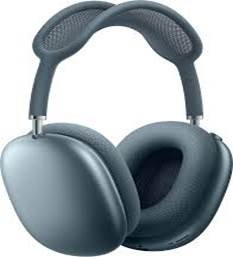
In 2026, you have several excellent choices. Apple AirPods Max 2 are the best choice for users who want the deepest Apple ecosystem integration, while Sony WH-1000XM6 are the best all-around headphones for most users. Bose QuietComfort Ultra Headphones (2nd Gen) are excellent if comfort and noise cancellation are your priorities.
Best Headphones for MacBook: Quick Comparison
| Headphones | Best For | Main Strength |
| Sony WH-1000XM6 | Best overall | Sound, ANC and features |
| Apple AirPods Max 2 | Best for Apple users | macOS ecosystem integration |
| Bose QuietComfort Ultra 2nd Gen | Best for comfort | ANC and long listening |
| AirPods Pro 3 | Best earbuds | Portability and Apple features |
| Wired audiophile headphones | Best sound quality | High-fidelity listening |
1. Sony WH-1000XM6 – Best Overall Headphones for MacBook
The Sony WH-1000XM6 are one of the strongest choices for MacBook users who want a combination of sound quality, noise cancellation, comfort, and smart features.
Current 2026 testing continues to place the WH-1000XM6 among the leading wireless headphones, particularly for noise cancellation and overall performance.
They connect to a MacBook through Bluetooth and work well for music, movies, online meetings, studying, and travel.
Why choose the Sony WH-1000XM6?
- Excellent active noise cancellation
- Detailed, enjoyable sound
- Comfortable over-ear design
- Strong microphone performance
- Useful customization through Sony’s app
- Excellent choice for travel and office work
The Sony headphones are particularly appealing if you use your MacBook alongside an Android phone or other non-Apple devices because you aren’t dependent on Apple’s ecosystem.
Best for: MacBook users who want the best balance of sound, ANC, comfort and versatility.
2. Apple AirPods Max 2 – Best for Apple Ecosystem
For someone heavily invested in Apple devices, the AirPods Max 2 are an obvious option.
Their biggest advantage isn’t simply sound quality. It’s the way they fit into the Apple ecosystem. When paired with a Mac, they provide features such as Spatial Audio and easy integration with Apple devices. Apple also supports lossless and ultra-low-latency audio through a USB-C connection on supported Macs.
They are particularly good for:
- MacBook music listening
- Movies and TV
- Video calls
- Spatial Audio
- Apple ecosystem users
- Premium everyday listening
Independent testing also finds that Apple’s headphones can be particularly compelling for people deeply invested in the Apple ecosystem.
Best for: MacBook, iPhone and iPad users who want seamless Apple integration.
3. Bose QuietComfort Ultra Headphones (2nd Gen) – Best for Comfort and ANC
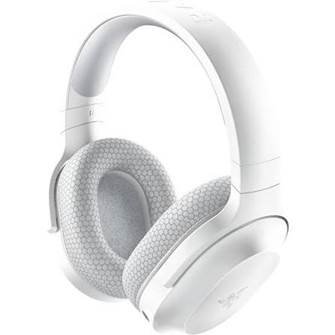
If your priority is blocking out background noise while remaining comfortable for hours, the Bose QuietComfort Ultra Headphones (2nd Gen) deserve serious consideration.
They support Bluetooth 5.4, USB-C and multipoint connectivity, allowing them to stay connected to two devices at once. Bose rates battery life at up to 30 hours, depending on features used.
That makes them particularly useful if you regularly move between your MacBook and smartphone.
Why Bose is a great MacBook choice
- Excellent active noise cancellation
- Very comfortable for long sessions
- Multipoint Bluetooth
- Strong battery life
- USB-C connectivity
- Immersive Audio
- Good choice for offices and travel
Best for: Students, remote workers and travelers who want comfort and excellent noise cancellation.
4. AirPods Pro 3 – Best Headphones for MacBook Portability
Not everyone wants large over-ear headphones. If you prefer something compact, the AirPods Pro 3 are one of the most convenient choices for MacBook users.
Their biggest advantage is portability. You can keep them in a pocket or small case and quickly switch between your MacBook and other Apple devices.
They are especially useful for:
- Students
- Commuters
- Video calls
- Podcasts
- Music
- Working in cafés
- Users who dislike bulky headphones
For Apple users, the combination of compact design and ecosystem integration makes AirPods Pro a strong alternative to traditional over-ear headphones.
5. Wired Headphones – Best for High-Quality MacBook Audio
Wireless headphones are convenient, but wired headphones can still make sense for serious music listeners.
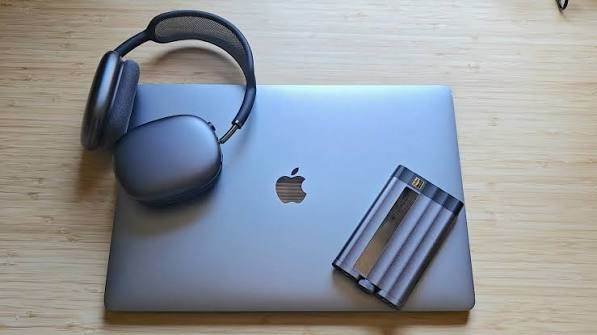
A good wired pair can provide excellent sound without worrying about Bluetooth battery life. MacBook users can also take advantage of USB-C DACs and headphone amplifiers when using compatible high-end headphones.
Wired headphones are particularly suitable for:
- Music production
- Audio editing
- Critical listening
- Mixing and mastering
- High-resolution music
- Users who prioritize sound quality over portability
However, compatibility depends on the connector. If your headphones use a traditional 3.5mm plug, check whether your MacBook has a headphone jack or use an appropriate USB-C audio adapter.
What Should You Look for in MacBook Headphones?
Choosing the best headphones for your MacBook isn’t only about sound quality.
Bluetooth Compatibility
Bluetooth headphones are the easiest option for most MacBook owners. They eliminate cables and work well for music, movies and calls.
Active Noise Cancellation
ANC is especially useful if you study or work in noisy environments. It can reduce background sounds such as conversations, traffic and airplane noise.
Microphone Quality
If you regularly use Zoom, Microsoft Teams, FaceTime or other communication apps, microphone quality matters. Some headphones sound excellent but have mediocre microphones.
Comfort
For several hours of studying or work, comfort may be more important than having the absolute best sound quality.
Battery Life
A long-lasting battery is useful for students, travelers and remote workers. USB-C charging is also convenient because many MacBook users already carry USB-C cables.
Multipoint Connectivity
Multipoint lets compatible headphones stay connected to more than one device. This is useful if you frequently switch between your MacBook and smartphone.
Best Headphones for MacBook Air vs MacBook Pro
The same headphones work with both MacBook Air and MacBook Pro, so your choice should depend on how you use them rather than which MacBook you own.
For MacBook Air: Sony WH-1000XM6 or AirPods Pro 3 are excellent everyday choices.
For MacBook Pro: AirPods Max 2, Sony WH-1000XM6 and Bose QuietComfort Ultra 2nd Gen are excellent premium options, particularly for professional work, editing and entertainment.
Are Bluetooth Headphones Good for MacBook?
Yes. Bluetooth headphones are an excellent choice for MacBook users because they eliminate cables and are easy to pair.
Apple’s AirPods have additional ecosystem features, but you do not need Apple headphones to get good wireless audio from a MacBook. Sony, Bose and other Bluetooth headphones can work perfectly well with macOS.
Final Verdict: What Are the Best Headphones for MacBook?
The Sony WH-1000XM6 are the best overall headphones for MacBook users because they combine excellent sound, strong noise cancellation, comfort and broad device compatibility.
Choose the AirPods Max 2 if you’re deeply invested in Apple’s ecosystem and want the most Apple-focused over-ear experience.
Choose the Bose QuietComfort Ultra Headphones (2nd Gen) if comfort and noise cancellation are your biggest priorities.
For maximum portability, choose AirPods Pro 3.
Ultimately, the best headphones for your MacBook depend on whether you prioritize sound quality, ANC, comfort, portability, microphone quality or Apple ecosystem features.
FAQs
Can any Bluetooth headphones work with a MacBook?
Yes. Most modern Bluetooth headphones can connect to a MacBook through macOS Bluetooth settings.
Are AirPods the best headphones for MacBook?
AirPods are among the best choices for Apple users because of their ecosystem integration, but Sony and Bose offer excellent alternatives with strong sound quality, ANC and cross-platform compatibility.
What are the best noise-canceling headphones for MacBook?
The Sony WH-1000XM6 and Bose QuietComfort Ultra Headphones (2nd Gen) are excellent choices for noise cancellation. Apple’s AirPods Max 2 are also a strong option for Apple users.
Can I use headphones with a MacBook for Zoom calls?
Yes. Bluetooth and wired headphones can both be used for video calls on a MacBook. Your MacBook can use the headphones’ microphone when supported.
Are wired or wireless headphones better for MacBook?
Wireless headphones are better for convenience and portability. Wired headphones can be preferable for serious audio work, high-fidelity listening and users who don’t want to manage battery life.